My Disney Experience
更新日
現在のバージョン
8.5
提供元

スマートフォンは不要!パソコンと同じようにキーボードとマウスで操作できます。MEmu Playは、あなたが待ち望んでいたすべての楽しみをお届けします。バッテリー残量や小さな画面を気にすることなく、My Disney Experienceをご利用ください。最新のMEmu 9は、My Disney ExperienceをPCで体験するのに最適です!完璧なキーマッピングシステムにより、PCのようなスムーズな操作性を実現します。マルチインスタンス機能により、複数のアプリケーションを同時に実行できます。独自の仮想化エンジンがPCのパフォーマンスを最大限に引き出します。アプリを使用するだけでなく、高品質な体験を得ることができます。
もっと見る
My Disney ExperienceをPCでダウンロード!大画面でより楽しむ。電源が落ちてしまうとか通信料が足りないとかの問題を心配する必要がなく、PCの大画面でより快適にゲームを楽しましょう! The official Walt Disney World® app!
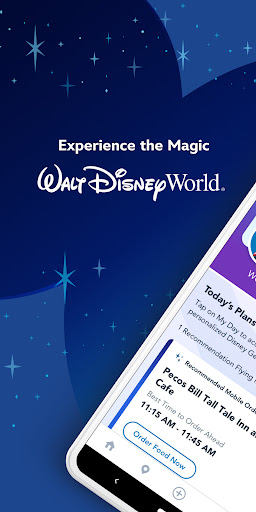
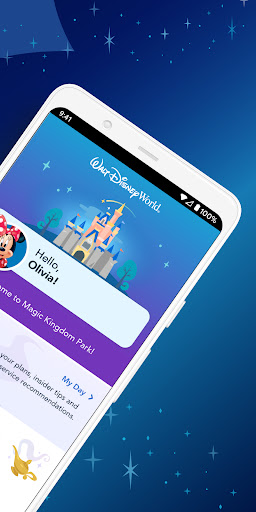
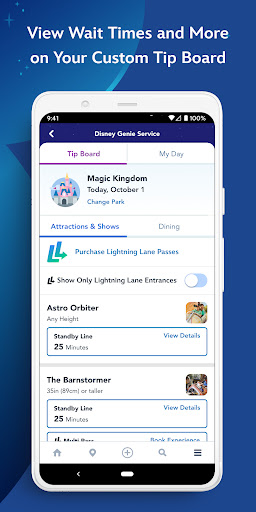
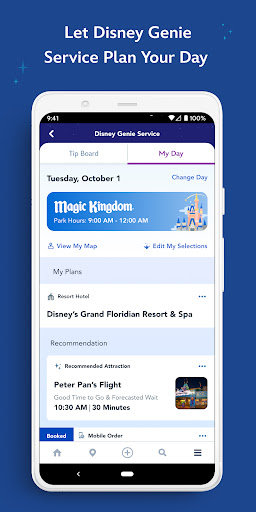
The official Walt Disney World® app! Now it’s easier than ever to plan & share your vacation details—at home & on the go.
-Maximize your park time by taking advantage of our new Disney Genie service, which generates a personalized itinerary that guides you through our theme parks with tips that can help you reduce time in lines & take the guesswork out of “what’s next.”
-Quickly access real-time wait times, park hours, Character Greetings, showtimes & more.
-Use the interactive, GPS-enabled map to explore the Resort & easily see the dining options, attractions & more nearest to you.
-Find your way around with step-by-step directions.
-Browse restaurant menus, make dining reservations, modify existing ones & even mobile order meals from select locations.
-Download, edit & share your Disney PhotoPass® photos & videos throughout your vacation once you’ve purchased Memory Maker.
-Search & filter activities to find exactly what you’re looking for.
-Keep select Disney Resort hotel reservations, dining plans & activities organized—all in one spot with My Day & Plans.
-Save time by starting your Disney Resort hotel check-in process right from the app.
-Link a MagicBand+ to your Disney account on the app & unlock enchanting touches of magic.
-Save your parking information at select parking locations with car locator.
-Manage your Disney Resort reservations, tickets, MagicBands & cards & share plans with others.
-Discover official content for Walt Disney World Resort, including our 4 theme parks (Magic Kingdom® park, Epcot®, Disney’s Hollywood Studios® & Disney’s Animal Kingdom® park), 2 water parks (Disney’s Typhoon Lagoon & Disney’s Blizzard Beach water parks), Disney Springs®, select Walt Disney World Resort hotels & ESPN Wide World of Sports Complex.
Have questions, problems, comments or suggestions? Reach out to us at app.support@disneyworld.com.
Connecting to the Internet in the parks: Without a strong Internet signal, wait times, park hours & schedules may not update accurately. You can see if your device is connected properly by checking under Settings.
Note: Some features in this app will require your full name, country, birthdate & email address, as well as access to your location data. If Bluetooth is enabled on your device, this app will also collect your precise location information through beacon technology in order to improve your in-park experience, such as wait times. To facilitate the sign-in process, the app will also require access to your email address, stored within Account Manager.
This app may request access to your camera to capture media & scan barcodes. Some Disney PhotoPass Lenses may use information on your device to detect face & hand coordinates. The app may request access to your external storage to cache certain data for offline browsing.
Optional planning tools may also ask you to provide details about your travel party. Some features in this app include the ability to make purchases & will require a Wi-Fi or mobile carrier data connection. Message, data and roaming rates may apply. Availability subject to handset limitations and features may vary by handset or service provider. Coverage and app stores not available everywhere. Guests must be 18 years or older to make purchases.
Before downloading, please consider that this app contains in-app purchases that cost real money. The app provides you with the option to receive push notifications for information relating to your visit to a Park or a Disney Resort hotel.
Terms of Use: http://disneytermsofuse.com
Privacy Policy: https://disneyprivacycenter.com
Your US State Privacy Rights: https://privacy.thewaltdisneycompany.com/en/current-privacy-policy/your-us-state-privacy-rights/
Do Not Sell or Share My Personal Information: https://privacy.twdc.com/dnssmpi
Important Info About Disney PhotoPass Lenses: https://disneyworld.disney.go.com/photopass-terms-conditions/#important-notice-about-attribute-lenses
もっと見る

1. MEmuインストーラーをダウンロードしてセットアップを完了する

2. MEmuを起動し、デスクトップでのPlayストアを開く

3. PlayストアでMy Disney Experienceを検索する
Install
4. My Disney Experienceをダウンロードしてインストールする
5. インストールが完了したら、アイコンをクリックしてスタート

6. MEmuを使ってパソコンでMy Disney Experienceを体験する
MEmu Playは現在、最高の無料Androidエミュレーターであり、5,000万人のユーザーが優れたAndroidアプリ体験を楽しんでいます。MEmuの仮想化テクノロジーにより、数千ものAndroidアプリをコンピューターでスムーズに実行できます。
大画面でより精細;無限の待機、電池とドラフィックの極限を超え
キーボード・マウス・コントローラーを全力でサポート、より快適
マルチインスタンスで複数のゲームを同時に実行
Use My Disney Experience on PC by following steps: