Primehealth ME
更新日
現在のバージョン
2.45.0
提供元

スマートフォンは不要!パソコンと同じようにキーボードとマウスで操作できます。MEmu Playは、あなたが待ち望んでいたすべての楽しみをお届けします。バッテリー残量や小さな画面を気にすることなく、Primehealth MEをご利用ください。最新のMEmu 9は、Primehealth MEをPCで体験するのに最適です!完璧なキーマッピングシステムにより、PCのようなスムーズな操作性を実現します。マルチインスタンス機能により、複数のアプリケーションを同時に実行できます。独自の仮想化エンジンがPCのパフォーマンスを最大限に引き出します。アプリを使用するだけでなく、高品質な体験を得ることができます。
もっと見る
Primehealth MEをPCでダウンロード!大画面でより楽しむ。電源が落ちてしまうとか通信料が足りないとかの問題を心配する必要がなく、PCの大画面でより快適にゲームを楽しましょう! Prime HealthCare Group is amongst the UAE’s leading healthcare provider with a team of over 350 physicians and 1000 supporting professionals providing state-of-the-art medical care to UAE’s citizens and residents.
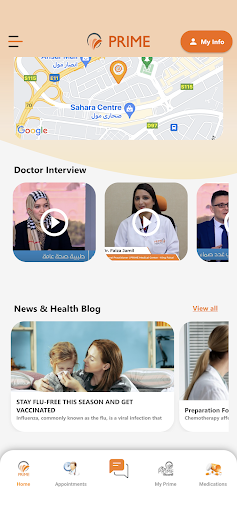
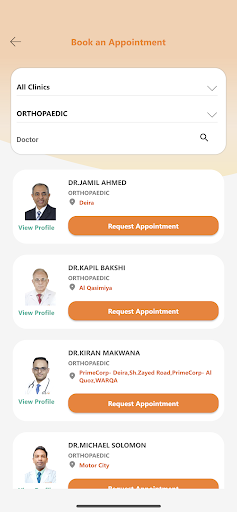
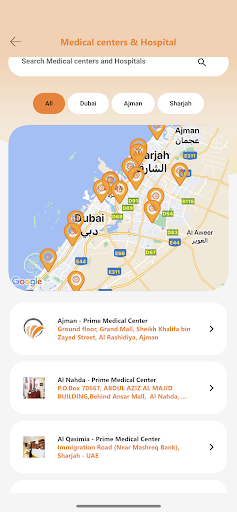
Prime HealthCare Group is amongst the UAE’s leading healthcare provider with a team of over 350 physicians and 1000 supporting professionals providing state-of-the-art medical care to UAE’s citizens and residents. “Personalized care, personally” – is our underpinning culture that drives every individual in the organization to ensure quality service to our patients. This along with our core values of Ownership, Team work, Customer focus, Quality Consciousness, Cost Consciousness, Staff Recognition & Rewards and Speed of action has helped us achieve prestigious awards and accreditations including, JCI accreditation 2016, Voted UAE's choice Superbrand 2016, Winner of Dubai Quality Appreciation Award 2012, Winner of Sharjah Economic Excellence Award 2010, Winner of Dubai Quality Appreciation Program 2007 and Certified ISO 15189 & ISO 9001 – 2008.
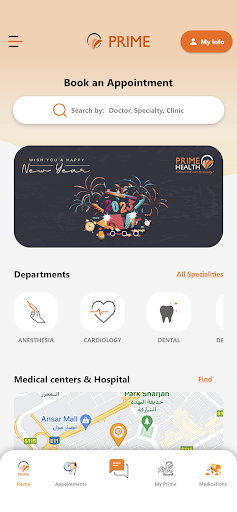
Primehealth ME App offers easy access to a comprehensive suite of health management features:
Visit Details: Patients can view their full medical summaries, including complaints, diagnoses, services received, medications, and care plans.
Laboratory Results: Lab results can be viewed in graphical format and downloaded directly from the app.
Prescriptions: The app provides a list of medications prescribed during visits and sets reminders based on the prescription schedule.
Radiology Results: Patients can download their radiology results directly from the app.
Chronic Condition Management: For diseases like hypertension and diabetes, patients can subscribe to the 'FALAK TAYEB' program. This includes FDA and MOH-approved devices for self-assessment of blood glucose, blood pressure, temperature, SpO2, and heart rate, with the ability to push values to their medical records for monitoring by healthcare providers.
Rewards Program: PRIME Rewards is designed to award patient loyalty.
Additional Key Features:
Doctor Information and Profile: Access detailed information and profiles of doctors.
Branch Location and Navigation: Find and navigate to branch locations easily.
Appointment Reminders: Receive reminders for upcoming appointments.
History of Visits: Review the history of visits along with prescriptions.
Medication Reminders: Set reminders for medication intake.
Health Tips: Access health tips to maintain well-being.
Request for Appointments: Conveniently request appointments through the app.
The Primehealth ME App is designed to enhance patient care and streamline health management, providing a comprehensive tool for managing medical needs efficiently
もっと見る

1. MEmuインストーラーをダウンロードしてセットアップを完了する

2. MEmuを起動し、デスクトップでのPlayストアを開く

3. PlayストアでPrimehealth MEを検索する
Install
4. Primehealth MEをダウンロードしてインストールする
5. インストールが完了したら、アイコンをクリックしてスタート

6. MEmuを使ってパソコンでPrimehealth MEを体験する
MEmu Playは現在、最高の無料Androidエミュレーターであり、5,000万人のユーザーが優れたAndroidアプリ体験を楽しんでいます。MEmuの仮想化テクノロジーにより、数千ものAndroidアプリをコンピューターでスムーズに実行できます。
大画面でより精細;無限の待機、電池とドラフィックの極限を超え
キーボード・マウス・コントローラーを全力でサポート、より快適
マルチインスタンスで複数のゲームを同時に実行
Use Primehealth ME on PC by following steps: