PRISM Live Studio: Games & IRL
更新日
現在のバージョン
1734502058
提供元

スマートフォンは不要!パソコンと同じようにキーボードとマウスで操作できます。MEmu Playは、あなたが待ち望んでいたすべての楽しみをお届けします。バッテリー残量や小さな画面を気にすることなく、PRISM Live Studio: Games & IRLをご利用ください。最新のMEmu 9は、PRISM Live Studio: Games & IRLをPCで体験するのに最適です!完璧なキーマッピングシステムにより、PCのようなスムーズな操作性を実現します。マルチインスタンス機能により、複数のアプリケーションを同時に実行できます。独自の仮想化エンジンがPCのパフォーマンスを最大限に引き出します。アプリを使用するだけでなく、高品質な体験を得ることができます。
もっと見る
PRISM Live Studio: Games & IRLをPCでダウンロード!大画面でより楽しむ。電源が落ちてしまうとか通信料が足りないとかの問題を心配する必要がなく、PCの大画面でより快適にゲームを楽しましょう! PRISM Live Studio helps you shoot and edit colorful live broadcasts, videos, and photos using various effects.
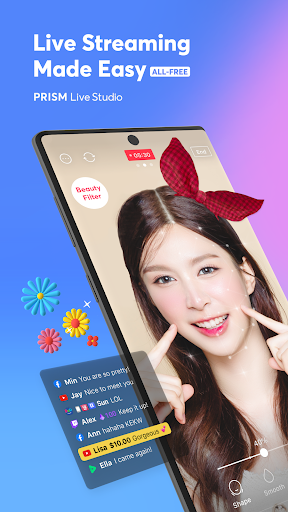
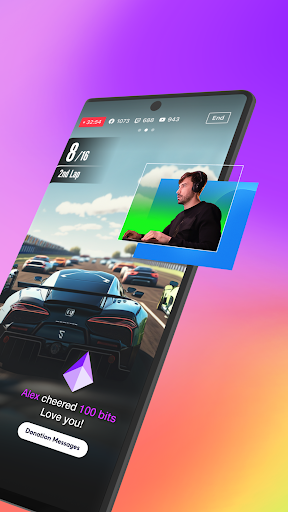
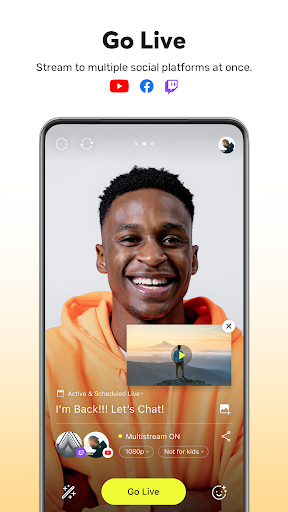
PRISM Live Studio helps you shoot and edit colorful live broadcasts, videos, and photos using various effects. Add fun stickers, videos, images, and music to create your own special video.
[Main features]
• Select shooting mode
Choose LIVE (Live video / Live game / Video live) , VIDEO, or PHOTO mode and to start a spontaneous live broadcast or film a unique recorded video.
• Login-based account linkage
Login to one account and easily link to YouTube, Facebook, Twitter, Twitch, Trovo and Nimo TV.
• Screencast / Screen mirror / Screen stream / Game live / Game stream
Stream and share your mobile screen or mobile game with viewers. Select various options available for screen casting and game streaming.
• Chat with viewers in real time
Use the PRISM chat widget to read and chat real time and create a special live together with your viewers.
• Media overlay
Add photos, videos, and music to your broadcast with My Studio and share the experience with your viewers.
• Web widget
Enter a URL to overlay a website during a broadcast in the way that you want. Try using this with the donation widget.
• CONNECT mode through PRISM PC app
Scan the QR code to easily connect your PRISM mobile app's camera to PRISM Windows app and use it as a video and audio source.
• Beauty effects
The beauty feature automatically recognizes your face and helps you look better in a natural way.
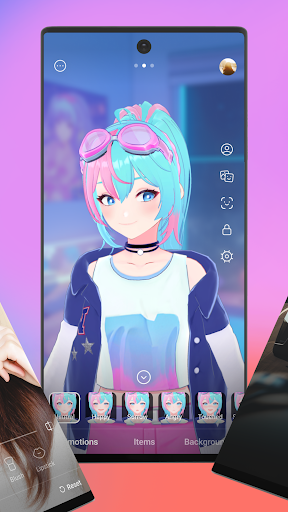
• Camera effects
Spice things up with various effects like unique masks, background filters to change the mood, touch filters to show reactions, and stylish filters.
• Animated text effects
Add simple text overlays or choose an animated theme from Title, Social, Caption, and Element to decorate your live stream.
• Add background music
Choose a stylish background music from Playful, Sentimental, Action, Beatdrop, Retro themes that are provided for free.
• Camera Pro
Create vibrant videos with manual focus, manual exposure, and other professional camera options.
• Chroma Key
Use the Chroma Key feature, a first among mobile live stream apps, to shoot more creative videos.
• Editing and sharing during a live streaming
Edit your live stream's title or information during a broadcast, and share your live URL in real time.
• High-definition 1080p 60fps live streaming
High-definition 1080p 60fps live stream options are available. (Supported range may vary depending on device and app environment.)
• Stream to multiple channels simultaneously
Stream a broadcast to multiple platforms simultaneously without adding other networks.
• Background streaming
The app helps you to continue your live stream without transmission errors even when you receive a call or text during a broadcast.
• My page
Check your live stream history, links, and VIDEO editing drafts.
• All features provided for free
All features of PRISM Live Studio are free, and even the watermark can be removed easily in settings.
[Required permissions]
• Camera: Shoot a live stream or record for VOD.
• Mic: Record audio while shooting a video.
• Storage: Device storage may be used to save recorded videos and live streams, or to load stored videos.
• Notification: Permission required for the indication of information related to Live Streaming.
[Support]
• Website: https://prismlive.com
• Contact: prismlive@navercorp.com
• Medium: https://medium.com/prismlivestudio
• Terms of Use: http://prismlive.com/en_us/policy/terms_content.html
• Privacy Policy: http://prismlive.com/en_us/policy/privacy_content.html
もっと見る

1. MEmuインストーラーをダウンロードしてセットアップを完了する

2. MEmuを起動し、デスクトップでのPlayストアを開く

3. PlayストアでPRISM Live Studio: Games & IRLを検索する
Install
4. PRISM Live Studio: Games & IRLをダウンロードしてインストールする
5. インストールが完了したら、アイコンをクリックしてスタート

6. MEmuを使ってパソコンでPRISM Live Studio: Games & IRLを体験する
MEmu Playは現在、最高の無料Androidエミュレーターであり、5,000万人のユーザーが優れたAndroidアプリ体験を楽しんでいます。MEmuの仮想化テクノロジーにより、数千ものAndroidアプリをコンピューターでスムーズに実行できます。
大画面でより精細;無限の待機、電池とドラフィックの極限を超え
キーボード・マウス・コントローラーを全力でサポート、より快適
マルチインスタンスで複数のゲームを同時に実行
Use PRISM Live Studio: Games & IRL on PC by following steps: