PRISM Live Studio: Games & IRL
Updated
Current Version
1734502058
Offered By

Stop worrying about high battery drain when using PRISM Live Studio: Games & IRL on your phone. Free yourself from the tiny screen and enjoy the app on a much larger display. From now on, get a full-screen experience of your app with the convenience of a keyboard and mouse. MEmu offers you all the surprising features you’d expect: quick installation and easy setup, intuitive controls, and no more worries about battery life, mobile data, or unexpected calls. The all-new MEmu 9 is the choice for using PRISM Live Studio: Games & IRL on your computer. With the MEmu multi-instance manager, you can run two or more accounts at the same time. Most importantly, our exclusive emulation engine unlocks your PC’s full potential, delivering smooth and enjoyable performance.
Show more
Enjoy superb experience of using PRISM Live Studio: Games & IRL on PC with MEMU App Player. It's a powerful free Android emulator which provides you with thousands of android apps for their desktop version. Enjoy connecting with friends and polishing your work with higher efficiency! PRISM Live Studio helps you shoot and edit colorful live broadcasts, videos, and photos using various effects.
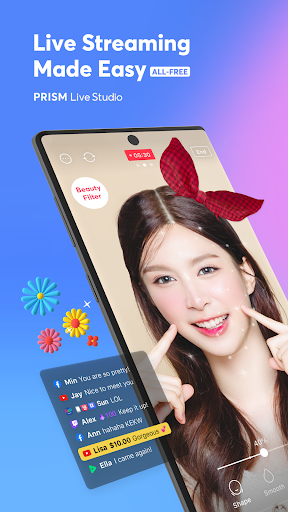
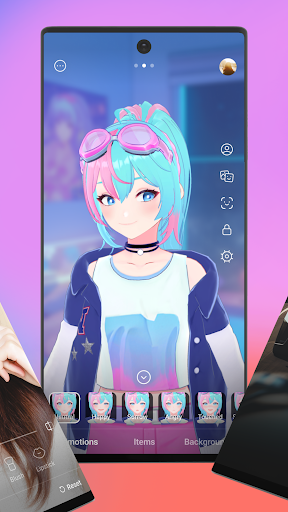
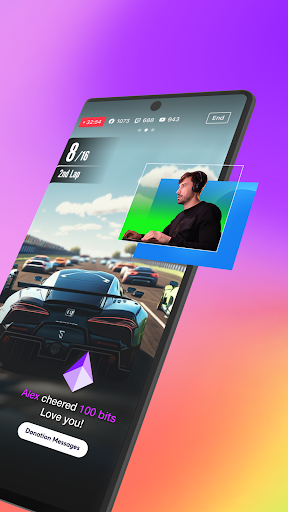
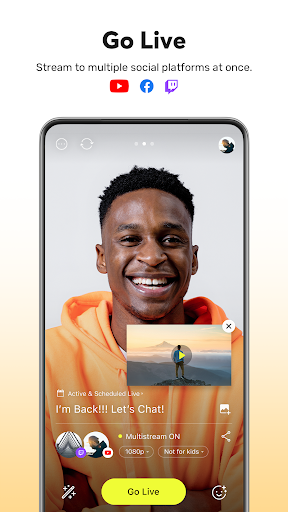
PRISM Live Studio helps you shoot and edit colorful live broadcasts, videos, and photos using various effects. Add fun stickers, videos, images, and music to create your own special video.
[Main features]
• Select shooting mode
Choose LIVE (Live video / Live game / Video live) , VIDEO, or PHOTO mode and to start a spontaneous live broadcast or film a unique recorded video.
• Login-based account linkage
Login to one account and easily link to YouTube, Facebook, Twitter, Twitch, Trovo and Nimo TV.
• Screencast / Screen mirror / Screen stream / Game live / Game stream
Stream and share your mobile screen or mobile game with viewers. Select various options available for screen casting and game streaming.
• Chat with viewers in real time
Use the PRISM chat widget to read and chat real time and create a special live together with your viewers.
• Media overlay
Add photos, videos, and music to your broadcast with My Studio and share the experience with your viewers.
• Web widget
Enter a URL to overlay a website during a broadcast in the way that you want. Try using this with the donation widget.
• CONNECT mode through PRISM PC app
Scan the QR code to easily connect your PRISM mobile app's camera to PRISM Windows app and use it as a video and audio source.
• Beauty effects
The beauty feature automatically recognizes your face and helps you look better in a natural way.
• Camera effects
Spice things up with various effects like unique masks, background filters to change the mood, touch filters to show reactions, and stylish filters.
• Animated text effects
Add simple text overlays or choose an animated theme from Title, Social, Caption, and Element to decorate your live stream.
• Add background music
Choose a stylish background music from Playful, Sentimental, Action, Beatdrop, Retro themes that are provided for free.
• Camera Pro
Create vibrant videos with manual focus, manual exposure, and other professional camera options.
• Chroma Key
Use the Chroma Key feature, a first among mobile live stream apps, to shoot more creative videos.
• Editing and sharing during a live streaming
Edit your live stream's title or information during a broadcast, and share your live URL in real time.
• High-definition 1080p 60fps live streaming
High-definition 1080p 60fps live stream options are available. (Supported range may vary depending on device and app environment.)
• Stream to multiple channels simultaneously
Stream a broadcast to multiple platforms simultaneously without adding other networks.
• Background streaming
The app helps you to continue your live stream without transmission errors even when you receive a call or text during a broadcast.
• My page
Check your live stream history, links, and VIDEO editing drafts.
• All features provided for free
All features of PRISM Live Studio are free, and even the watermark can be removed easily in settings.
[Required permissions]
• Camera: Shoot a live stream or record for VOD.
• Mic: Record audio while shooting a video.
• Storage: Device storage may be used to save recorded videos and live streams, or to load stored videos.
• Notification: Permission required for the indication of information related to Live Streaming.
[Support]
• Website: https://prismlive.com
• Contact: prismlive@navercorp.com
• Medium: https://medium.com/prismlivestudio
• Terms of Use: http://prismlive.com/en_us/policy/terms_content.html
• Privacy Policy: http://prismlive.com/en_us/policy/privacy_content.html
Show more

1. Download MEmu installer and finish the setup

2. Start MEmu then open Google Play on the desktop

3. Search PRISM Live Studio: Games & IRL in Google Play
Install
4. Download and Install PRISM Live Studio: Games & IRL
5. On install completion click the icon to start

6. Enjoy using PRISM Live Studio: Games & IRL on PC with MEmu
MEmu Play is the best Android emulator, and 100 million users already enjoy its superb Android app experience. Powered by advanced virtualization technology, it lets you enjoy thousands of Android apps smoothly on your PC—including the most graphics-intensive ones.
Bigger screen with better graphics; Long duration, without limitation of battery or mobile data.
Full Keymapping support for precise control of keyboard and mouse or gamepad.
Multiple game accounts or tasks on single PC at one time with Multi-Instance manager.
Use PRISM Live Studio: Games & IRL on PC by following steps: