Rise: 66 Days Life reset
更新日
現在のバージョン
3.0.4
提供元

スマートフォンは不要!パソコンと同じようにキーボードとマウスで操作できます。MEmu Playは、あなたが待ち望んでいたすべての楽しみをお届けします。バッテリー残量や小さな画面を気にすることなく、Rise: 66 Days Life resetをご利用ください。最新のMEmu 9は、Rise: 66 Days Life resetをPCで体験するのに最適です!完璧なキーマッピングシステムにより、PCのようなスムーズな操作性を実現します。マルチインスタンス機能により、複数のアプリケーションを同時に実行できます。独自の仮想化エンジンがPCのパフォーマンスを最大限に引き出します。アプリを使用するだけでなく、高品質な体験を得ることができます。
もっと見る
Rise: 66 Days Life resetをPCでダウンロード!大画面でより楽しむ。電源が落ちてしまうとか通信料が足りないとかの問題を心配する必要がなく、PCの大画面でより快適にゲームを楽しましょう! Rise: 66 Days to get yourself together.
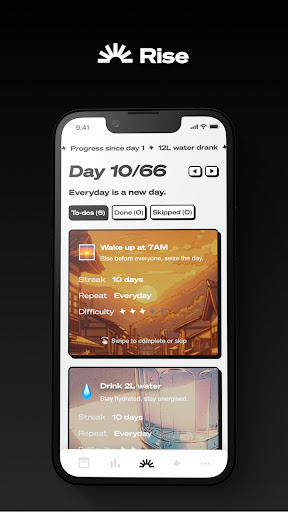
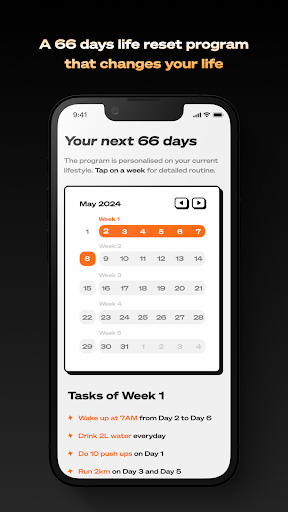
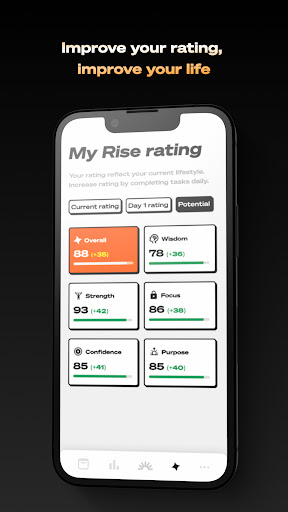
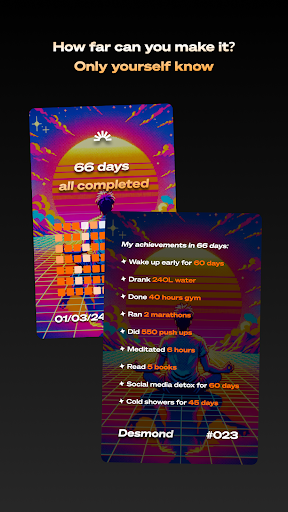
Rise: 66 Days to get yourself together
Struggling with motivation or direction? Rise offers a personalised 66-day program to help you reset your life. Tailored to individuals seeking purpose and a fresh start, Rise is more than an app—it's a companion on your journey to self-improvement.
How Rise Works:
1. Personalized program generation
Begin with a simple questionnaire about your current lifestyle. Rise will craft a custom life reset program focusing on six vital areas: Sleep, Water, Exercise, Mind, Screen Time, and Shower habits.
2. Gradual Challenge Increase
Each week, your tasks evolve, becoming incrementally more challenging, pushing you to grow and succeed in your daily routines.
3. Daily Reminders & Tasks
Every morning, Rise presents you with the day's tasks. Check them off by midnight and watch your progress unfold.
Why 66 Days?
It's scientifically backed that 66 days is an effective timeframe to form new habits. Rise leverages this to help you cement positive changes for a lasting impact.
Join the Rise Movement:
Rise isn't just about self-improvement; it's about community. Share your success, gain insights from others, and be part of a supportive network.
Download Rise now and take the first step towards a more fulfilled and motivated life. Your 66-day life reset awaits.
Remark: Please notice that you can only view the customised, generated program before you start free trial. You can start the program and use the features like progress tracking and social share as depicted in the previews, only after you start the free trial of Rise’s weekly subscription plan.
もっと見る

1. MEmuインストーラーをダウンロードしてセットアップを完了する

2. MEmuを起動し、デスクトップでのPlayストアを開く

3. PlayストアでRise: 66 Days Life resetを検索する
Install
4. Rise: 66 Days Life resetをダウンロードしてインストールする
5. インストールが完了したら、アイコンをクリックしてスタート

6. MEmuを使ってパソコンでRise: 66 Days Life resetを体験する
MEmu Playは現在、最高の無料Androidエミュレーターであり、5,000万人のユーザーが優れたAndroidアプリ体験を楽しんでいます。MEmuの仮想化テクノロジーにより、数千ものAndroidアプリをコンピューターでスムーズに実行できます。
大画面でより精細;無限の待機、電池とドラフィックの極限を超え
キーボード・マウス・コントローラーを全力でサポート、より快適
マルチインスタンスで複数のゲームを同時に実行
Use Rise: 66 Days Life reset on PC by following steps: