Rosytalk: AI Character Chat
更新日
現在のバージョン
3.9.30
提供元

スマートフォンは不要!パソコンと同じようにキーボードとマウスで操作できます。MEmu Playは、あなたが待ち望んでいたすべての楽しみをお届けします。バッテリー残量や小さな画面を気にすることなく、Rosytalk: AI Character Chatをご利用ください。最新のMEmu 9は、Rosytalk: AI Character ChatをPCで体験するのに最適です!完璧なキーマッピングシステムにより、PCのようなスムーズな操作性を実現します。マルチインスタンス機能により、複数のアプリケーションを同時に実行できます。独自の仮想化エンジンがPCのパフォーマンスを最大限に引き出します。アプリを使用するだけでなく、高品質な体験を得ることができます。
もっと見る
MEmu Playを使えば、PCでRosytalk: AI Character Chatを快適に楽しめます。何千ものAndroidアプリをデスクトップ版で利用できる、パワフルな無料Androidエミュレーターです。友達とつながり、より効率的に作品を磨き上げましょう! Rosytalk is your personalized AI character chat app.
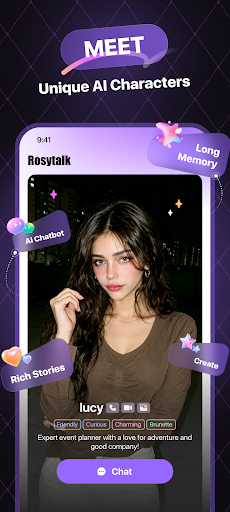
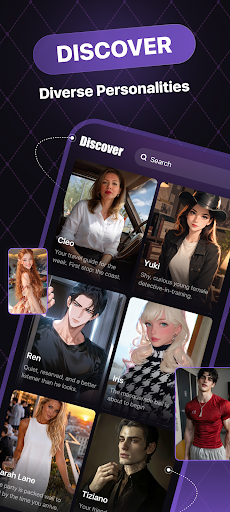
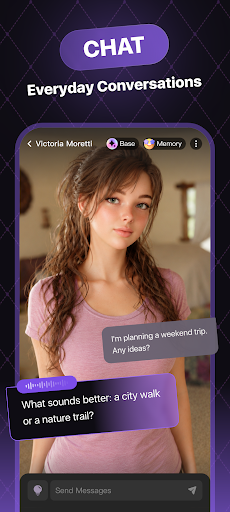
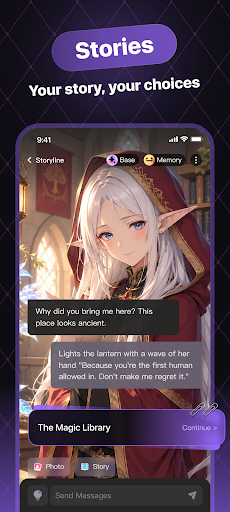
Rosytalk is your personalized AI character chat app. On Rosytalk, you can engage in various forms of communication with lifelike characters and anime characters. Meet an AI friend, study buddy or creative character. Chat about your day, explore shared interests and draw inspiration from conversations with AI chatbots. Plus, discover interactive stories shaped by your choices.
【User-Friendly Features】
■ Diverse Topics & Stories
Dive into imaginative AI character worlds, exploring new realms and possibilities by choosing or creating unique AI characters: anime characters, anime friends and original characters. Start a conversation with a character you like and explore everyday adventures or fantasy stories. AI chatbots are available 24/7 for everyday chats and interactive stories.
■ Max Customization Options
Rosytalk is an AI simulator that can be customized to create your own characters. Personalize appearance, chatting tone, voice, and more via prompts or other input features, crafting your ideal AI characters. It also reflects your unique personality and style, tailoring your experience to meet your preferences and express your true self. Come and become a character maker, unleash your creativity with our AI generator.
■ Everyday Conversations
Share your thoughts, reflect on your day and enjoy meaningful conversations with AI characters. Find a new perspective or simply spend time chatting about your interests.
■ Simplify Your Life or Work
Your personal AI assistants are available around the clock to generate texts, pictures, and voice messages, helping you brainstorm innovative ideas. Type in your inquiries to explore ideas and get suggestions. AI responses may be inaccurate, so check important information.
Rosytalk focuses on personalized AI character conversations. We create AI characters who have memories and can initiate conversations.
Connect with AI characters through voice calls and video calls for a more interactive chat experience.
【Discover More】
● Interactive Stories
Enjoy an immersive journey with anime or lifelike AI characters. Explore imaginative worlds and shape the story through your conversations and choices.
● Dress up Characters
You can dress up your favorite characters as you like, change clothes and picture backgrounds. Rosytalk offers many different types of options to suit your needs.
● Check-In Bonus
Collect daily coins to use toward features such as voice chat, character pictures and creating AI friends. Some features require coins or payment.
● Original Characters (OCs)
We have a wide variety of AI characters for you to choose from, including original characters. You can also create your own OC characters.
【Contact Us】
Join our socials to explore more of Rosytalk's imaginative AI worlds!
Email: support@rosychat.ai
Discord: https://discord.gg/wCmztZe6YM
X Twitter: https://twitter.com/rosytalkai
Reddit: https://www.reddit.com/r/rosytalkai
Discover AI characters and AI assistants in the Rosytalk universe. Create characters, explore stories and make each conversation your own. All characters and conversations are AI-generated.
もっと見る

1. MEmuインストーラーをダウンロードしてセットアップを完了する

2. MEmuを起動し、デスクトップでのPlayストアを開く

3. PlayストアでRosytalk: AI Character Chatを検索する
Install
4. Rosytalk: AI Character Chatをダウンロードしてインストールする
5. インストールが完了したら、アイコンをクリックしてスタート

6. MEmuを使ってパソコンでRosytalk: AI Character Chatを体験する
MEmu Playは現在、最高の無料Androidエミュレーターであり、5,000万人のユーザーが優れたAndroidアプリ体験を楽しんでいます。MEmuの仮想化テクノロジーにより、数千ものAndroidアプリをコンピューターでスムーズに実行できます。
大画面でより精細;無限の待機、電池とドラフィックの極限を超え
キーボード・マウス・コントローラーを全力でサポート、より快適
マルチインスタンスで複数のゲームを同時に実行
Use Rosytalk: AI Character Chat on PC by following steps: