
SmartDaddy Child Screen Time
更新日
現在のバージョン
3.3.2
提供元

スマートフォンは不要!パソコンと同じようにキーボードとマウスで操作できます。MEmu Playは、あなたが待ち望んでいたすべての楽しみをお届けします。バッテリー残量や小さな画面を気にすることなく、SmartDaddy Child Screen Timeをご利用ください。最新のMEmu 9は、SmartDaddy Child Screen TimeをPCで体験するのに最適です!完璧なキーマッピングシステムにより、PCのようなスムーズな操作性を実現します。マルチインスタンス機能により、複数のアプリケーションを同時に実行できます。独自の仮想化エンジンがPCのパフォーマンスを最大限に引き出します。アプリを使用するだけでなく、高品質な体験を得ることができます。
もっと見る
SmartDaddy Child Screen TimeをPCでダウンロード!大画面でより楽しむ。電源が落ちてしまうとか通信料が足りないとかの問題を心配する必要がなく、PCの大画面でより快適にゲームを楽しましょう! SmartDaddy child monitoring and parental control app is a comprehensive tool designed to ensure your child's online safety.
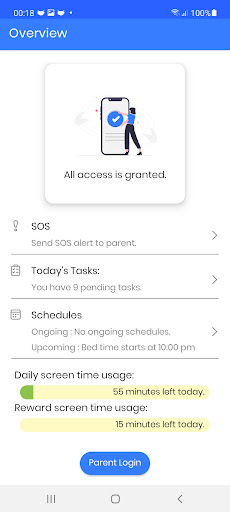
SmartDaddy child monitoring and parental control app is a comprehensive tool designed to ensure your child's online safety. Our app provides you with complete peace of mind by creating a secure virtual space for your family. It offers a wide range of features to keep your child safe both online and offline.
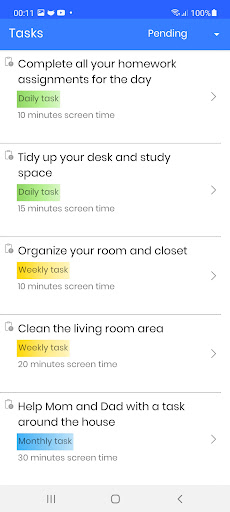
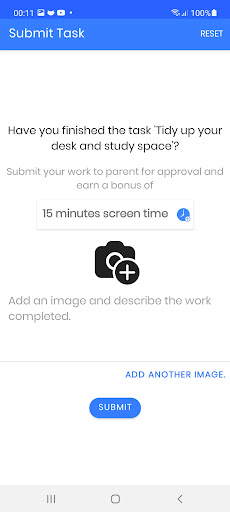
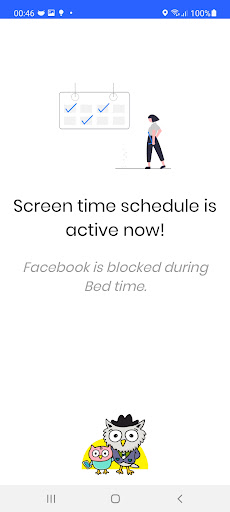
With our app, you can limit screen time for specific apps and create custom schedules to balance screen time with other activities. Our Instant Pause and Free Play features allow you to take a break or reward extra screen time. You can also create to-do lists for your child and grant screen time as they complete them.
Moreover, our child safe kit of software features provides full peace of mind with live location tracking and kid monitoring. You can monitor and block app usage for live protection 24/7.
SmartDaddy provides seamless real-time tracking, safety, and an easy-to-use interface. It's always on guard, providing benefits such as:
◉ Screen time control
◉ App/game blocker and schedule
◉ Instant Pause and Free Play
◉ Live location tracker & history
◉ Manage to-do lists for kid’s tasks and homework
◉ App details and activities
◉ Activity report
◉ SOS emergency alerts
Online child abuse cases have increased by a staggering 50% during lockdown times. With our app, you can practice online child safety parental control and protect your child from predators, bullies, and other dangerous situations.
Our child monitoring app is affordable with packages that suit your family's size and can be adjusted at any time. Upgrade to a bigger package or switch to a lower one with complete ease.
Try SmartDaddy for free with a 14-day free trial! Download the Parent App from Google Play (SmartDaddy - Parental Control), create your account, subscribe to the plan that fits your family, then create a child profile and link it to this child app. The setup is simple and can be done in just minutes on your child's phone. Sign in and start monitoring!
Visit https://smartdaddy.app today or contact support@smartdaddy.app for more information.
Note:
SmartDaddy utilizes the AccessibilityService API to help users in setting suitable levels of access and monitoring for screen time, web content, and apps, ensuring that their exposure is minimized and they can enjoy their life as usual.
It should be noted that SmartDaddy also employs the Device Administrator permission to prevent any unauthorized uninstallation.
Furthermore, on certain devices, it may be necessary to deactivate battery-saving mode to guarantee proper SmartDaddy operation.
If you have any issues, please take a look at our help pages or contact us via the contact page of our website:
SmartDaddy Child App Help: https://smartdaddy.app/help
SmartDaddy Child App Contact: https://smartdaddy.app/contact-us
Please make sure you have read the following before you use SmartDaddy Child App:
Privacy Policy: https://smartdaddy.app/privacy
Terms of Service: https://smartdaddy.app/terms
もっと見る

1. MEmuインストーラーをダウンロードしてセットアップを完了する

2. MEmuを起動し、デスクトップでのPlayストアを開く

3. PlayストアでSmartDaddy Child Screen Timeを検索する
Install
4. SmartDaddy Child Screen Timeをダウンロードしてインストールする
5. インストールが完了したら、アイコンをクリックしてスタート

6. MEmuを使ってパソコンでSmartDaddy Child Screen Timeを体験する
MEmu Playは現在、最高の無料Androidエミュレーターであり、5,000万人のユーザーが優れたAndroidアプリ体験を楽しんでいます。MEmuの仮想化テクノロジーにより、数千ものAndroidアプリをコンピューターでスムーズに実行できます。
大画面でより精細;無限の待機、電池とドラフィックの極限を超え
キーボード・マウス・コントローラーを全力でサポート、より快適
マルチインスタンスで複数のゲームを同時に実行
Use SmartDaddy Child Screen Time on PC by following steps: