TE for Education
更新日
現在のバージョン
2.0.6
提供元

スマートフォンは不要!パソコンと同じようにキーボードとマウスで操作できます。MEmu Playは、あなたが待ち望んでいたすべての楽しみをお届けします。バッテリー残量や小さな画面を気にすることなく、TE for Educationをご利用ください。最新のMEmu 9は、TE for EducationをPCで体験するのに最適です!完璧なキーマッピングシステムにより、PCのようなスムーズな操作性を実現します。マルチインスタンス機能により、複数のアプリケーションを同時に実行できます。独自の仮想化エンジンがPCのパフォーマンスを最大限に引き出します。アプリを使用するだけでなく、高品質な体験を得ることができます。
もっと見る
MEmu Playを使えば、PCでTE for Educationを快適に楽しめます。何千ものAndroidアプリをデスクトップ版で利用できる、パワフルな無料Androidエミュレーターです。友達とつながり、より効率的に作品を磨き上げましょう! IMPORTANT!
IMPORTANT! This is the special version of TonalEnergy specifically for use by students and educators who are a part of our educational institution program. You must have a pre-existing account to use it through your school, if you don't, please look for the regular TonalEnergy Tuner & Metronome app on the store.
--------
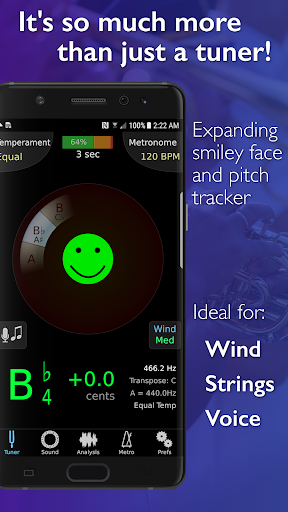
For musicians from pros to beginners, whether you sing, play a brass, woodwind or stringed instrument or any type of guitar, this app provides a set of feature-rich practice tools that gives fun and rewarding feedback. It’s much more than just a tuner!
• It's an all-in-one app, with a state-of-the-art tuner, an advanced metronome, dedicated orchestral strings and guitar tuning page, a piano keyboard, sound analysis pages, and audio/visual recording capabilities.
• It’s easy to use. Options like the Target Tuner or Pitch Tracker are on all the main pages. TonalEnergy helps users create rewarding and attainable goals during a rehearsal or when working alone. Colorful analysis data pages and audio/video recording features enhance the experience of practice.
• The metronome is cutting edge. It offers unmatched flexibility in sound choices, tempo settings, meters, subdivision patterns and visual displays. Voice count-ins, the ability to create and edit preset groups and Ableton link for syncing multiple devices make this a superior tool for performers.
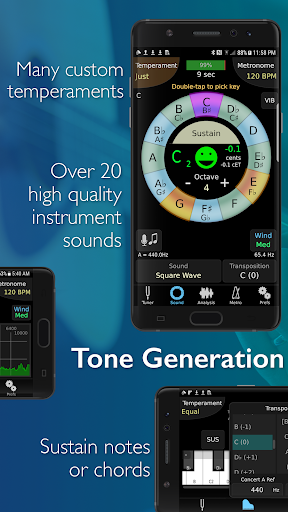
• Ear training possibilities are endless. The high quality multi-sampled instrument sounds for symphonic instruments are unique among all other tuning applications. Listening skills can be developed through the use of the eight-octave keyboard, chromatic wheel and tone generator. There are no other sounds like these.
• Learning is a social activity. Using features unique to the TonalEnergy Tuner, data can be collected, reviewed, edited and shared with others. Feedback is essential for growing and developing great performers. It’s all about connectivity.
FEATURES
• Recognizes a large pitch range, extending to lower registers than many competing tuners (C0 - C8) that is highly responsive to wind instruments, as well as acoustic and electric string instruments
• Adjustable A=440 Hz reference
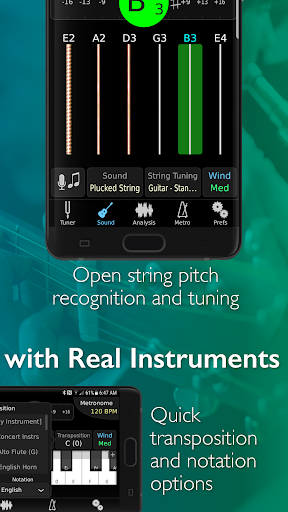
• Automatic or manual transposing options
• Instantly changes between equal, just and other custom temperaments, including user-defined ones
• Auto or instant pitch reference note feature using the TonalEnergy sounds
• Extensive tuning list for all orchestral string and fretted string instruments including many more features than most other string-only tuner apps
• An expandable eight octave piano keyboard enhancing many of the key aspects of the tuner’s functions
• Chromatic wheel tone generator, with optional auto-vibrato feature
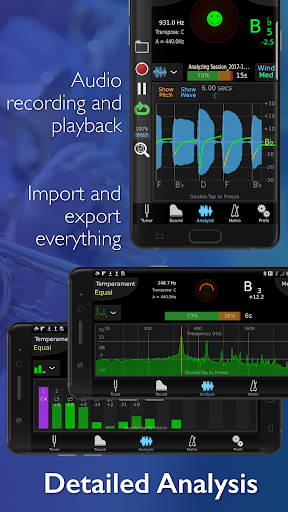
• Frequency and Harmonic energy overtone graphs, along with a multi-function waveform
• Dedicated metronome page that matches or exceeds the features available on all other stand alone metronome apps
• Notation options including standard English, Solfege, Northern European, and Indian variants
• Bluetooth output/input support
• Audio and Video recording capabilities including, editing, looping, timestretch that are all exportable via iTunes sharing, AirDrop, email, AudioCopy, SoundCloud, etc
• Import music from iTunes Library or email attachments
• Compatible with external microphones and clip-on vibration sensor devices
• Supports external video output to an external display for use in rehearsal halls
• External MIDI keyboard control support
• Apple Watch app acts ONLY as a remote control for the phone app
• Audiobus and inter-app audio support
• VoiceOver support for the blind or visually impaired
もっと見る

1. MEmuインストーラーをダウンロードしてセットアップを完了する

2. MEmuを起動し、デスクトップでのPlayストアを開く

3. PlayストアでTE for Educationを検索する
Install
4. TE for Educationをダウンロードしてインストールする
5. インストールが完了したら、アイコンをクリックしてスタート

6. MEmuを使ってパソコンでTE for Educationを体験する
MEmu Playは現在、最高の無料Androidエミュレーターであり、5,000万人のユーザーが優れたAndroidアプリ体験を楽しんでいます。MEmuの仮想化テクノロジーにより、数千ものAndroidアプリをコンピューターでスムーズに実行できます。
大画面でより精細;無限の待機、電池とドラフィックの極限を超え
キーボード・マウス・コントローラーを全力でサポート、より快適
マルチインスタンスで複数のゲームを同時に実行
Use TE for Education on PC by following steps: