TE for Education
อัปเดตเมื่อ
เวอร์ชันปัจจุบัน
1.9.23
ให้บริการโดย

เมื่อใช้ TE for Education บนโทรศัพท์ของคุณไม่ต้องกังวลกับการชาร์จไฟมากเกินไปปลดปล่อยตัวคุณเองจากหน้าจอขนาดเล็กและสนุกกับการใช้แอพนี้บนหน้าจอขนาดใหญ่ จากนี้ไปรับประสบการณ์เต็มหน้าจอของแอปพลิเคชันของคุณด้วยคีย์บอร์ดและเมาส์ MEmu มีคุณสมบัติที่น่าแปลกใจที่คุณคาดหวัง: การติดตั้งที่รวดเร็วและการตั้งค่าที่ง่ายควบคุมได้ง่ายไม่ จำกัด แบตเตอรี่ข้อมูลมือถือและการโทรที่รบกวน MEmu 9 ใหม่ล่าสุดเป็นตัวเลือกที่ดีที่สุดสำหรับการใช้ Meitu – โปรแกรมแก้ไขภาพแนวธรรมชาติ บนคอมพิวเตอร์ของคุณ ด้วยรหัสการดูดซึมของเราผู้จัดการหลายอินสแตนซ์ทำให้สามารถเปิดบัญชี 2 บัญชีขึ้นไปในเวลาเดียวกันได้ และที่สำคัญที่สุดเอ็นจิ้นจำลองพิเศษของเราสามารถปลดปล่อยศักยภาพของPCของคุณและทำให้ทุกอย่างราบรื่นและสนุกสนาน
แสดงเพิ่มเติม
สัมผัสประสบการณ์สุดยอดการใช้งาน TE for Education บนพีซีด้วย MEmu Play นี่คือโปรแกรมจำลอง Android ฟรีที่ทรงพลัง ให้คุณใช้งานแอป Android นับพันบนเดสก์ท็อป สนุกกับการเชื่อมต่อกับเพื่อนๆ และขัดเกลาผลงานของคุณอย่างมีประสิทธิภาพยิ่งขึ้น! IMPORTANT!
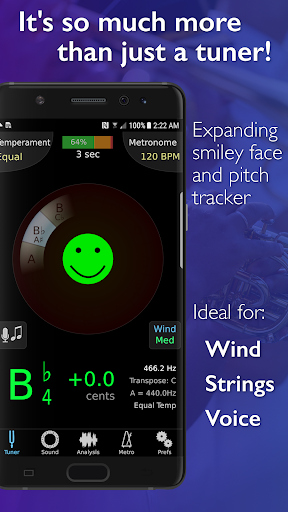
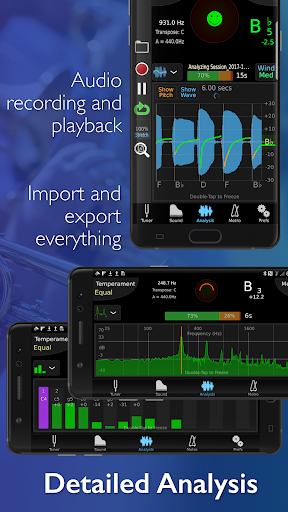
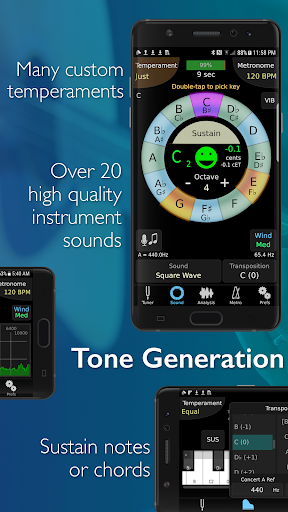
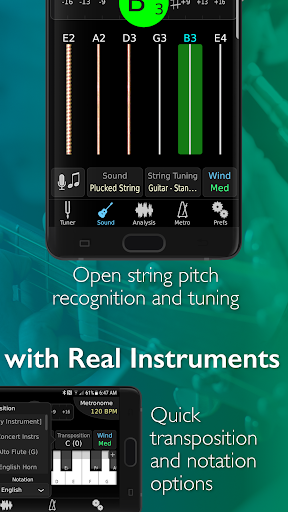
IMPORTANT! This is the special version of TonalEnergy specifically for use by students and educators who are a part of our educational institution program. You must have a pre-existing account to use it through your school, if you don't, please look for the regular TonalEnergy Tuner & Metronome app on the store.
--------
For musicians from pros to beginners, whether you sing, play a brass, woodwind or stringed instrument or any type of guitar, this app provides a set of feature-rich practice tools that gives fun and rewarding feedback. It’s much more than just a tuner!
• It's an all-in-one app, with a state-of-the-art tuner, an advanced metronome, dedicated orchestral strings and guitar tuning page, a piano keyboard, sound analysis pages, and audio/visual recording capabilities.
• It’s easy to use. Options like the Target Tuner or Pitch Tracker are on all the main pages. TonalEnergy helps users create rewarding and attainable goals during a rehearsal or when working alone. Colorful analysis data pages and audio/video recording features enhance the experience of practice.
• The metronome is cutting edge. It offers unmatched flexibility in sound choices, tempo settings, meters, subdivision patterns and visual displays. Voice count-ins, the ability to create and edit preset groups and Ableton link for syncing multiple devices make this a superior tool for performers.
• Ear training possibilities are endless. The high quality multi-sampled instrument sounds for symphonic instruments are unique among all other tuning applications. Listening skills can be developed through the use of the eight-octave keyboard, chromatic wheel and tone generator. There are no other sounds like these.
• Learning is a social activity. Using features unique to the TonalEnergy Tuner, data can be collected, reviewed, edited and shared with others. Feedback is essential for growing and developing great performers. It’s all about connectivity.
FEATURES
• Recognizes a large pitch range, extending to lower registers than many competing tuners (C0 - C8) that is highly responsive to wind instruments, as well as acoustic and electric string instruments
• Adjustable A=440 Hz reference
• Automatic or manual transposing options
• Instantly changes between equal, just and other custom temperaments, including user-defined ones
• Auto or instant pitch reference note feature using the TonalEnergy sounds
• Extensive tuning list for all orchestral string and fretted string instruments including many more features than most other string-only tuner apps
• An expandable eight octave piano keyboard enhancing many of the key aspects of the tuner’s functions
• Chromatic wheel tone generator, with optional auto-vibrato feature
• Frequency and Harmonic energy overtone graphs, along with a multi-function waveform
• Dedicated metronome page that matches or exceeds the features available on all other stand alone metronome apps
• Notation options including standard English, Solfege, Northern European, and Indian variants
• Bluetooth output/input support
• Audio and Video recording capabilities including, editing, looping, timestretch that are all exportable via iTunes sharing, AirDrop, email, AudioCopy, SoundCloud, etc
• Import music from iTunes Library or email attachments
• Compatible with external microphones and clip-on vibration sensor devices
• Supports external video output to an external display for use in rehearsal halls
• External MIDI keyboard control support
• Apple Watch app acts ONLY as a remote control for the phone app
• Audiobus and inter-app audio support
• VoiceOver support for the blind or visually impaired
แสดงเพิ่มเติม

1. ดาวน์โหลดตัวติดตั้ง MEmu และสิ้นสุดการติดตั้ง

2. เริ่ม MEmu จากนั้นเปิด Google Play บนหน้าแรก

3. ค้นหา TE for Education ใน Google Play
Install
4. ดาวน์โหลดและติดตั้ง TE for Education
5. เมื่อติดตั้งเสร็จให้คลิกที่ไอคอนเพื่อเริ่มใช้งาน

6. ใช้ MEmu เพื่อสัมผัสประสบการณ์ TE for Education บนคอมพิวเตอร์ของคุณ
MEmu Play คือโปรแกรมจำลอง Android ที่ดีที่สุด มีผู้ใช้มากกว่า 50 ล้านคน มอบประสบการณ์การใช้งานแอป Android ขั้นสุดยอดให้กับคุณ เทคโนโลยีจำลองเสมือนของ MEmu ช่วยให้คุณรันแอป Android หลายพันแอปบนคอมพิวเตอร์ได้อย่างราบรื่น แม้แอปที่กินทรัพยากรเครื่องสูงที่สุด
จอใหญ่และกราฟฟิกสวยกว่า; เล่นได้นาน, ไม่ต้องใช้แบตเตอรี่โทรศัพท์หรือเน็ตโทรศัพท์.
ระบบปรับแต่งปุ่มคีย์บอร์ดและเม้าส์ตามที่คุณเลือก
เล่นมากกว่าหนึ่งเกมบน PC ในเวลาเดียวกันด้วยระบบหลายจอหรือ Multi-Instance manager.
Use TE for Education on PC by following steps: