
The Journey Pregnancy
更新日
現在のバージョン
1.7.6
提供元

スマートフォンは不要!パソコンと同じようにキーボードとマウスで操作できます。MEmu Playは、あなたが待ち望んでいたすべての楽しみをお届けします。バッテリー残量や小さな画面を気にすることなく、The Journey Pregnancyをご利用ください。最新のMEmu 9は、The Journey PregnancyをPCで体験するのに最適です!完璧なキーマッピングシステムにより、PCのようなスムーズな操作性を実現します。マルチインスタンス機能により、複数のアプリケーションを同時に実行できます。独自の仮想化エンジンがPCのパフォーマンスを最大限に引き出します。アプリを使用するだけでなく、高品質な体験を得ることができます。
もっと見る
The Journey PregnancyをPCでダウンロード!大画面でより楽しむ。電源が落ちてしまうとか通信料が足りないとかの問題を心配する必要がなく、PCの大画面でより快適にゲームを楽しましょう! The Journey Pregnancy: Your Companion for a Safe Pregnancy.
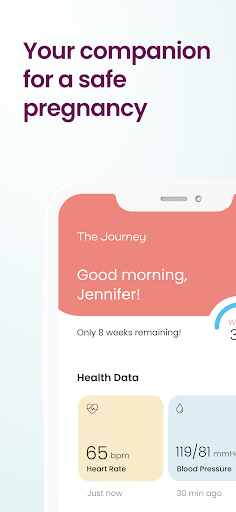
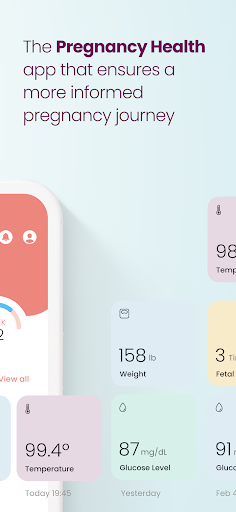
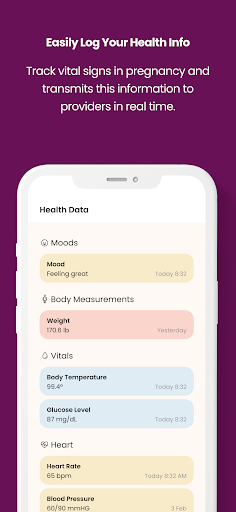
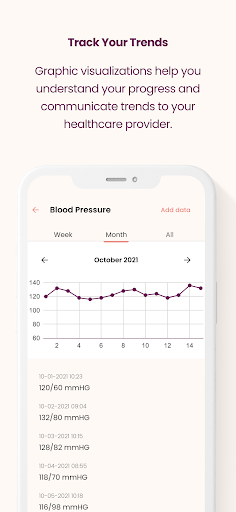
The Journey Pregnancy: Your Companion for a Safe Pregnancy.
Are you planning for a healthy pregnancy that leads to a healthy baby? If so, 'The Journey Pregnancy' app is your ultimate companion from your positive pregnancy test to your postpartum recovery, a comprehensive pregnancy health tracker. This user-friendly app enables pregnant patients to self-manage their maternal health. We support you in advocating for your prenatal health.
Whether your pregnancy is high-risk, or you simply wish to maintain a detailed health journal, 'The Journey Pregnancy' app is designed for all expecting mothers and parents who want to take control of their health. It is especially beneficial for those monitoring hypertension, weight, blood glucose, and preeclampsia risk, as it helps you maintain peace of mind by keeping a digital health log to communicate with your healthcare provider.
Key Features:
Health Trends Tracker: Get graphic visualizations of your health metrics and easily communicate your trends to your healthcare provider.
Personalized Pregnancy Wellness Coach: Enjoy one-on-one guidance and weekly calls from your dedicated coach.
Vital Stats Tracking: Keep a close eye on your weight, BMI, blood pressure, blood glucose, body temperature, and heart rate. Receive instant alerts if any of these pass CDC-recommended thresholds.
Symptom Tracker: Log and track the severity of symptoms you're experiencing to better understand your pregnancy health trends.
Mood Monitor: Stay aware of your maternal mental health and identify trends to share with your provider.
Direct Provider Communication: If your provider uses 'The Journey Clinic' software, you can share your health trends in real-time and send them quick questions.
Pregnancy Journey Documentation: Be prepared for your prenatal appointments by documenting questions to ask your doctor and make the most of your time with your OBGYN or healthcare provider.
Diet Tracker: Keep a record of your cravings and aversions for healthier diet management.
Daily Pregnancy Health Tips: Learn new facts about pregnancy health every day and share them with your partner and birth supporters.
Appointment Calendar: Chart your appointments in the app and keep a record of when you see your provider.
Fetal Movement Tracker: Use the kick counter and contraction counter for baby's safety and your peace of mind.
Export and Share: Export your information at any time and share your PDF with your provider or your birth supporters.
Photo Album: Capture weekly bump pics, see your weekly journey in pictures, and save your album to remember your pregnancy.
Does your healthcare provider have The Journey Clinic software? Ask your provider today. If they do, your healthcare team can follow your pregnancy progress even when you're not in the office, offering seamless remote patient monitoring for pregnancy care.
Emagine Solutions Technology, a woman-owned, minority-owned maternal health technology company, is committed to making pregnancy safer. Our platform, featuring 'The Journey Pregnancy' app, 'The Journey Clinic' connected provider software, and our FDA-cleared handheld ultrasound VistaScan, empowers both patients and providers for improved pregnancy outcomes.
Website: https://emaginest.com
LinkedIn: linkedin.com/company/emagine-solutions-technology/
Instagram: @emaginestech
TikTok: https://www.tiktok.com/@thejourneypregnancy
Contact us anytime with questions, comments, suggestions at Questions@emaginest.com. We'd love to hear from you and know how your pregnancy journey is going.
Optimize your pregnancy experience with 'The Journey Pregnancy' app - your companion for a safer and healthier pregnancy journey.
もっと見る

1. MEmuインストーラーをダウンロードしてセットアップを完了する

2. MEmuを起動し、デスクトップでのPlayストアを開く

3. PlayストアでThe Journey Pregnancyを検索する
Install
4. The Journey Pregnancyをダウンロードしてインストールする
5. インストールが完了したら、アイコンをクリックしてスタート

6. MEmuを使ってパソコンでThe Journey Pregnancyを体験する
MEmu Playは現在、最高の無料Androidエミュレーターであり、5,000万人のユーザーが優れたAndroidアプリ体験を楽しんでいます。MEmuの仮想化テクノロジーにより、数千ものAndroidアプリをコンピューターでスムーズに実行できます。
大画面でより精細;無限の待機、電池とドラフィックの極限を超え
キーボード・マウス・コントローラーを全力でサポート、より快適
マルチインスタンスで複数のゲームを同時に実行
Use The Journey Pregnancy on PC by following steps: