Tutorina: Parental Control App
更新日
現在のバージョン
1.0.0.360
提供元

スマートフォンは不要!パソコンと同じようにキーボードとマウスで操作できます。MEmu Playは、あなたが待ち望んでいたすべての楽しみをお届けします。バッテリー残量や小さな画面を気にすることなく、Tutorina: Parental Control Appをご利用ください。最新のMEmu 9は、Tutorina: Parental Control AppをPCで体験するのに最適です!完璧なキーマッピングシステムにより、PCのようなスムーズな操作性を実現します。マルチインスタンス機能により、複数のアプリケーションを同時に実行できます。独自の仮想化エンジンがPCのパフォーマンスを最大限に引き出します。アプリを使用するだけでなく、高品質な体験を得ることができます。
もっと見る
Tutorina: Parental Control AppをPCでダウンロード!大画面でより楽しむ。電源が落ちてしまうとか通信料が足りないとかの問題を心配する必要がなく、PCの大画面でより快適にゲームを楽しましょう! Tutorina is like having a friend to help you gently guide your kids away from their screens.

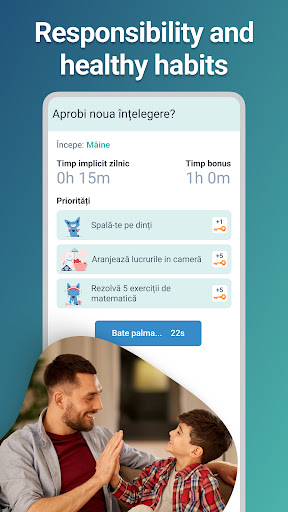
Tutorina is like having a friend to help you gently guide your kids away from their screens. With daily agreements and a list of priority activities, children willingly accept healthy limits and develop good habits. By earning keys for daily and educational activities, children can unlock additional screen time or have pre-agreed wishes fulfilled. Since it "costs" them some effort, children become less and less attracted to spending time on their phones.
Main Features:
Daily Agreement: Agree with your child on how much screen time they receive daily and say goodbye to endless bickering. A pact is a pact. When they feel you listened to what they have to say, children will respect the agreement.
Priorities: Together with your child, set up a list of activities to earn extra time or fulfill certain wishes. Kids quickly learn to do homework and tidy their room first before using the phone.
Parental Control: Set which apps and website categories can be accessed. Monitor online activity, device usage time, and get alerts if personal information is shared.
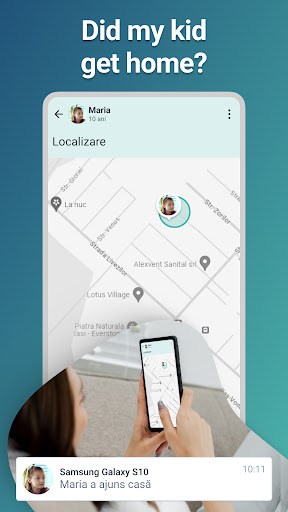
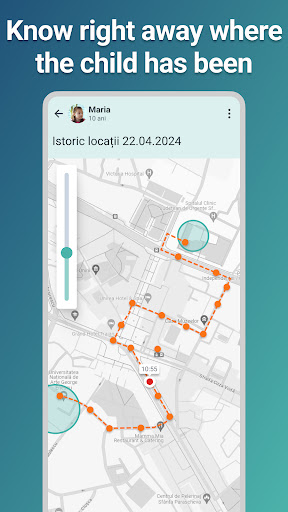
Location: Know where your child currently is and has been, even if their device is offline.
Stop Bullying: Get notified when bullying messages appear in your child's WhatsApp conversations.
Educational Games: In Tutorina, children find math, science, or language games. By solving these tests and quizzes, they earn keys for extra screen time or wishes. This way, children are happy to get more knowledge and practice.
Analysis and Reports: At a glance, you can see how your children used their screen time over a week, how much time they spent on educational apps, how many priorities they completed, and their whereabouts.
In child mode:
Tutorina uses a custom accessibility service, whose activation is essential to the proper functioning of the app. The service will allow the parent: to know what apps are installed on the child's device, block an app, monitor app usage, enforce sleep time, and restrict the Settings app with an authentication screen requiring a PIN code. The app uses a VPN service to enable web filtering functions that allow the parent to monitor internet traffic on the child's device. Web filtering also permits the parent to create a secure online environment for the child due to certain content control.
Download Tutorina now! Start nurturing good habits for your kid in a positive and interactive way!
もっと見る

1. MEmuインストーラーをダウンロードしてセットアップを完了する

2. MEmuを起動し、デスクトップでのPlayストアを開く

3. PlayストアでTutorina: Parental Control Appを検索する
Install
4. Tutorina: Parental Control Appをダウンロードしてインストールする
5. インストールが完了したら、アイコンをクリックしてスタート

6. MEmuを使ってパソコンでTutorina: Parental Control Appを体験する
MEmu Playは現在、最高の無料Androidエミュレーターであり、5,000万人のユーザーが優れたAndroidアプリ体験を楽しんでいます。MEmuの仮想化テクノロジーにより、数千ものAndroidアプリをコンピューターでスムーズに実行できます。
大画面でより精細;無限の待機、電池とドラフィックの極限を超え
キーボード・マウス・コントローラーを全力でサポート、より快適
マルチインスタンスで複数のゲームを同時に実行
Use Tutorina: Parental Control App on PC by following steps: