UniON
更新日
現在のバージョン
2.1.8
提供元

スマートフォンは不要!パソコンと同じようにキーボードとマウスで操作できます。MEmu Playは、あなたが待ち望んでいたすべての楽しみをお届けします。バッテリー残量や小さな画面を気にすることなく、UniONをご利用ください。最新のMEmu 9は、UniONをPCで体験するのに最適です!完璧なキーマッピングシステムにより、PCのようなスムーズな操作性を実現します。マルチインスタンス機能により、複数のアプリケーションを同時に実行できます。独自の仮想化エンジンがPCのパフォーマンスを最大限に引き出します。アプリを使用するだけでなく、高品質な体験を得ることができます。
もっと見る
UniONをPCでダウンロード!大画面でより楽しむ。電源が落ちてしまうとか通信料が足りないとかの問題を心配する必要がなく、PCの大画面でより快適にゲームを楽しましょう! All your UBPLC accounts in one place.
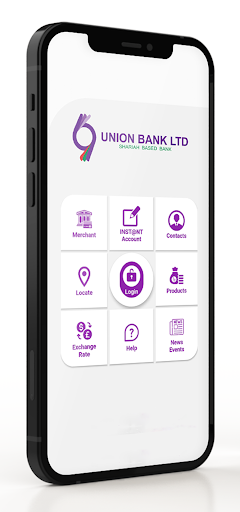
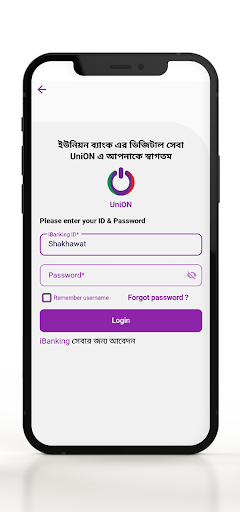
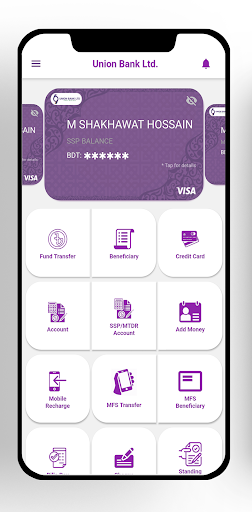
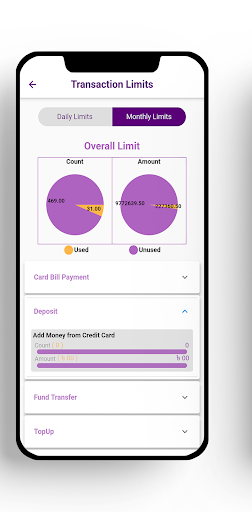
All your UBPLC accounts in one place. To provide a digital platform, Union Bank PLC introduced ‘UniON’ mobile application to its clients. Accessing all your Union Bank accounts is now simpler. Do all your banking needs smartly! Viewing your balance, transferring money, utility and credit card bill is just a tap away with ‘UniON’.
Services by UniON App:
1. Fund Transfer
i. Own account
ii. UBL Account
iii. Other Bank (EFT, NPSB & RTGS)
2. Credit Card Bill Pay
3. Account
i.Account Details
ii.Account Statement
4. Account Opening( SSP & MTDR , eKYC )
5. Mobile Talktime Recharge(Prepaid & Postpaid)
6. Add money from Credit card
7. MFS Transfer (Bkash, Nagad)
8. Bills Pay(Electricity (NESCO), VISA (IVAC))
9. Cheque management
10. Standing Instruction Management
Pre-log in features:
a. Marchant information
b. Instant account
c. Contact information
d. Branch/ATM location
e. Product information
f. Exchange rate
g. News about bank
What you'll need to start?
1. Device running a version over anrdoid 4.4
2. Wi-Fi or 2G/3G/4G data on your phone
3. Google Play store account
4. Internet Banking User ID and password
5. Savings account maintained with Union Bank PLC
Discloser Information:
We are committed to protect your privacy and ensure that your information is kept safe and secure. We take any failure to comply with our privacy policy very seriously and will take the necessary disciplinary action to ensure that your information remains secure.
Your consent to this policy is exerted when you ‘Register’ for, access, or use the "Services" provided by us. You agree to terms and condition, allow us to use and disclose your personal information entered into our system according to the description of this Policy.
CONTACT LIST
After your permission, the app can read your contact number information to provide you the top-up services where you dont need to type the beneficiary number. We may also collect non-personal information such as device information, app usage data, and location information.
Registration process:
It's easy to register and takes about 5 minutes to apply for internet banking.
1. Enter your Customer ID, A/c Number, Email and Mobile Number details for one of your Union Bank accounts.
2. You will need access to a phone and we may need to send you an activation code in the
email as reference number.
3.Download the below mentioned form. Fill up the application form and contact to a/c opening branch.
Download Link : https://www.unionbank.com.bd/assets/ebanking/others/User_Registration_Form.pdf to activate internet banking
4. Log in to Internet Banking using the username and password given on email.
security:
1. 2-FA Authentication for online financial transaction
2. One time password for transaction
If you have any questions or concerns about us, please contact us at below address or may message us through Internet Banking App 'Customer Feedback' option. In any communication channel chosen by you to notify us of your decision, please specify your name as per UBPLC Customer ID (CIS ID).
HEAD OFFICE
Bahela Tower, 72, Gulshan Avenue Gulshan-1, Dhaka-1212, Bangladesh
E-mail : ib.support@unionbank.com.bd
Website Link : www.unionbank.com.bd
Phone: 02222297310
SWIFT: UBLDBDDH
CALL CENTER (DOMESTIC): 16716, 09666712616
もっと見る

1. MEmuインストーラーをダウンロードしてセットアップを完了する

2. MEmuを起動し、デスクトップでのPlayストアを開く

3. PlayストアでUniONを検索する
Install
4. UniONをダウンロードしてインストールする
5. インストールが完了したら、アイコンをクリックしてスタート

6. MEmuを使ってパソコンでUniONを体験する
MEmu Playは現在、最高の無料Androidエミュレーターであり、5,000万人のユーザーが優れたAndroidアプリ体験を楽しんでいます。MEmuの仮想化テクノロジーにより、数千ものAndroidアプリをコンピューターでスムーズに実行できます。
大画面でより精細;無限の待機、電池とドラフィックの極限を超え
キーボード・マウス・コントローラーを全力でサポート、より快適
マルチインスタンスで複数のゲームを同時に実行
Use UniON on PC by following steps: