TSN: FIFA World Cup 2026™
Dikemas kini
Versi Semasa
Ditawarkan Oleh

Berhentilah bimbang dengan bayaran berlebihan semasa menggunakan TSN: FIFA World Cup 2026™ di telefon bimbit anda, bebaskan diri anda dari layar kecil dan nikmati penggunaan aplikasi pada paparan yang jauh lebih besar. Mulai sekarang, dapatkan pengalaman skrin penuh aplikasi anda dengan papan kekunci dan tetikus. MEmu Play semua ciri mengejutkan yang anda harapkan: pemasangan cepat dan penyediaan mudah, kawalan intuitif, tidak ada batasan bateri, data mudah alih, dan panggilan yang mengganggu. MEmu 9 yang baru adalah pilihan terbaik untuk menggunakan TSN: FIFA World Cup 2026™ di komputer anda. Dikodkan dengan penyerapan kami, pengurus multi-instance menjadikan pembukaan 2 atau lebih akaun pada masa yang sama mungkin. Dan yang paling penting, mesin emulasi eksklusif kami dapat melepaskan potensi penuh PC anda, menjadikan semuanya lancar dan menyeronokkan.
Tunjukkan Lagi
Nikmati pengalaman hebat menggunakan TSN: FIFA World Cup 2026™ di PC dengan MEmu Play. Ia merupakan emulator Android percuma yang hebat yang menyediakan beribu-ribu aplikasi Android untuk versi desktop mereka. Nikmati berhubung dengan rakan-rakan dan menggilap kerja anda dengan kecekapan yang lebih tinggi! Live stream over 600+ championship events* and get the latest news, highlights, on-demand games, and analysis from our all-star roster of insiders and experts.

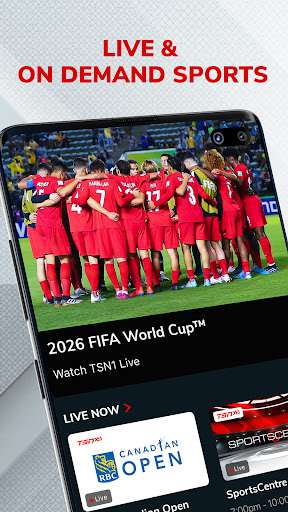
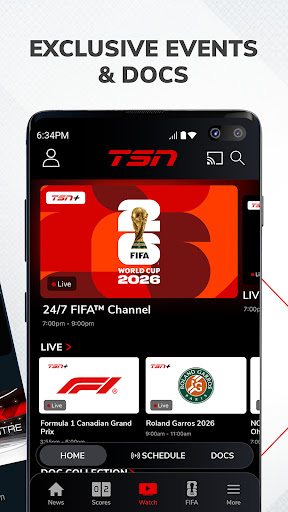
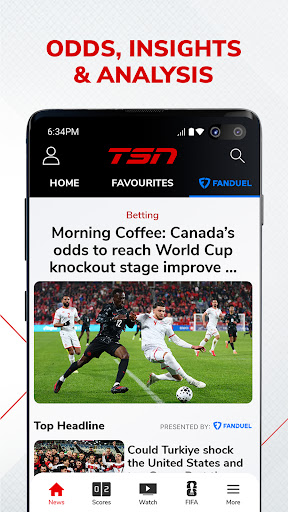
Live stream over 600+ championship events* and get the latest news, highlights, on-demand games, and analysis from our all-star roster of insiders and experts
WATCH ON TSN
Coverage of every major league, sport, and tournament, including:
Soccer: FIFA Men’s & Women’s World Cup, MLS, NWSL, UEFA Euro, Copa América, EPL / Hockey: NHL, PWHL, World Juniors, CHL / Football: NFL, CFL (Grey Cup), NCAA Football, XFL / Basketball: NBA, WNBA, NCAA Basketball / Auto Racing: F1, NASCAR / Curling: Curling Canada / Baseball: MLB / Tennis: ATP, WTA, French Open, Wimbledon, US Open / Golf: PGA, LPGA / Combat Sports: AEW / Rugby / Lacrosse: NLL / Studio Shows (SportsCentre, SC With Jay Onrait, and more)
Toronto Raptors / Toronto Maple Leafs / Montreal Canadiens / Ottawa Senators / Winnipeg Jets
FEATURES
• TSN+* – Unlock exclusive live and on-demand games, augmented feeds, and award-winning sports documentaries. Exclusive games include NFL RedZone, PGA Tour Live, AEW Rampage, AEW Collision, and more
• LIVE STREAMING* – Immerse yourself in the heart-pounding action of live sports on TSN1, TSN2, TSN3, TSN4, and TSN5
• ON-DEMAND VIEWING* – Catch up with live sports broadcasts and TSN's popular TV shows at your convenience
• NEWS & HIGHLIGHTS – Get the latest sports news and in-depth analysis from TSN’s best in class team of insiders, analysts, and reporters including Darren Dreger, Pierre Lebrun, James Duthie, Jeff O’Neil, Luke Willson, Davis Sanchez, Jack Armstrong, and more
*PLEASE NOTE*
• TSN+ is a digital streaming service that is included with a TSN subscription through TSN.ca or the TSN app, and it can also be purchased separately as a standalone subscription
• Live streaming and on-demand viewing require an active TSN subscription, either through an online subscription or through a TV package
• Blackout restrictions may apply for certain content
• Video content is exclusively accessible within Canada
• The app features in-app advertisements, even with a TSN subscription
• In-app subscriptions provide access to TSN during the term of the prepaid subscription period. At the end of that period, the subscription plan will automatically renew according to the selected period and payment will be charged to your credit card account within 24-hours prior to the end of the current period. Auto-renewal can be turned off in your Account Settings after purchase. All cancellations will take effect at the end of the current period. There are no refunds on paid subscription fees. Prices are subject to change.
Terms and Conditions –
https://www.tsn.ca/terms-and-conditions-1.1097912
Privacy Policy –
https://www.bell.ca/Security_and_privacy/Commitment_to_privacy#EXT=MULTI_off_URL_privacy_20110917_pc_
Tunjukkan Lagi

1. Muat turun pemasang MEmu dan selesaikan persediaan

2. Mulakan MEnu kemudian buka Google Play di desktop

3. Cari TSN: FIFA World Cup 2026™ di Google Play
Install
4. Muat turun dan Pasang TSN: FIFA World Cup 2026™
5. Apabila selesai pemasangan, menekan ikon itu untuk memulakan

6. Gunakan MENu untuk mengalami TSN: FIFA World Cup 2026™ pada komputer anda
MEmu Play ialah emulator Android terbaik, dengan lebih 100 juta pengguna mengalami pengalaman aplikasi Android yang unggul. Teknologi virtualisasi MEmu membolehkan anda menjalankan beribu-ribu aplikasi Android dengan lancar pada komputer anda, walaupun yang paling mencabar.
Skrin lebih besar dengan grafik yang lebih baik; Tempoh yang panjang, tanpa had bateri atau data mudah alih.
Sokongan Keymapping penuh untuk kawalan tepat papan kekunci dan tetikus atau gamepad.
Pelbagai akaun permainan atau tugas pada satu PC sekaligus dengan pengurus pelbagai contoh.
Use TSN: FIFA World Cup 2026™ on PC by following steps: