TSN: FIFA World Cup 2026™
Aktualisiert
Aktuelle Version
Angeboten von

Machen Sie sich keine Sorgen mehr über überhöhte Gebühren, wenn Sie TSN: FIFA World Cup 2026™ auf Ihrem Mobiltelefon verwenden, befreien Sie sich von dem winzigen Bildschirm und genießen Sie die Nutzung der App auf einem viel größeren Display. Von nun an können Sie Ihre App mit Tastatur und Maus im Vollbildmodus nutzen. MEmu bietet Ihnen all die überraschenden Funktionen, die Sie erwartet haben: schnelle Installation und einfache Einrichtung, intuitive Steuerung, keine Einschränkungen mehr durch Batterie, mobile Daten und störende Anrufe. Der brandneue MEmu 9 ist die beste Wahl für die Nutzung von TSN: FIFA World Cup 2026™ auf Ihrem Computer. Mit unserer Absorption kodiert, ermöglicht der Multi-Instanz-Manager die Eröffnung von 2 oder mehr Konten zur gleichen Zeit. Und das Wichtigste, unsere exklusive Emulations-Engine kann das volle Potenzial Ihres PCs freisetzen und alles reibungslos und angenehm gestalten.
Mehr anzeigen
Genieße TSN: FIFA World Cup 2026™ auf deinem PC mit MEmu Play in einer fantastischen Version. Dieser leistungsstarke, kostenlose Android-Emulator bietet dir Zugriff auf Tausende von Android-Apps für deinen Desktop. Bleib mit Freunden in Kontakt und arbeite effizienter! Live stream over 600+ championship events* and get the latest news, highlights, on-demand games, and analysis from our all-star roster of insiders and experts.

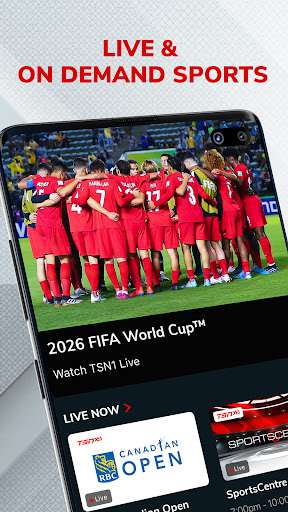
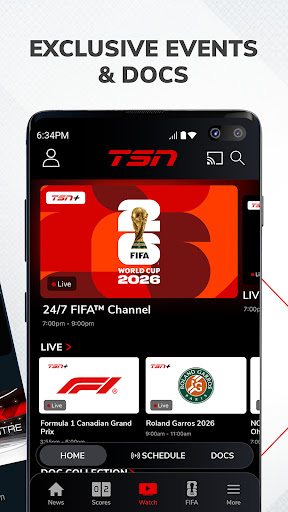
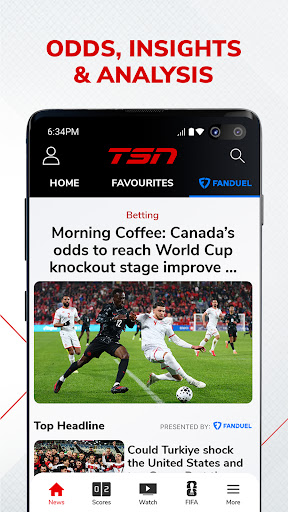
Live stream over 600+ championship events* and get the latest news, highlights, on-demand games, and analysis from our all-star roster of insiders and experts
WATCH ON TSN
Coverage of every major league, sport, and tournament, including:
Soccer: FIFA Men’s & Women’s World Cup, MLS, NWSL, UEFA Euro, Copa América, EPL / Hockey: NHL, PWHL, World Juniors, CHL / Football: NFL, CFL (Grey Cup), NCAA Football, XFL / Basketball: NBA, WNBA, NCAA Basketball / Auto Racing: F1, NASCAR / Curling: Curling Canada / Baseball: MLB / Tennis: ATP, WTA, French Open, Wimbledon, US Open / Golf: PGA, LPGA / Combat Sports: AEW / Rugby / Lacrosse: NLL / Studio Shows (SportsCentre, SC With Jay Onrait, and more)
Toronto Raptors / Toronto Maple Leafs / Montreal Canadiens / Ottawa Senators / Winnipeg Jets
FEATURES
• TSN+* – Unlock exclusive live and on-demand games, augmented feeds, and award-winning sports documentaries. Exclusive games include NFL RedZone, PGA Tour Live, AEW Rampage, AEW Collision, and more
• LIVE STREAMING* – Immerse yourself in the heart-pounding action of live sports on TSN1, TSN2, TSN3, TSN4, and TSN5
• ON-DEMAND VIEWING* – Catch up with live sports broadcasts and TSN's popular TV shows at your convenience
• NEWS & HIGHLIGHTS – Get the latest sports news and in-depth analysis from TSN’s best in class team of insiders, analysts, and reporters including Darren Dreger, Pierre Lebrun, James Duthie, Jeff O’Neil, Luke Willson, Davis Sanchez, Jack Armstrong, and more
*PLEASE NOTE*
• TSN+ is a digital streaming service that is included with a TSN subscription through TSN.ca or the TSN app, and it can also be purchased separately as a standalone subscription
• Live streaming and on-demand viewing require an active TSN subscription, either through an online subscription or through a TV package
• Blackout restrictions may apply for certain content
• Video content is exclusively accessible within Canada
• The app features in-app advertisements, even with a TSN subscription
• In-app subscriptions provide access to TSN during the term of the prepaid subscription period. At the end of that period, the subscription plan will automatically renew according to the selected period and payment will be charged to your credit card account within 24-hours prior to the end of the current period. Auto-renewal can be turned off in your Account Settings after purchase. All cancellations will take effect at the end of the current period. There are no refunds on paid subscription fees. Prices are subject to change.
Terms and Conditions –
https://www.tsn.ca/terms-and-conditions-1.1097912
Privacy Policy –
https://www.bell.ca/Security_and_privacy/Commitment_to_privacy#EXT=MULTI_off_URL_privacy_20110917_pc_
Mehr anzeigen

1. Laden das MEmu-Installationsprogramm herunter und beenden die Installation

2. MEmu starten und Google Play auf der Homepage öffnen

3. Suchen TSN: FIFA World Cup 2026™ in Google Play
Install
4. Herunterladen und Installieren TSN: FIFA World Cup 2026™
5. Klicken nach Abschluss der Installation auf das Symbol, um es zu starten

6. Verwenden Sie MEmu, um TSN: FIFA World Cup 2026™ auf Ihrem PC zu nutzen
MEmu Play ist aktuell der beste kostenlose Android-Emulator und bietet 50 Millionen Nutzern ein überragendes Android-App-Erlebnis. Dank der Virtualisierungstechnologie von MEmu können Sie Tausende von Android-Apps problemlos auf Ihrem Computer nutzen, selbst solche mit hohen Grafikanforderungen.
BGrößeres Bild mit besserer Grafik; Keine unterbrechungen, keine sorgen um Akku
Komplette Tastenbelegung unterstützt mit Maus und Tastatur oder Controller
Mit dem „Multi-Instance-Manager“ können Sie mehrere Spielkonten oder Spiele gleichzeitig auf einem PC ausführen.
Use TSN: FIFA World Cup 2026™ on PC by following steps: