TSN: FIFA World Cup 2026™
Mise à jour
Version actuelle
Proposée par

Ne vous inquiétez plus des surcharges lorsque vous utilisez TSN: FIFA World Cup 2026™ sur votre téléphone portable, libérez-vous de l'écran minuscule et profitez de l'application sur un écran beaucoup plus grand. Désormais, vous pouvez utiliser votre application en plein écran avec le clavier et la souris. MEmu vous offre toutes les fonctionnalités surprenantes que vous attendiez : installation rapide et configuration facile, commandes intuitives, plus de limitations de batterie, de données mobiles et d'appels dérangeants. Le tout nouveau MEmu 9 est le meilleur choix pour utiliser TSN: FIFA World Cup 2026™ sur votre ordinateur. Codé avec notre absorption, le gestionnaire multi-instance permet d'ouvrir 2 ou plusieurs comptes en même temps. Et le plus important, notre moteur d'émulation exclusif peut libérer tout le potentiel de votre PC, rendre tout cela fluide et agréable.
Afficher plus
Profitez d'une expérience TSN: FIFA World Cup 2026™ exceptionnelle sur PC grâce à MEmu Play. Cet émulateur Android gratuit et performant vous donne accès à des milliers d'applications Android pour votre ordinateur. Restez en contact avec vos amis et travaillez plus efficacement ! Live stream over 600+ championship events* and get the latest news, highlights, on-demand games, and analysis from our all-star roster of insiders and experts.

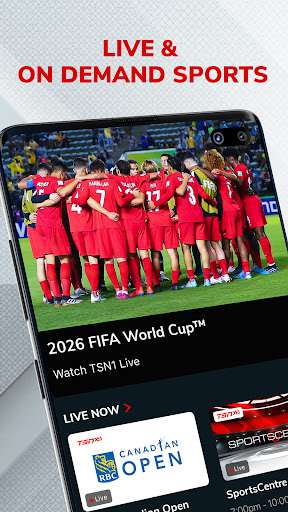
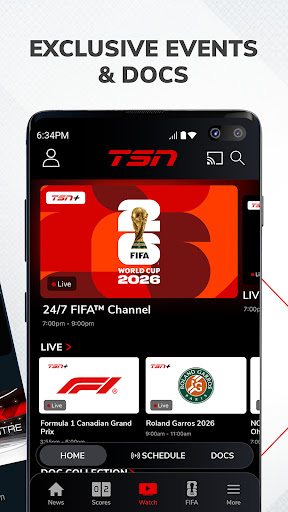
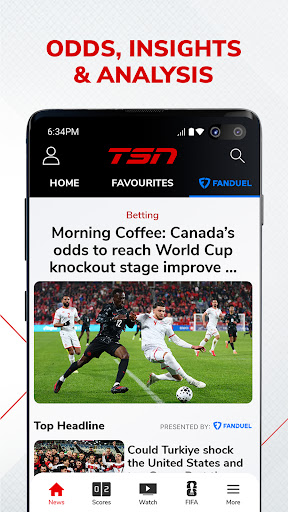
Live stream over 600+ championship events* and get the latest news, highlights, on-demand games, and analysis from our all-star roster of insiders and experts
WATCH ON TSN
Coverage of every major league, sport, and tournament, including:
Soccer: FIFA Men’s & Women’s World Cup, MLS, NWSL, UEFA Euro, Copa América, EPL / Hockey: NHL, PWHL, World Juniors, CHL / Football: NFL, CFL (Grey Cup), NCAA Football, XFL / Basketball: NBA, WNBA, NCAA Basketball / Auto Racing: F1, NASCAR / Curling: Curling Canada / Baseball: MLB / Tennis: ATP, WTA, French Open, Wimbledon, US Open / Golf: PGA, LPGA / Combat Sports: AEW / Rugby / Lacrosse: NLL / Studio Shows (SportsCentre, SC With Jay Onrait, and more)
Toronto Raptors / Toronto Maple Leafs / Montreal Canadiens / Ottawa Senators / Winnipeg Jets
FEATURES
• TSN+* – Unlock exclusive live and on-demand games, augmented feeds, and award-winning sports documentaries. Exclusive games include NFL RedZone, PGA Tour Live, AEW Rampage, AEW Collision, and more
• LIVE STREAMING* – Immerse yourself in the heart-pounding action of live sports on TSN1, TSN2, TSN3, TSN4, and TSN5
• ON-DEMAND VIEWING* – Catch up with live sports broadcasts and TSN's popular TV shows at your convenience
• NEWS & HIGHLIGHTS – Get the latest sports news and in-depth analysis from TSN’s best in class team of insiders, analysts, and reporters including Darren Dreger, Pierre Lebrun, James Duthie, Jeff O’Neil, Luke Willson, Davis Sanchez, Jack Armstrong, and more
*PLEASE NOTE*
• TSN+ is a digital streaming service that is included with a TSN subscription through TSN.ca or the TSN app, and it can also be purchased separately as a standalone subscription
• Live streaming and on-demand viewing require an active TSN subscription, either through an online subscription or through a TV package
• Blackout restrictions may apply for certain content
• Video content is exclusively accessible within Canada
• The app features in-app advertisements, even with a TSN subscription
• In-app subscriptions provide access to TSN during the term of the prepaid subscription period. At the end of that period, the subscription plan will automatically renew according to the selected period and payment will be charged to your credit card account within 24-hours prior to the end of the current period. Auto-renewal can be turned off in your Account Settings after purchase. All cancellations will take effect at the end of the current period. There are no refunds on paid subscription fees. Prices are subject to change.
Terms and Conditions –
https://www.tsn.ca/terms-and-conditions-1.1097912
Privacy Policy –
https://www.bell.ca/Security_and_privacy/Commitment_to_privacy#EXT=MULTI_off_URL_privacy_20110917_pc_
Afficher plus

1. Téléchargez l'installateur MEmu et terminez l'installation

2. Démarrez MEmu puis ouvrez Google Play sur la page d'accueil

3. Recherchez TSN: FIFA World Cup 2026™ dans Google Play
Install
4. Téléchargez et installez TSN: FIFA World Cup 2026™
5. Une fois l'installation terminée, cliquez sur l'icône pour démarrer

6. Utiliser MEmu pour utiliser TSN: FIFA World Cup 2026™ sur votre ordinateur
MEmu Play est actuellement le meilleur émulateur Android gratuit, avec 50 millions d'utilisateurs qui profitent d'une expérience Android exceptionnelle. La technologie de virtualisation de MEmu vous permet de jouer facilement à des milliers d'applications Android sur votre ordinateur, même les plus gourmandes en ressources.
L’écran plus grand avec de meilleurs graphismes; Une longue durée, sans limitation de batterie ou de données mobiles.
Soutien du Keymapping pour un contrôle précis du clavier et de la souris ou de la manette de jeu
Plusieurs comptes de jeu ou tâches sur un seul PC en même temps avec le gestionnaire de multi-instance.
Use TSN: FIFA World Cup 2026™ on PC by following steps: