
In Falsus
Bijgewerkt
Huidige Versie
Aangeboden door

Met al je passie voor het spelen van In Falsus, zouden je handen niet beperkt moeten zijn tot een klein scherm van je telefoon. Speel als een professional en krijg volledige controle over je spel met toetsenbord en muis. MEmu biedt je alles wat je verwacht. Download en speel In Falsus op PC. Speel zo lang als je wilt, geen beperkingen meer van batterij, mobiele data en storende oproepen. De gloednieuwe MEmu 9 is de beste keuze om In Falsus op PC te spelen. Voorbereid met onze expertise, maakt het uitmuntende vooraf ingestelde keymapping systeem van In Falsus een echt PC-spel. MEmu multi-instance manager maakt het spelen van 2 of meer accounts op hetzelfde apparaat mogelijk. En het belangrijkste, onze exclusieve emulatie-engine kan het volledige potentieel van je PC benutten, waardoor alles soepel verloopt.
Meer tonen
Download In Falsus op je pc met de MEmu Android-emulator. Geniet van spelen op een groot scherm. Tying music gameplay to a tale of lies and truth, 'In Falsus' guides players through seamless progression from flow to mastery, welcoming those new and experienced to surmount challenges and rise higher with each and every encounter.
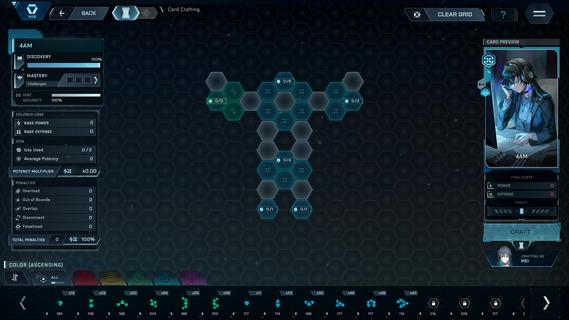
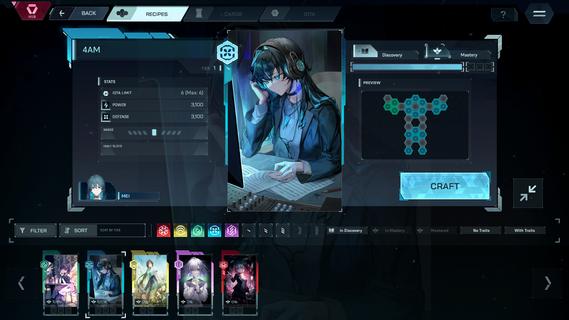


Tying music gameplay to a tale of lies and truth, 'In Falsus' guides players through seamless progression from flow to mastery, welcoming those new and experienced to surmount challenges and rise higher with each and every encounter.Follow the separate perspectives of 5 girls making their way through high school in a near-future world, whose lives take a sharp turn one day as they are bid to join a strange government program, and soon are forced to face an undiscovered side of their reality.Progression: With a signature control system of mouse and keyboard, In Falsus brings challenges across 4 difficulties, rising in intensity of incoming notes and a sweeping aerial Field.Encounters: Every step forward brings a greater trial. Throughout their ordeals, the protagonists encounter characters who they must contend with or assist, with these key moments each tied to unique songs.Songs: Produced by composers at the forefront of Japan's independent music scene as well as international artists, In Falsus features over 70 songs, over 40 of which are original, represented across a multitude of genres and styles.Crafting: Overcome challenges to collect materials, craft unique Cards, and gain new advantages and approaches during song gameplay.Blueprints: Integrate Cards by slotting earned materials into Blueprints, grids with a wide variety of choices in stat boosts and bonuses. Every Card crafted is different, and every Blueprint is a puzzle. How you choose to arrange materials within Blueprints shapes unique possibilities in solutions and effects.Cards: Featuring artwork of characters met and unfolding narrative moments witnessed, illustrated by a range of skilled and renowned artists, equip up to 5 Cards to vary your approach when challenging the songs you come across.A world where emotions are laid bare at the neck, and no lies are permitted.Narrative: Through visual novel-styled narrative design, switch between the individual perspectives of 5 protagonistsâall of whom are interconnected.Immersion: Become drawn into a new world through expressive characters, captivating environments, and full Japanese voice acting.Experience: Narrative is at the heart of In Falsus, with music gameplay, sound design, and themes reflecting and directly linked to the events of the game.
Meer tonen

1. Download de MEmu-installatie en voltooi de setup

2. Start MEmu en open vervolgens Google Play op het bureaublad

3. Zoek In Falsus in Google Play
Install
4. Download en installeer In Falsus
5. Klik op het icoon om te starten na het voltooien van de installatie

6. Geniet van het spelen van In Falsus op PC met MEmu
MEmu Play is de beste Android Emulator en 100 miljoen mensen genieten al van de superieure Android-game-ervaring. De virtualisatietechnologie van MEmu stelt je in staat om duizenden Android-spellen soepel op je PC te spelen, zelfs de meest grafisch intensieve.
Groter scherm met betere graphics; Lange duur, zonder beperking van batterij of mobiele data.
Volledige Keymapping-ondersteuning voor nauwkeurige besturing van toetsenbord en muis of gamepad.
Meerdere game-accounts of taken op één PC tegelijk met Multi-Instance manager.
Speel In Falsus op PC door de volgende stappen te volgen: