
In Falsus
อัปเดตเมื่อ
เวอร์ชันปัจจุบัน
ให้บริการโดย

เวลาคุณเล่น In Falsus, คุณอาจรู้สึกว่ามือคุณอาจบังจอแล้วทำให้ไม่ได้เล่นแบบเต็มที่. เล่นแบบไร้ขีดจำกัดด้วยเม้าส์และคีย์บอร์ด. MEmu มีตัวเลือกหลายอย่างให้คุณใช้งานเกมที่คุณเล่นแบบที่คุณต้องการ. ดาวน์โหลดและเล่น In Falsus บน PC. เล่นนานแค่ไหนก็ได้, ไม่ต้องชาร์จแบตเตอรี่, หรือเจอคนโทรเข้ามาระหว่างเล่น. MEmu 9 เป็นตัวเลือกสำหรับการเล่น In Falsus บน PC. ทางทีมงานเราได้ปรับแต่งเกม, ปรับให้เล่นเกมบางเกมได้เหมือนเล่น In Falsus เป็นเกม PC เช่นเล็งด้วยเม้าส์หรือใช้คีย์บอร์ด. ระบบของเรายังทำให้คุณสามารถเปิดเล่นได้มากกว่า 2 เกมพร้อมๆกันในคอมของคุณ. และที่สำคัญที่สุด, ระบบโปรแกรมของเราสามารถทำให้คุณใช้ระบบของ PC ทำให้เกมลื่นเหมือนกับใช้โทรศัพท์รุ่นล่าสุด. เราไม่ได้ดูแลเรื่องการเล่นเกม, แต่เราดูแลถึงความสนุกสนานที่คุณได้จากการเล่นด้วย.
แสดงเพิ่มเติม
ดาวน์โหลด In Falsus บน PC ด้วย MEmu Android Emulator สนุกกับการเล่นบนหน้าจอขนาดใหญ่ Tying music gameplay to a tale of lies and truth, 'In Falsus' guides players through seamless progression from flow to mastery, welcoming those new and experienced to surmount challenges and rise higher with each and every encounter.
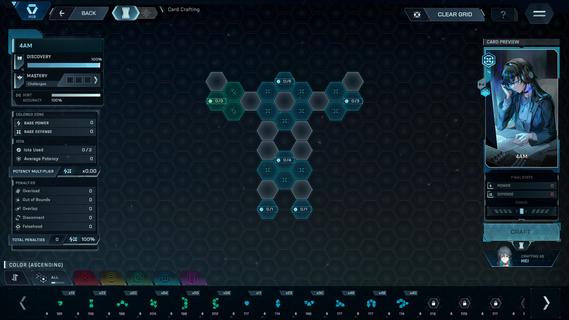
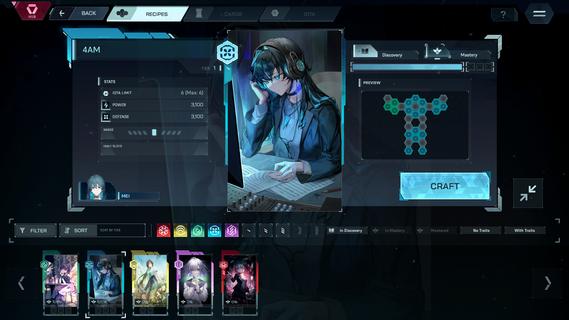


Tying music gameplay to a tale of lies and truth, 'In Falsus' guides players through seamless progression from flow to mastery, welcoming those new and experienced to surmount challenges and rise higher with each and every encounter.Follow the separate perspectives of 5 girls making their way through high school in a near-future world, whose lives take a sharp turn one day as they are bid to join a strange government program, and soon are forced to face an undiscovered side of their reality.Progression: With a signature control system of mouse and keyboard, In Falsus brings challenges across 4 difficulties, rising in intensity of incoming notes and a sweeping aerial Field.Encounters: Every step forward brings a greater trial. Throughout their ordeals, the protagonists encounter characters who they must contend with or assist, with these key moments each tied to unique songs.Songs: Produced by composers at the forefront of Japan's independent music scene as well as international artists, In Falsus features over 70 songs, over 40 of which are original, represented across a multitude of genres and styles.Crafting: Overcome challenges to collect materials, craft unique Cards, and gain new advantages and approaches during song gameplay.Blueprints: Integrate Cards by slotting earned materials into Blueprints, grids with a wide variety of choices in stat boosts and bonuses. Every Card crafted is different, and every Blueprint is a puzzle. How you choose to arrange materials within Blueprints shapes unique possibilities in solutions and effects.Cards: Featuring artwork of characters met and unfolding narrative moments witnessed, illustrated by a range of skilled and renowned artists, equip up to 5 Cards to vary your approach when challenging the songs you come across.A world where emotions are laid bare at the neck, and no lies are permitted.Narrative: Through visual novel-styled narrative design, switch between the individual perspectives of 5 protagonistsâall of whom are interconnected.Immersion: Become drawn into a new world through expressive characters, captivating environments, and full Japanese voice acting.Experience: Narrative is at the heart of In Falsus, with music gameplay, sound design, and themes reflecting and directly linked to the events of the game.
แสดงเพิ่มเติม

1. ดาวน์โหลดตัวติดตั้ง MEmu และสิ้นสุดการติดตั้ง

2. เริ่ม MEmu จากนั้นเปิด Google Play บนหน้าแรก

3. ค้นหา In Falsus ใน Google Play
Install
4. ดาวน์โหลดและติดตั้ง In Falsus
5. เมื่อติดตั้งเสร็จให้คลิกที่ไอคอนเพื่อเริ่มใช้งาน

6. สนุกกับการเล่น In Falsus บนพีซีด้วย MEmu
MEmu App Player เป็นอีมูเลเตอร์ Android ที่ดีที่สุดและผู้คนกว่า 50 ล้านคนเพลิดเพลินไปกับประสบการณ์การเล่นเกม Android ที่ยอดเยี่ยม เทคโนโลยีการจำลองเสมือนของ MEmu ช่วยให้คุณเล่นเกม Android หลายพันเกมได้อย่างราบรื่นบนพีซีของคุณแม้แต่เกมที่ต้องใช้กราฟิกมากที่สุด
จอใหญ่และกราฟฟิกสวยกว่า; เล่นได้นาน, ไม่ต้องใช้แบตเตอรี่โทรศัพท์หรือเน็ตโทรศัพท์.
ระบบปรับแต่งปุ่มคีย์บอร์ดและเม้าส์ตามที่คุณเลือก
เล่นมากกว่าหนึ่งเกมบน PC ในเวลาเดียวกันด้วยระบบหลายจอหรือ Multi-Instance manager.
Play In Falsus on PC by following steps:
























![[ไกด์เกม] CookieRun Classic แนะนำ 5 คุกกี้น่าปั้น น่าลงทุน ที่มือใหม่ห้ามพลาด! (เล่นบน PC ผ่าน MEmu ให้ลื่นสุด ๆ) PC](https://www.memuplay.com/blog/wp-content/uploads/2026/08/579c01ab-a953-45b3-8115-9b6279b7d6f9.png)