
In Falsus
Aktualisiert
Aktuelle Version
Angeboten von

Bei all Ihrer Leidenschaft für das Spielen von In Falsus sollten Ihre Hände nicht auf einen winzigen Bildschirm Ihres Telefons beschränkt sein. Spielen Sie wie ein Profi und übernehmen Sie die volle Kontrolle über Ihr Spiel mit Tastatur und Maus. MEmu bietet Ihnen all die Dinge, die Sie erwarten. Laden Sie In Falsus herunter und spielen Sie es auf dem PC. Spielen Sie so lange, wie Sie wollen, ohne Grenzwerte für Akku, mobile Daten und störende Anrufe. Das brandneue MEmu 9 ist die beste Wahl, um In Falsus auf dem PC zu spielen. Das exquisite voreingestellte Tastaturbelegungssystem, das mit unserem Fachwissen vorbereitet wurde, macht In Falsus zu einem echten PC-Spiel. Der MEmu Multi-Instanz-Manager ermöglicht das Spielen von 2 oder mehr Konten auf demselben Gerät. Und das Wichtigste: Unsere exklusive Emulations-Engine kann das volle Potenzial Ihres PCs freisetzen und für reibungslose Abläufe sorgen.
Mehr anzeigen
Laden Sie Play In Falsus auf dem PC mit MEmu Android Emulator. Viel Spaß beim Spielen auf großmundieren. Tying music gameplay to a tale of lies and truth, 'In Falsus' guides players through seamless progression from flow to mastery, welcoming those new and experienced to surmount challenges and rise higher with each and every encounter.
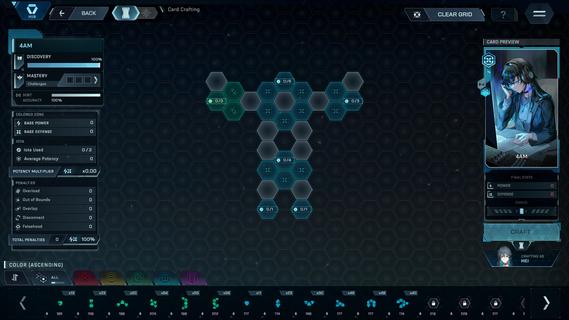
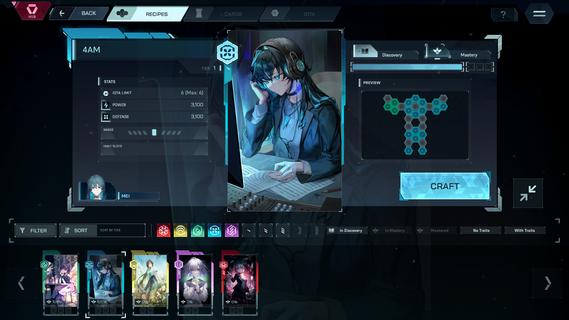
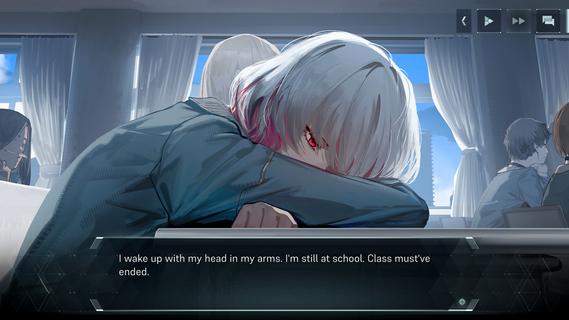

Tying music gameplay to a tale of lies and truth, 'In Falsus' guides players through seamless progression from flow to mastery, welcoming those new and experienced to surmount challenges and rise higher with each and every encounter.Follow the separate perspectives of 5 girls making their way through high school in a near-future world, whose lives take a sharp turn one day as they are bid to join a strange government program, and soon are forced to face an undiscovered side of their reality.Progression: With a signature control system of mouse and keyboard, In Falsus brings challenges across 4 difficulties, rising in intensity of incoming notes and a sweeping aerial Field.Encounters: Every step forward brings a greater trial. Throughout their ordeals, the protagonists encounter characters who they must contend with or assist, with these key moments each tied to unique songs.Songs: Produced by composers at the forefront of Japan's independent music scene as well as international artists, In Falsus features over 70 songs, over 40 of which are original, represented across a multitude of genres and styles.Crafting: Overcome challenges to collect materials, craft unique Cards, and gain new advantages and approaches during song gameplay.Blueprints: Integrate Cards by slotting earned materials into Blueprints, grids with a wide variety of choices in stat boosts and bonuses. Every Card crafted is different, and every Blueprint is a puzzle. How you choose to arrange materials within Blueprints shapes unique possibilities in solutions and effects.Cards: Featuring artwork of characters met and unfolding narrative moments witnessed, illustrated by a range of skilled and renowned artists, equip up to 5 Cards to vary your approach when challenging the songs you come across.A world where emotions are laid bare at the neck, and no lies are permitted.Narrative: Through visual novel-styled narrative design, switch between the individual perspectives of 5 protagonistsâall of whom are interconnected.Immersion: Become drawn into a new world through expressive characters, captivating environments, and full Japanese voice acting.Experience: Narrative is at the heart of In Falsus, with music gameplay, sound design, and themes reflecting and directly linked to the events of the game.
Mehr anzeigen

1. Laden das MEmu-Installationsprogramm herunter und beenden die Installation

2. MEmu starten und Google Play auf der Homepage öffnen

3. Suchen In Falsus in Google Play
Install
4. Herunterladen und Installieren In Falsus
5. Klicken nach Abschluss der Installation auf das Symbol, um es zu starten

6. Viel Spaß beim Spielen von In Falsus auf dem PC mit MEmu
MEmu App Player ist der beste kostenlose Android-Emulator und 50 Millionen Menschen genießen bereits seine hervorragende Android-Gaming-Erfahrung. Mit der MEmu-Virtualisierungstechnologie können Sie Tausende von Android-Spielen problemlos auf Ihrem PC spielen, selbst bei grafikintensiven Spielen.
BGrößeres Bild mit besserer Grafik; Keine unterbrechungen, keine sorgen um Akku
Komplette Tastenbelegung unterstützt mit Maus und Tastatur oder Controller
Mit dem „Multi-Instance-Manager“ können Sie mehrere Spielkonten oder Spiele gleichzeitig auf einem PC ausführen.
Play In Falsus on PC by following steps: