Clubhouse
Bijgewerkt
Huidige Versie
2.13.11
Aangeboden door

Maak je geen zorgen meer over extra kosten bij het gebruik van Clubhouse op je mobiele telefoon, bevrijd jezelf van het kleine scherm en geniet van het gebruik van de app op een veel groter display. Vanaf nu, krijg een volledige schermervaring van je app met toetsenbord en muis. MEmu biedt je alle verrassende functies die je verwachtte: snelle installatie en eenvoudige configuratie, intuïtieve besturing, geen beperkingen meer van batterij, mobiele data en storende oproepen. De gloednieuwe MEmu 9 is de beste keuze voor het gebruik van Clubhouse op je computer. MEmu multi-instance manager maakt het mogelijk om tegelijkertijd 2 of meer accounts te openen. En het belangrijkste, onze exclusieve emulatiemotor kan het volledige potentieel van je PC benutten, waardoor alles soepel en plezierig wordt.
Meer tonen
Download Clubhouse on PC with MEmu Android Emulator. Enjoy playing on big screen. Clubhouse is collaborative project management without all the management.
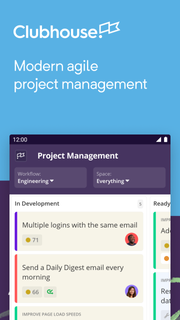
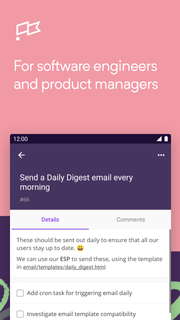
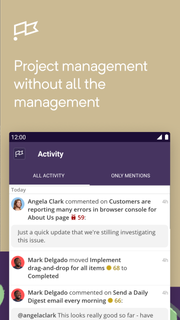

Clubhouse is collaborative project management without all the management. We streamline and refine your existing software development workflow so that managing your tasks (and your team's tasks) is no longer a task.Features of Clubhouse for Android:• Create new Stories quickly with a few taps• Search for, track progress on, update, and add comments to all Stories in your workspace• View details and progress on all Epics in your workspace• Quickly see what you’re working on in the Dashboard• See all activity on the projects that you’re working on in the Activity FeedThousands of technology-driven organizations – from start-ups to large enterprises – enjoy using Clubhouse to develop software more efficiently:“Clubhouse provides the ability to work on a task list at the smallest level where I can check things off, all the way up to tracking my entire company's engineering velocity at the milestone level.”- John Kodumal, CTO/Co-Founder, LaunchDarkly“Clubhouse allows us to provide structure and process. It keeps us organized and focused.”- Yasmin Nozari, VP of Product, MakeSpace“Clubhouse is fine grained enough that each sub-team can track the tasks they're working on, but allows us to zoom out to the team, product, or stack level.”- Clinton Gormley, Team Lead, elasticHave feedback? Shake your device and let us know!
Meer tonen

1. Download de MEmu-installatie en voltooi de setup

2. Start MEmu en open vervolgens Google Play op het bureaublad

3. Zoek Clubhouse in Google Play
Install
4. Download en installeer Clubhouse
5. Klik op het icoon om te starten na het voltooien van de installatie

6. Ervaar Clubhouse op pc met MEmu
MEmu Play is de beste Android-emulator, met meer dan 100 miljoen gebruikers die genieten van de superieure Android-app-ervaring. Dankzij de virtualisatietechnologie van MEmu kun je duizenden Android-apps soepel op je computer draaien, zelfs de meest veeleisende.
Groter scherm met betere graphics; Lange duur, zonder beperking van batterij of mobiele data.
Volledige Keymapping-ondersteuning voor nauwkeurige besturing van toetsenbord en muis of gamepad.
Meerdere game-accounts of taken op één PC tegelijk met Multi-Instance manager.
Gebruik Clubhouse op PC door de volgende stappen te volgen: