Dicegeon: Roguelike RPG
Zaktualizowano
Aktualna wersja
Sprzedawca

Przy całej swojej pasji do grania w Dicegeon: Roguelike RPG, twoje ręce nie powinny być ograniczone na małym ekranie telefonu. Graj jak zawodowiec i uzyskaj pełną kontrolę nad grą za pomocą klawiatury i myszy. MEmu oferuje ci wszystko, czego oczekujesz. Pobierz i graj Dicegeon: Roguelike RPG na PC. Graj tak długo, jak chcesz, bez ograniczeń baterii, danych komórkowych i niepokojących połączeń. Zupełnie nowy MEmu 9 to najlepszy wybór do grania w Dicegeon: Roguelike RPG na PC. Przygotowany dzięki naszej wiedzy, znakomity, wstępnie ustawiony system mapowania klawiszy sprawia, że Dicegeon: Roguelike RPG jest prawdziwą grą na PC. Zakodowany naszą absorpcją, menedżer wielu instancji umożliwia granie na 2 lub więcej kontach na tym samym urządzeniu. A co najważniejsze, nasz emulator może uwolnić pełny potencjał twojego komputera, sprawić, że wszystko będzie płynne. Dbamy nie tylko o to, jak grasz, ale także o cały proces czerpania radości z grania.
Pokaż więcej
Ciesz się wspaniałym doświadczeniem podczas grania w Dicegeon: Roguelike RPG na komputerze z aplikacją MEMU App Player. Jest to potężny darmowy emulator Androida pozwalający grać w tysiące gier na Androida. DICEGEON: ROLL THE DICE, FORGE YOUR DESTINY!
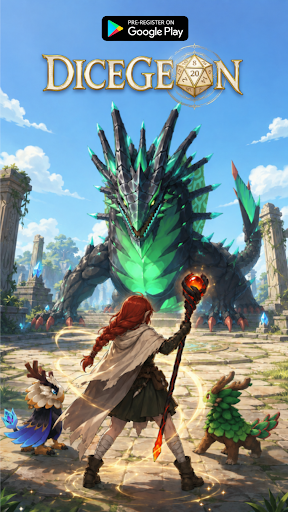
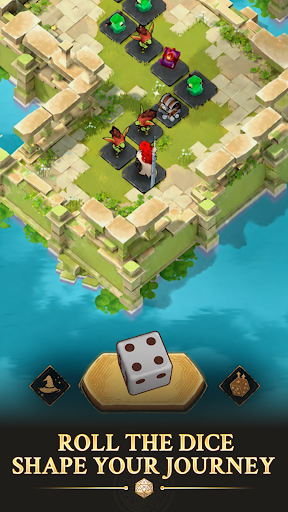
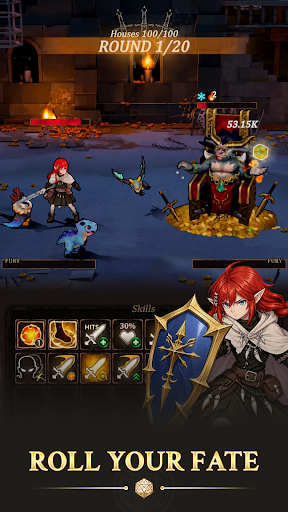
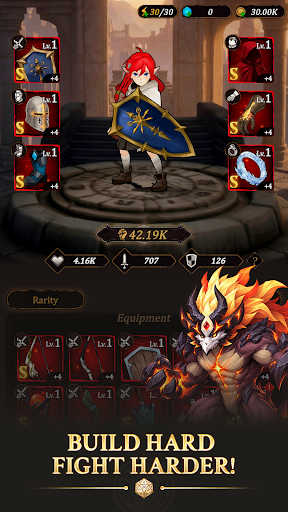
DICEGEON: ROLL THE DICE, FORGE YOUR DESTINY!
Every legend starts with a single roll! Step into an epic fantasy RPG world where every step brings a fresh thrill: unlock hidden paths, trigger intense turn-based battles, or uncover legendary rewards.
Will you trust pure luck, or mastermind your way to victory?
PRE-REGISTER NOW TO UNLOCK EXCLUSIVE LAUNCH REWARDS!
Be among the first brave adventurers to enter Dicegeon! Pre-register today to receive an exclusive character skin on your very first day of downloading the game, giving you a stylish power-up for your journey right from Day 1!
KEY FEATURES
- Roll, Move & Conquer: Cast the dice to navigate dynamic campaign maps. Every tile forces a strategic choice—battle fierce monsters, trigger random events, or claim high-tier loot.
- Ascend the Infinite Tower: Test your limits in the Tower challenge! Climb endless floors filled with escalating bosses, exclusive rewards, and ultimate bragging rights.
- Forge & Equip Legendary Gear: Gear up your hero with powerful weapon and armor sets. Refine your build to crush enemies and adapt to any challenge.
- Deep Talent Tree Progression: Permanently enhance your hero's core stats and stats-boosting Talents to unlock game-changing perks for future runs.
- Loyal Pet Companions: Collect and upgrade cute yet lethal Pets! Bring them into battle to unleash unique active skills and passive buffs.
- Endless Roguelike Replayability: Ever-changing maps, unpredictable events, and distinct reward pools make every single run feel entirely unique.
A MUST-PLAY FOR FANTASY RPG FANS
Easy to pick up, impossible to master. Dicegeon delivers the perfect blend of casual dice-rolling excitement, deep strategy, and satisfying hero progression.
Pre-register TODAY, claim your special rewards at launch, and prepare for adventure!
Join our community for early news, launch updates & exclusive perks:
Facebook: https://www.facebook.com/dicegeon
Discord: https://discord.gg/ppEtwN3Ywj
Pokaż więcej

1. Pobierz instalator MEmu i zakończ instalację

2. Uruchom MEmu, a następnie otwórz Google Play na pulpicie

3. Wyszukaj Dicegeon: Roguelike RPG w Google Play
Install
4. Pobierz i zainstaluj Dicegeon: Roguelike RPG
5. Po zakończeniu instalacji kliknij ikonę, aby rozpocząć

6. Ciesz się grą Dicegeon: Roguelike RPG na PC z MEmu
MEmu Play to najlepszy emulator Androida, a 100 milionów ludzi już korzysta z jego i dosta doskonałe wrażenia z gier na Androida. Technologia wirtualizacji MEmu umożliwia płynne granie w tysiące gier Androida na komputerze, nawet tych najbardziej wymagających grafiki.
Większy ekran z lepszą grafiką; Długi czas, bez ograniczeń baterii lub danych mobilnych.
Pełna obsługa mapowania klawiszy dla precyzyjnego sterowania klawiaturą i myszą lub gamepadem.
Wiele kont gier lub zadań na jednym komputerze jednocześnie z menedżerem wielu instancji.
Play Dicegeon: Roguelike RPG on PC by following steps: