DeepSkyCamera
Zaktualizowano
Aktualna wersja
2.1.3
Sprzedawca

Przestań martwić się nadmiernymi opłatami podczas korzystania z DeepSkyCamera na telefonie komórkowym, uwolnij się od małego ekranu i ciesz się korzystaniem z aplikacji na znacznie większym wyświetlaczu. Od teraz korzystaj z aplikacji na pełnym ekranie za pomocą klawiatury i myszy. MEmu oferuje wszystkie zaskakujące funkcje, których się spodziewałeś: szybką instalację i łatwą konfigurację, intuicyjne sterowanie, koniec z ograniczeniami baterii, danych mobilnych i niepokojących połączeń. Zupełnie nowy MEmu 9 to najlepszy wybór do używania DeepSkyCamera na twoim komputerze. Zakodowany przez naszą absorpcję, menedżer wielu instancji umożliwia otwarcie 2 lub więcej kont w tym samym czasie. A co najważniejsze, nasz ekskluzywny emulator może uwolnić pełny potencjał twojego komputera, sprawić, że wszystko będzie płynne i przyjemne.
Pokaż więcej
Ciesz się wspaniałym doświadczeniem podczas grania w DeepSkyCamera na komputerze z aplikacją MEMU App Player. Jest to potężny darmowy emulator Androida pozwalający grać w tysiące gier na Androida. This app is for astrophotography with your smartphone.


This app is for astrophotography with your smartphone. You can take pictures with long exposure times like classical astrophotography with a DSLR or CCD/CMOS camera.
DeepSkyCamera takes pictures of the stars including a plan. You take the pictures in RAW format. Android uses the format DNG which can be processed with the well-known stacking software.
Astrophotography is not a 1 click solution and you should familiar with astronomy and astrophotography. The app is for astronomers who know what is a RAW file, what is stacking software and how to postprocess an image. The app is NOT a 1 click solution for pretty pictures without any work. This app helps astronomers and astrophotographers to take the images. You need knowledge about astrophotography and for some images you need a telescope.
The phone must support RAW mode and must support manual settings. The app checks the support of RAW and manual settings during startup. Most of the cheaper phones doesn't support RAW and manual settings (like Samsung A and J, Huawei P10 lite). High end phones (Samsung S, Huawei P9, P10 and P20, LG G4 to G7) support RAW.
You can take light, flats, bias and dark frames. Its very similar to take pictures with a classical DSLR oder CCD/CMOS camera. After that you can do the post-processing with other stacking software as well as with other software for image processing.
App can focus automatically to infinity, hyperfocal and of course manual focus.
The maximum ISO depends on the camera sensor. Most sensors limiting the ISO value to 800. You can type in a higher value but the sensor wil set it to maximum ISO level of the sensor. LG G supports ISO until 6400, Google Pixel until 12800.
Its the same for the exposure time. Most of the sensors limiting the maximum exposure time to 30 seconds. You can type in a higher value but the sensor sets it to the highest possible value. Die LG G and Huawei P supports up to 30 seconds.
DeepSkyCamera takes only pictures. The app is not designed for the post-processing.
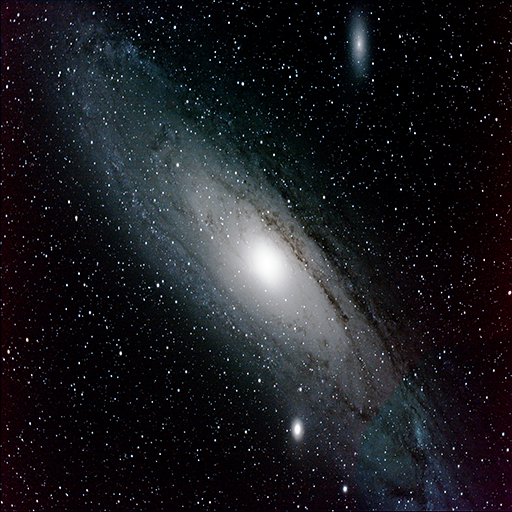
The sample picture shows constellation Ursa Major with the LG G4: 256 light frames each 30 sec which results in nearly 2 h exposure time in total. 170 dark framesan 100 flat frames applied. Processed with additional software. The second and third pic shows Cygnus taken with LG G4 and LG G6. The last pic shows M31 with LG G6 (M33 is on the bottom, double star cluster and Cassiopeia upper left).
You can use a simple portable mount for travel purposes like iOptron SkyTracker, AstroTrac or StarAdventurer. You put a ballhead on the top and add a clip from a small phone tripod. With the preview function (which is automatically visible after start) you can adjust the ballhead according to the brightest stars.
A manual is here:
https://www.deepskycamera.de/manual/DeepSkyCamera_manual_en.pdf
Pokaż więcej

1. Pobierz instalator MEmu i zakończ instalację

2. Uruchom MEmu, a następnie otwórz Google Play na pulpicie

3. Wyszukaj DeepSkyCamera w Google Play
Install
4. Pobierz i zainstaluj DeepSkyCamera
5. Po zakończeniu instalacji kliknij ikonę, aby rozpocząć

6. Użyj MEmu, aby doświadczyć DeepSkyCamera na swoim komputerze
MEmu Play to najlepszy emulator Androida, z którego korzysta ponad 100 milionów użytkowników, ciesząc się wyjątkowym doświadczeniem aplikacji na Androida. Technologia wirtualizacji MEmu pozwala na płynne uruchamianie tysięcy aplikacji Androida na komputerze, nawet tych najbardziej wymagających.
Większy ekran z lepszą grafiką; Długi czas, bez ograniczeń baterii lub danych mobilnych.
Pełna obsługa mapowania klawiszy dla precyzyjnego sterowania klawiaturą i myszą lub gamepadem.
Wiele kont gier lub zadań na jednym komputerze jednocześnie z menedżerem wielu instancji.
Use DeepSkyCamera on PC by following steps: