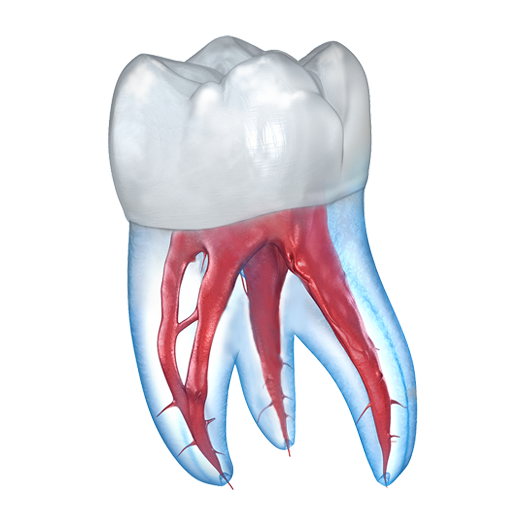
Dental 3D Illustrations
Zaktualizowano
Aktualna wersja
2.0.95
Sprzedawca

Przestań martwić się nadmiernymi opłatami podczas korzystania z Dental 3D Illustrations na telefonie komórkowym, uwolnij się od małego ekranu i ciesz się korzystaniem z aplikacji na znacznie większym wyświetlaczu. Od teraz korzystaj z aplikacji na pełnym ekranie za pomocą klawiatury i myszy. MEmu oferuje wszystkie zaskakujące funkcje, których się spodziewałeś: szybką instalację i łatwą konfigurację, intuicyjne sterowanie, koniec z ograniczeniami baterii, danych mobilnych i niepokojących połączeń. Zupełnie nowy MEmu 9 to najlepszy wybór do używania Dental 3D Illustrations na twoim komputerze. Zakodowany przez naszą absorpcję, menedżer wielu instancji umożliwia otwarcie 2 lub więcej kont w tym samym czasie. A co najważniejsze, nasz ekskluzywny emulator może uwolnić pełny potencjał twojego komputera, sprawić, że wszystko będzie płynne i przyjemne.
Pokaż więcej
Ciesz się wspaniałym doświadczeniem podczas grania w Dental 3D Illustrations na komputerze z aplikacją MEMU App Player. Jest to potężny darmowy emulator Androida pozwalający grać w tysiące gier na Androida. This dental application is designed for professional dentists who want to advise their patients more effectively.
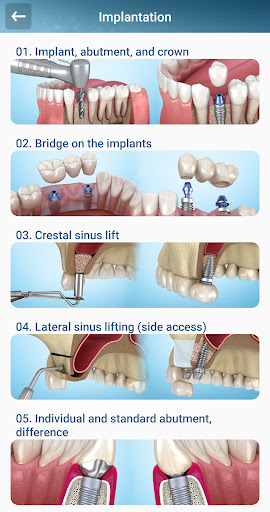
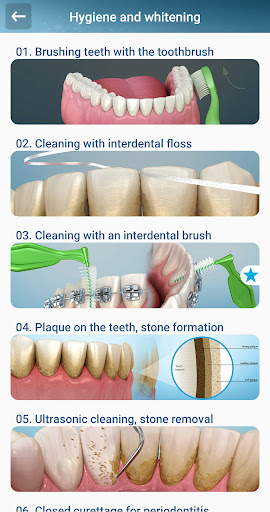
This dental application is designed for professional dentists who want to advise their patients more effectively. A large collection of 3D illustrations of dental treatment is sorted into groups and located inside this application.
Quick and easy. Many dentists draw illustrations on paper every time explaining the treatment process to their patients, which can take some time. Finding the necessary illustration in the application database is very simple- it will take you about 10 seconds.
The 3D illustration is better than a photo. Patients can be shocked and frightened by seeing photographs of blood operations or a real photo of teeth. If you use 3D illustrations, the patient most likely will perceive such information loyally.
Quality and precision. All illustrations are based on accurate anatomy, real procedures, and treatment, based on the support of professional doctors and dental surgeons.
Access to the necessary illustrations will be instant regardless of where you are. This application does not use the Internet traffic to download the illustrations, all necessary 3D illustration files are already contained within the dental app.
Use your materials. You can place your photos in the application using them to demonstrate to your patients. The application does not store your data but only uses the image file from your device in its gallery.
The category of selected illustration topics allows you to access the most frequently used topics even faster. To do this, you will need to transfer the necessary topic to the Favorites section.
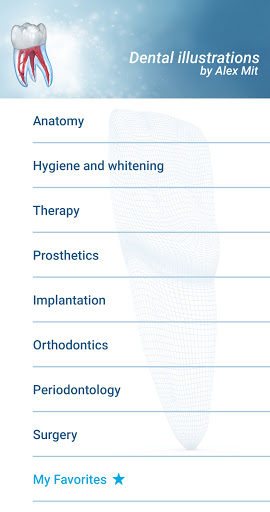
The list of topics by category:
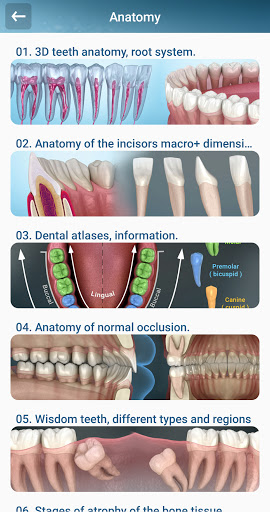
⦁ Anatomy of teeth and jaws. Information schemes.
⦁ Hygiene and teeth whitening. The development of tartar and plaque. Cleaning.
⦁ Therapy- dental treatment. Different types of caries.
⦁ Prosthetics. Veneers, Restorations, Bridges, Crowns, Removable prostheses.
⦁ Implantation. Bone Augmentation. Partial and complete rehabilitation of teeth.
⦁ Orthodontics. Braces, Occlusion, Congenital and acquired defects.
⦁ Periodontology. Various gum problems and their treatment.
⦁ Surgery. Extractions, Hemisection, Sinus-lifting, Bone Augmentation.
The gallery works on the principle of the slideshow presentation. You open a topic you are interested in, the topic itself can contain 3-10 images. You choose the most suitable illustration and show to the patient and consult him. Next, you can switch the related images from the topic while you continue to consult.
Using a TV for a demonstration. Read the instructions of your TV and smartphone, most likely you have the opportunity to broadcast on a large TV display. This can probably be implemented as a duplication of the display.
I am constantly working on improving the application creating new illustrations. Please tell us what new topics you might be interested in.
Sincerely, Alex Mit.
Pokaż więcej

1. Pobierz instalator MEmu i zakończ instalację

2. Uruchom MEmu, a następnie otwórz Google Play na pulpicie

3. Wyszukaj Dental 3D Illustrations w Google Play
Install
4. Pobierz i zainstaluj Dental 3D Illustrations
5. Po zakończeniu instalacji kliknij ikonę, aby rozpocząć

6. Użyj MEmu, aby doświadczyć Dental 3D Illustrations na swoim komputerze
MEmu Play to najlepszy emulator Androida, z którego korzysta ponad 100 milionów użytkowników, ciesząc się wyjątkowym doświadczeniem aplikacji na Androida. Technologia wirtualizacji MEmu pozwala na płynne uruchamianie tysięcy aplikacji Androida na komputerze, nawet tych najbardziej wymagających.
Większy ekran z lepszą grafiką; Długi czas, bez ograniczeń baterii lub danych mobilnych.
Pełna obsługa mapowania klawiszy dla precyzyjnego sterowania klawiaturą i myszą lub gamepadem.
Wiele kont gier lub zadań na jednym komputerze jednocześnie z menedżerem wielu instancji.
Use Dental 3D Illustrations on PC by following steps: