Heart Rate Analyzer PC

Pobierz Heart Rate Analyzer na PC

Heart Rate Analyzer PC

Heart Rate Analyzer

  • Zaktualizowano

  • Aktualna wersja

    1.13

  • Sprzedawca

    Heart Rate Analyzer PC

Funkcje Heart Rate Analyzer na PC

Przestań martwić się nadmiernymi opłatami podczas korzystania z Heart Rate Analyzer na telefonie komórkowym, uwolnij się od małego ekranu i ciesz się korzystaniem z aplikacji na znacznie większym wyświetlaczu. Od teraz korzystaj z aplikacji na pełnym ekranie za pomocą klawiatury i myszy. MEmu oferuje wszystkie zaskakujące funkcje, których się spodziewałeś: szybką instalację i łatwą konfigurację, intuicyjne sterowanie, koniec z ograniczeniami baterii, danych mobilnych i niepokojących połączeń. Zupełnie nowy MEmu 9 to najlepszy wybór do używania Heart Rate Analyzer na twoim komputerze. Zakodowany przez naszą absorpcję, menedżer wielu instancji umożliwia otwarcie 2 lub więcej kont w tym samym czasie. A co najważniejsze, nasz ekskluzywny emulator może uwolnić pełny potencjał twojego komputera, sprawić, że wszystko będzie płynne i przyjemne.

Pokaż więcej

Zrzuty ekranu i wideo z Heart Rate Analyzer PC

Ciesz się wspaniałym doświadczeniem podczas grania w Heart Rate Analyzer na komputerze z aplikacją MEMU App Player. Jest to potężny darmowy emulator Androida pozwalający grać w tysiące gier na Androida. Introduction.
Informacje o aplikacji

Introduction.


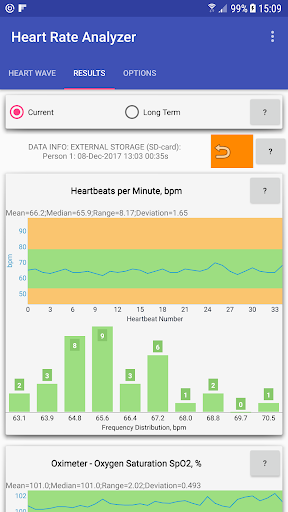
Heart Rate Analyzer is the App that allows you to perform a comprehensive data analysis of the Samsung heart rate sensor for both IR and RED sensors. Getting heart rate sensor data is possible only for Samsung devices, that are equipped such sensors OR some other Android devices that have the same sensors. But getting the results of analysis can be done on any Android device, if you transfer the sensor data from the Samsung devices by using external microSD-card or Google Drive cloud service.


Features

.

  • Completely NO ads.

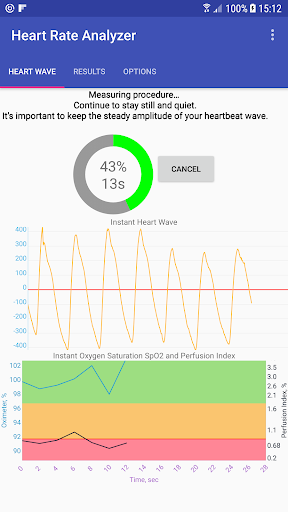
  • Oximeter. Calculation the oxygen saturation (SpO2).

  • Possibility to save the raw heart rate sensor data of both IR and RED sensors to the internal memory, the external memory (e.g., micro SD-card), or to your Google Drive.

  • Possibility to load heart rate sensor data on another Android device using a micro SD-card or your Google Drive service.

  • Possibility to get heart rate sensor data with a duration between 30 sec and 30 min.

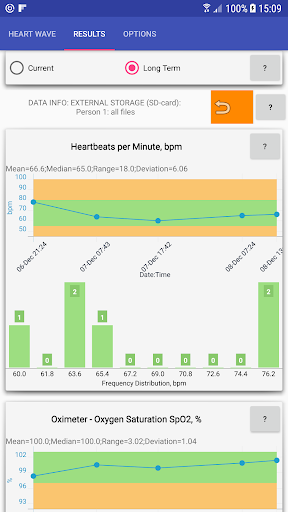
  • Possibility to create a database of your heart wave data for a long period of time for future analyzing.

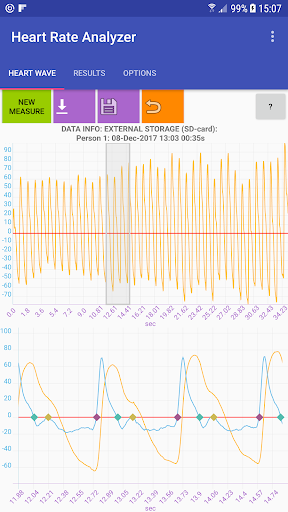
  • Detailed visual inspection of heart wave data (finger arterial pressure FAP waveform).

  • Comprehensive data and statistical analysis of the many heart wave parameters, including long term data on one diagram. Besides the oxygen saturation, these parameters include heartbeats per minute (bpm), perfusion index, stiffness index, reflection index, peripheral augmentation index and more.

  • Color-defined values of the heart wave parameters and manual adjustment the alerting thresholds.


If you have any problems or any suggestions to improve this application, please feel free to contact


by e-mail: info.sergiosoft@gmail.com


Thanks!

Pokaż więcej

Jak pobrać Heart Rate Analyzer na PC

  • Heart Rate Analyzer PC

    1. Pobierz instalator MEmu i zakończ instalację

  • Heart Rate Analyzer PC

    2. Uruchom MEmu, a następnie otwórz Google Play na pulpicie

  • Heart Rate Analyzer PC

    3. Wyszukaj Heart Rate Analyzer w Google Play

  • Heart Rate Analyzer PC Install

    4. Pobierz i zainstaluj Heart Rate Analyzer

  • Heart Rate Analyzer PC

    5. Po zakończeniu instalacji kliknij ikonę, aby rozpocząć

  • Heart Rate Analyzer PC
    Heart Rate Analyzer PC Heart Rate Analyzer PC

    6. Użyj MEmu, aby doświadczyć Heart Rate Analyzer na swoim komputerze

Dlaczego warto używać MEmu do korzystania z Heart Rate Analyzer

MEmu Play to najlepszy emulator Androida, z którego korzysta ponad 100 milionów użytkowników, ciesząc się wyjątkowym doświadczeniem aplikacji na Androida. Technologia wirtualizacji MEmu pozwala na płynne uruchamianie tysięcy aplikacji Androida na komputerze, nawet tych najbardziej wymagających.

  • Większy ekran z lepszą grafiką; Długi czas, bez ograniczeń baterii lub danych mobilnych.

  • Pełna obsługa mapowania klawiszy dla precyzyjnego sterowania klawiaturą i myszą lub gamepadem.

  • Wiele kont gier lub zadań na jednym komputerze jednocześnie z menedżerem wielu instancji.

Gotowy, żeby tego doświadczyć?

Gorące tematy

Heart Rate Analyzer - FAQs

  • Jak korzystać z Heart Rate Analyzer na PC?

    Use Heart Rate Analyzer on PC by following steps:

    • Download MEmu, then install and launch it
    • Login to Google Play Store, install the app
    • Enjoy using the app on PC with MEmu
  • Jakie są minimalne wymagania systemowe, aby uruchomić Heart Rate Analyzer na PC?
    • Intel or AMD Processor
    • Microsoft Windows 7 and above
    • 2GB of memory
    • 5GB of free disk space
    • Hardware Virtualization Technology