Learn Chinese - ChineseSkill
Zaktualizowano
Aktualna wersja
6.6.16
Sprzedawca

Przestań martwić się nadmiernymi opłatami podczas korzystania z Learn Chinese - ChineseSkill na telefonie komórkowym, uwolnij się od małego ekranu i ciesz się korzystaniem z aplikacji na znacznie większym wyświetlaczu. Od teraz korzystaj z aplikacji na pełnym ekranie za pomocą klawiatury i myszy. MEmu oferuje wszystkie zaskakujące funkcje, których się spodziewałeś: szybką instalację i łatwą konfigurację, intuicyjne sterowanie, koniec z ograniczeniami baterii, danych mobilnych i niepokojących połączeń. Zupełnie nowy MEmu 9 to najlepszy wybór do używania Learn Chinese - ChineseSkill na twoim komputerze. Zakodowany przez naszą absorpcję, menedżer wielu instancji umożliwia otwarcie 2 lub więcej kont w tym samym czasie. A co najważniejsze, nasz ekskluzywny emulator może uwolnić pełny potencjał twojego komputera, sprawić, że wszystko będzie płynne i przyjemne.
Pokaż więcej
Ciesz się wspaniałym doświadczeniem podczas grania w Learn Chinese - ChineseSkill na komputerze z aplikacją MEMU App Player. Jest to potężny darmowy emulator Androida pozwalający grać w tysiące gier na Androida. Learn Chinese - ChineseSkill is the must-have app for all Mandarin Chinese beginners.


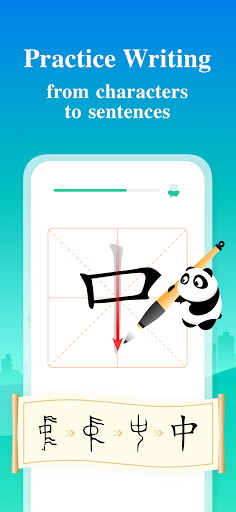
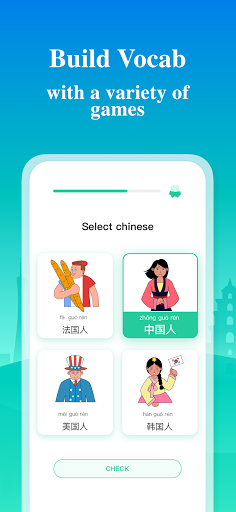
Learn Chinese - ChineseSkill is the must-have app for all Mandarin Chinese beginners. This app includes 500+ fun and engaging mini-lessons that will teach you everything from Pinyin to Chinese grammar and train your listening, speaking, reading, and writing skills.
ChineseSkill's core curriculum is designed by professional CSL (Chinese as a Second Language) teachers in accordance with the unique characteristics of Mandarin Chinese. The curriculum covers grammar and vocabulary required to pass HSK 3-4.
Automatic Chinese speech assessment, Chinese character handwriting and pinyin tone animation technologies are used in ChineseSkill app to make language learning more convenient, exciting and effective. With ChineseSkill, complete beginners have a chance to learn Mandarin Chinese systematically and quickly reach a conversational level.
Features:
■ Professionally designed curriculum: optimized for total beginners and customized for the Chinese language grammar structure;
■ Automatic speech assessment: start speaking Chinese immediately;
■ Learn by playing: lessons and challenges are presented in a gamified style;
■ Multiple practice modes: original exercise types will help you memorize new information and reinforce learning faster than with textbooks;
■ Bite-sized lessons: perfect for morning commutes and lunch breaks;
■ Competing with friends: makes learning Chinese addictive and fun;
■ HD recordings from native speakers: every sentence can be played in both slow and normal pronunciation speeds;
■ Offline learning: no internet connection required after downloading;
■ Both simplified and traditional characters are supported;
■ Display Chinese as pinyin, characters or both;
■ Synchronization of learning progress across multiple devices.
What are you going to learn?
■ 400+ grammar points
■ 300+ sentence patterns
■ 1000+ keywords and phrases
■ 1500+ essential Chinese characters
ChineseSkill supports learning Chinese from 13 languages: ENGLISH, SPANISH, KOREAN, JAPANESE, FRENCH, GERMAN, TURKISH, RUSSIAN, VIETNAMESE, PORTUGUESE, ITALIAN, INDONESIAN AND THAI.
Download “Learn Chinese - ChineseSkill” now and start your Chinese studying anywhere at your own pace!
Terms of Use: https://www.chineseskill.com/terms-conditions-html
Privacy Policy: https://www.chineseskill.com/privacypolicy-html
Support Url: https://www.facebook.com/chineseskill
Support Email: nihao@chineseskill.com
Pokaż więcej

1. Pobierz instalator MEmu i zakończ instalację

2. Uruchom MEmu, a następnie otwórz Google Play na pulpicie

3. Wyszukaj Learn Chinese - ChineseSkill w Google Play
Install
4. Pobierz i zainstaluj Learn Chinese - ChineseSkill
5. Po zakończeniu instalacji kliknij ikonę, aby rozpocząć

6. Użyj MEmu, aby doświadczyć Learn Chinese - ChineseSkill na swoim komputerze
MEmu Play to najlepszy emulator Androida, z którego korzysta ponad 100 milionów użytkowników, ciesząc się wyjątkowym doświadczeniem aplikacji na Androida. Technologia wirtualizacji MEmu pozwala na płynne uruchamianie tysięcy aplikacji Androida na komputerze, nawet tych najbardziej wymagających.
Większy ekran z lepszą grafiką; Długi czas, bez ograniczeń baterii lub danych mobilnych.
Pełna obsługa mapowania klawiszy dla precyzyjnego sterowania klawiaturą i myszą lub gamepadem.
Wiele kont gier lub zadań na jednym komputerze jednocześnie z menedżerem wielu instancji.
Use Learn Chinese - ChineseSkill on PC by following steps: