
My Cocktail Bar
Zaktualizowano
Aktualna wersja
2.6.4
Sprzedawca

Przestań martwić się nadmiernymi opłatami podczas korzystania z My Cocktail Bar na telefonie komórkowym, uwolnij się od małego ekranu i ciesz się korzystaniem z aplikacji na znacznie większym wyświetlaczu. Od teraz korzystaj z aplikacji na pełnym ekranie za pomocą klawiatury i myszy. MEmu oferuje wszystkie zaskakujące funkcje, których się spodziewałeś: szybką instalację i łatwą konfigurację, intuicyjne sterowanie, koniec z ograniczeniami baterii, danych mobilnych i niepokojących połączeń. Zupełnie nowy MEmu 9 to najlepszy wybór do używania My Cocktail Bar na twoim komputerze. Zakodowany przez naszą absorpcję, menedżer wielu instancji umożliwia otwarcie 2 lub więcej kont w tym samym czasie. A co najważniejsze, nasz ekskluzywny emulator może uwolnić pełny potencjał twojego komputera, sprawić, że wszystko będzie płynne i przyjemne.
Pokaż więcej
Ciesz się wspaniałym doświadczeniem podczas grania w My Cocktail Bar na komputerze z aplikacją MEMU App Player. Jest to potężny darmowy emulator Androida pozwalający grać w tysiące gier na Androida. You have alcohol, some beverages and fruits and wonder what cocktails you can make?
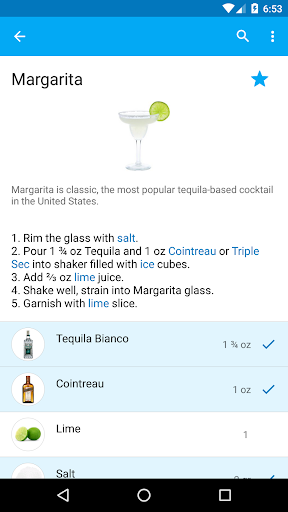
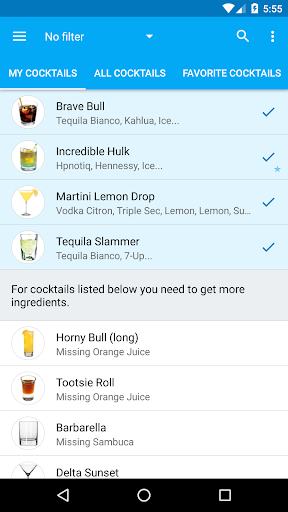
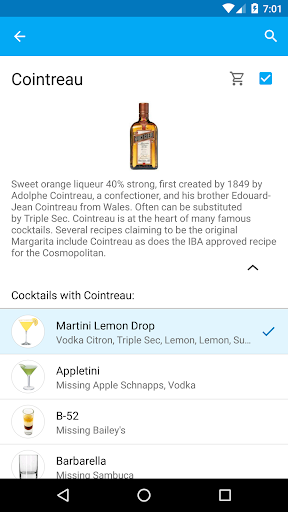
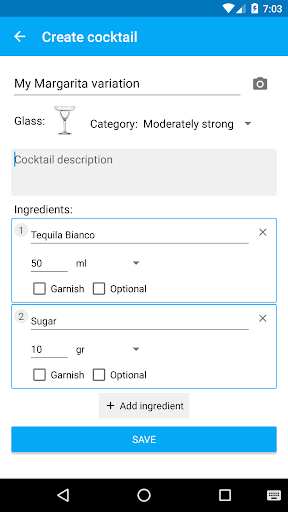
You have alcohol, some beverages and fruits and wonder what cocktails you can make? My Bar is for you. Just choose what ingredients you have and My Bar will show you a list of all cocktails you can enjoy and offer to your friends.
Check out the screenshots! Features:
★ BROWSE ALL COCKTAILS ★ just a list of all cocktails available. Do you really care about 9000 cocktails other applications offer? Most of them you probably won't like. We include only carefully chosen and most popular cocktails. The cocktails you can make are highlighted, you know that you can make it. For other cocktails missing ingredients are listed.
★ MY BAR ★ all your ingredients in one place. For each one, quickly see what cocktails you can make with that particular ingredients.
★ MY COCKTAILS ★ all cocktails you can make using only ingredients you have. Below that list - cocktails that you almost can make, missing one or two ingredient. You can easily see what exactly you need to add to your bar shelf to expand a list of your cocktails.
★ CUSTOM COCKTAILS AND INGREDIENTS ★ Create your own unique cocktails and add new ingredients.
★ FAVORITE COCKTAILS ★ Manage your favorite cocktails and have them quickly accessible in a separate tab.
★ MANAGE BAR ★ choose what ingredients are on your bar shelf, see how many cocktails are available with particular ingredient.
★ BROWSE BY CATEGORY ★ Select a category to see only IBA official cocktails or shooters etc. For ingredient list select a category to see only strong alcohol, beveragers etc.
★ SEARCH ★ Quick cocktail and ingredient search option.
★ COCKTAIL DETAILS ★ Description, detailed recipe with variations and a list of needed ingredients including garnish.
★ INGREDIENT DETAILS ★ Browse all cocktails with Tequila, for example, quickly see which of these cocktails you can make right now.
★ If you cannot find a cocktail you love, tell us! We will update our cocktail database regularly.
★ Having problems with application? Want a feature we don't have? Contact us at support@mybarapp.com and we will try to help.
★ Don't want any ads? Support our development and get a Pro version. Thank you!
Pokaż więcej

1. Pobierz instalator MEmu i zakończ instalację

2. Uruchom MEmu, a następnie otwórz Google Play na pulpicie

3. Wyszukaj My Cocktail Bar w Google Play
Install
4. Pobierz i zainstaluj My Cocktail Bar
5. Po zakończeniu instalacji kliknij ikonę, aby rozpocząć

6. Użyj MEmu, aby doświadczyć My Cocktail Bar na swoim komputerze
MEmu Play to najlepszy emulator Androida, z którego korzysta ponad 100 milionów użytkowników, ciesząc się wyjątkowym doświadczeniem aplikacji na Androida. Technologia wirtualizacji MEmu pozwala na płynne uruchamianie tysięcy aplikacji Androida na komputerze, nawet tych najbardziej wymagających.
Większy ekran z lepszą grafiką; Długi czas, bez ograniczeń baterii lub danych mobilnych.
Pełna obsługa mapowania klawiszy dla precyzyjnego sterowania klawiaturą i myszą lub gamepadem.
Wiele kont gier lub zadań na jednym komputerze jednocześnie z menedżerem wielu instancji.
Use My Cocktail Bar on PC by following steps: