Pill Reminder and Med Tracker
Zaktualizowano
Aktualna wersja
2.9
Sprzedawca

Przestań martwić się nadmiernymi opłatami podczas korzystania z Pill Reminder and Med Tracker na telefonie komórkowym, uwolnij się od małego ekranu i ciesz się korzystaniem z aplikacji na znacznie większym wyświetlaczu. Od teraz korzystaj z aplikacji na pełnym ekranie za pomocą klawiatury i myszy. MEmu oferuje wszystkie zaskakujące funkcje, których się spodziewałeś: szybką instalację i łatwą konfigurację, intuicyjne sterowanie, koniec z ograniczeniami baterii, danych mobilnych i niepokojących połączeń. Zupełnie nowy MEmu 9 to najlepszy wybór do używania Pill Reminder and Med Tracker na twoim komputerze. Zakodowany przez naszą absorpcję, menedżer wielu instancji umożliwia otwarcie 2 lub więcej kont w tym samym czasie. A co najważniejsze, nasz ekskluzywny emulator może uwolnić pełny potencjał twojego komputera, sprawić, że wszystko będzie płynne i przyjemne.
Pokaż więcej
Ciesz się wspaniałym doświadczeniem podczas grania w Pill Reminder and Med Tracker na komputerze z aplikacją MEMU App Player. Jest to potężny darmowy emulator Androida pozwalający grać w tysiące gier na Androida. Pill Reminder - Never forget to take your medications again with this app.
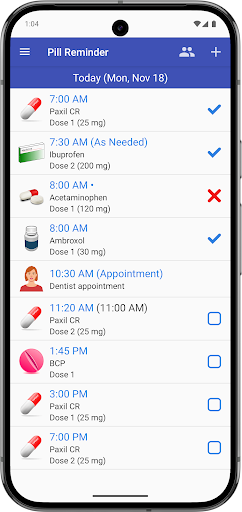
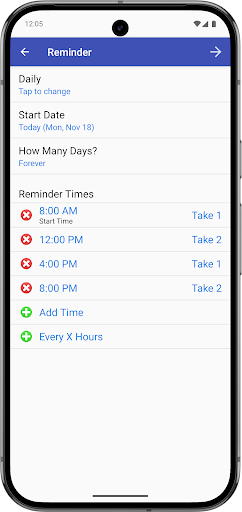
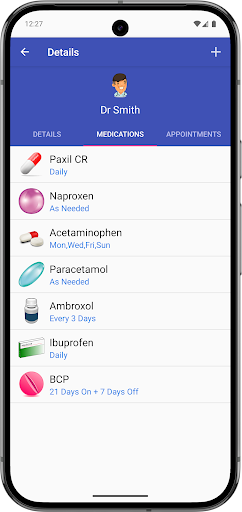
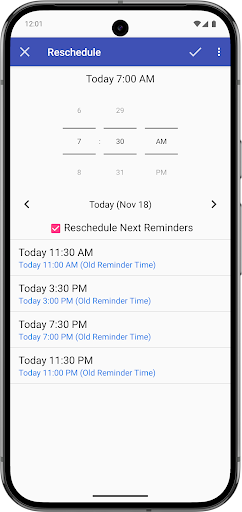
Pill Reminder - Never forget to take your medications again with this app. It's easy to use and reliable, allowing you to set up any recurring reminders you need (every X hours, specific times, daily, weekly, specific days of the week, every X days, etc).
It has everything you need:
• Mark Medications as Taken or Missed
• Snooze or Reschedule Medications
• Refill Reminders
• Suspend and Resume Medications
• Add PRN (as needed) Medications
• Reminders for Medical Appointments
• Send Reports to your Doctor
• Multiple User Support
By remembering to take all your medications at the right time, you are taking control of your own health.
RECURRING REMINDERS
• Repeat every X hours (e.g. From 8 AM to 8 PM, every 4 hours)
• Repeat at specific times (e.g. 9:15 AM, 1:30 PM, 8:50 PM)
• Repeat every half hour (e.g. From 10 AM to 2 PM, every 30 minutes)
• Repeat on selected days of the week (e.g. Every week only on Mondays and Fridays)
• Repeat every X days or weeks (e.g. Every 3 days, Every 2 weeks)
• Repeat daily for 21 days and then take 7 days off (Birth Control)
MAIN FEATURES
• User friendly interface
• Get reminders for all your medications
• If you took your medication early or late, you can reschedule the next doses for that day
• Get alerts to refill your prescriptions before they run out
• Suspend and resume medications
• Can be used with any medication, supplement, vitamin, pill or birth control that follows a regular schedule
• Mark a medication as "Taken" directly from the lock screen or notification banner
• Ability to add PRN (as needed) medications
• Keep track of the medications you have to take throughout the day
• Auto-Snooze: Automatically repeat the alarm up to 6 times at regular intervals (e.g. 1 min, 10 mins, 30 mins) until you take action
• Mark medications as Taken or Missed to avoid double doses
• Email your medication list or administration history to your doctor
• Add reminders for medical appointments
• Add photos to each medication for easy identification
• Multiple user support. Add medications for yourself, family members, or others you care for
• Ability to search the FDA Drug Database for your medications (Available in the US only)
• Backup and restore all data on the same device or multiple devices
GENERAL
• TalkBack accessibility support
• Dark Theme supported (Android 10 and higher)
• Notifications are local, you don't require internet
• App doesn't need to be open to receive notifications
• Universal App, full native support for Phones and Tablets
FREE VERSION
• In the free version you can only add 3 medications
• Full version with unlimited medications is available as an In-App Purchase
• One-Time payment. No monthly or annual fees
Pokaż więcej

1. Pobierz instalator MEmu i zakończ instalację

2. Uruchom MEmu, a następnie otwórz Google Play na pulpicie

3. Wyszukaj Pill Reminder and Med Tracker w Google Play
Install
4. Pobierz i zainstaluj Pill Reminder and Med Tracker
5. Po zakończeniu instalacji kliknij ikonę, aby rozpocząć

6. Użyj MEmu, aby doświadczyć Pill Reminder and Med Tracker na swoim komputerze
MEmu Play to najlepszy emulator Androida, z którego korzysta ponad 100 milionów użytkowników, ciesząc się wyjątkowym doświadczeniem aplikacji na Androida. Technologia wirtualizacji MEmu pozwala na płynne uruchamianie tysięcy aplikacji Androida na komputerze, nawet tych najbardziej wymagających.
Większy ekran z lepszą grafiką; Długi czas, bez ograniczeń baterii lub danych mobilnych.
Pełna obsługa mapowania klawiszy dla precyzyjnego sterowania klawiaturą i myszą lub gamepadem.
Wiele kont gier lub zadań na jednym komputerze jednocześnie z menedżerem wielu instancji.
Use Pill Reminder and Med Tracker on PC by following steps: