Super Hearing from Distance
Zaktualizowano
Aktualna wersja
1.1.6.5
Sprzedawca

Przestań martwić się nadmiernymi opłatami podczas korzystania z Super Hearing from Distance na telefonie komórkowym, uwolnij się od małego ekranu i ciesz się korzystaniem z aplikacji na znacznie większym wyświetlaczu. Od teraz korzystaj z aplikacji na pełnym ekranie za pomocą klawiatury i myszy. MEmu oferuje wszystkie zaskakujące funkcje, których się spodziewałeś: szybką instalację i łatwą konfigurację, intuicyjne sterowanie, koniec z ograniczeniami baterii, danych mobilnych i niepokojących połączeń. Zupełnie nowy MEmu 9 to najlepszy wybór do używania Super Hearing from Distance na twoim komputerze. Zakodowany przez naszą absorpcję, menedżer wielu instancji umożliwia otwarcie 2 lub więcej kont w tym samym czasie. A co najważniejsze, nasz ekskluzywny emulator może uwolnić pełny potencjał twojego komputera, sprawić, że wszystko będzie płynne i przyjemne.
Pokaż więcej
Ciesz się wspaniałym doświadczeniem podczas grania w Super Hearing from Distance na komputerze z aplikacją MEMU App Player. Jest to potężny darmowy emulator Androida pozwalający grać w tysiące gier na Androida. Super Hearing from Distance can help you hear a conversation in a noisy area or even hear someone speaking across the room.
Super Hearing from Distance can help you hear a conversation in a noisy area or even hear someone speaking across the room. Listen to conversations with friends and family, surrounding sounds, lectures, or TV programs louder with earphones, headphones or earbuds (wired or Bluetooth).
Super Hearing from Distance app can amplify sounds around you or from your surroundings for super hearing from distance. Use Super Hearing from Distance with wired or Bluetooth headphones to filter, augment, and amplify the sounds in your environment for super hearing.
For the hearing impaired or hard of hearing (those with hearing loss), Super Hearing from Distance can turn your phone or earphones into a hearing aid for louder hearing. Useful if your hearing aid is damaged or missing.
At home, you can place your phone on a table and hear family and friends from another room as they’re speaking to you.
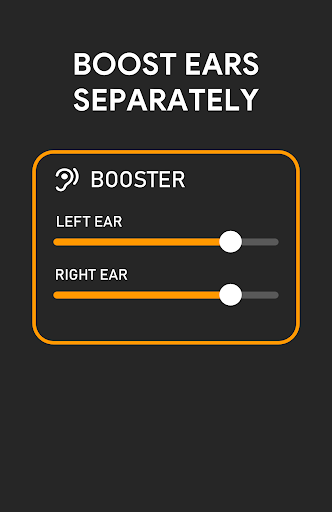
You can boost each ear independently if you have hearing loss in one ear. Perfect hearing aid for those who need basic hearing assistance.
To hear a specific person better in a room full of people, just turned my headphones mic towards that person and use the Equalizer. You’ll hear them clearly despite the noise.
You can also use it over a Bluetooth speaker in another room.
Features:
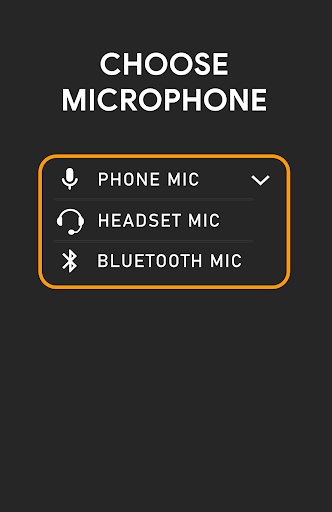
- Microphone Selection: Phone mic, Headset mic, Bluetooth mic.
- Boost Ears Separately
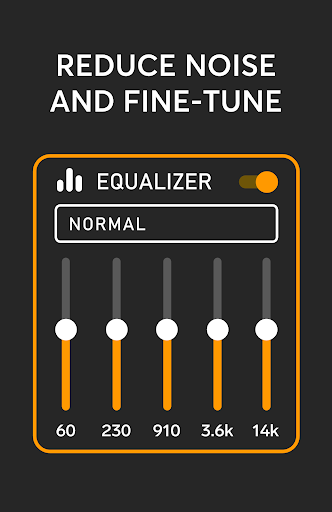
- Equalizer for Noise Reduction
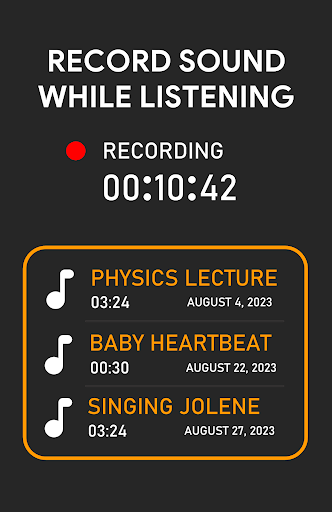
- Sound Recorder
- Wireless/Bluetooth Connectivity
- Also works with USB Headphones
- Connect your Android-compatible Hearing aids.
Super Hearing from Distance uses the microphone on your device to pick up nearby sounds and deliver them to your ear at louder volume. Simply connect earphones or Bluetooth headphones and tap the listen button to hear clear what the microphone is picking up.
You can boost ears separately if you have more hearing loss in one ear than the other. Use the audio recorder to record interviews, lectures, meetings and important conversations so you can listen later.
You can stream sound from your phone to your headphones or earbuds.
Use Super Hearing from Distance with Bluetooth earphones for remote hearing, where you hear people from far away or hear from a distance.
Whether you want to responsibly hear your environment, hear the TV and conversations better (non-medical hearing aid), or just listen to birdsong from indoors, Super Hearing from Distance amplifies and streams the audio from the mic to your Bluetooth headset (mic-to-headphone) for remote super hearing.
Hearing aid for your hearing problems and hearing clear from distance.
Use your headphones or earbuds as hearing aids to amplify conversations and surrounding sounds or boost your hearing.
You can connect your Bluetooth-enabled hearing aids.
Use your phone or Bluetooth earpiece's microphones to amplify surrounding sounds. You can listen to music whilst amplifying surrounding sounds and reducing noise.
Super Hearing Sound Magnifier amplifies the sounds around you and plays back over headphones and earbuds.
You can hear people from far away or from outside much clearer and louder.
If you’re using Bluetooth earbuds, you can place your phone near a sound source.
Works with earphones, wired headphones, Bluetooth headphones, earbuds, Bluetooth headsets, hearing aids, USB headphones, AUX speakers, and Bluetooth speakers.
Listen to what’s going on in your surroundings to avoid danger.
Runs in the background so you can listen to music or do something else and still be able to hear and be more aware of your surroundings.
Super Hearing from Distance app comes with an Equalizer so you can control how you listen, amplifying speech and hear very low whispers.
For audio sources that are farther away, Bluetooth earphones are recommended.
Pokaż więcej

1. Pobierz instalator MEmu i zakończ instalację

2. Uruchom MEmu, a następnie otwórz Google Play na pulpicie

3. Wyszukaj Super Hearing from Distance w Google Play
Install
4. Pobierz i zainstaluj Super Hearing from Distance
5. Po zakończeniu instalacji kliknij ikonę, aby rozpocząć

6. Użyj MEmu, aby doświadczyć Super Hearing from Distance na swoim komputerze
MEmu Play to najlepszy emulator Androida, z którego korzysta ponad 100 milionów użytkowników, ciesząc się wyjątkowym doświadczeniem aplikacji na Androida. Technologia wirtualizacji MEmu pozwala na płynne uruchamianie tysięcy aplikacji Androida na komputerze, nawet tych najbardziej wymagających.
Większy ekran z lepszą grafiką; Długi czas, bez ograniczeń baterii lub danych mobilnych.
Pełna obsługa mapowania klawiszy dla precyzyjnego sterowania klawiaturą i myszą lub gamepadem.
Wiele kont gier lub zadań na jednym komputerze jednocześnie z menedżerem wielu instancji.
Use Super Hearing from Distance on PC by following steps: