Video Editor APP - VivaCut
Zaktualizowano
Aktualna wersja
1
Sprzedawca

Przestań martwić się nadmiernymi opłatami podczas korzystania z Video Editor APP - VivaCut na telefonie komórkowym, uwolnij się od małego ekranu i ciesz się korzystaniem z aplikacji na znacznie większym wyświetlaczu. Od teraz korzystaj z aplikacji na pełnym ekranie za pomocą klawiatury i myszy. MEmu oferuje wszystkie zaskakujące funkcje, których się spodziewałeś: szybką instalację i łatwą konfigurację, intuicyjne sterowanie, koniec z ograniczeniami baterii, danych mobilnych i niepokojących połączeń. Zupełnie nowy MEmu 9 to najlepszy wybór do używania Video Editor APP - VivaCut na twoim komputerze. Zakodowany przez naszą absorpcję, menedżer wielu instancji umożliwia otwarcie 2 lub więcej kont w tym samym czasie. A co najważniejsze, nasz ekskluzywny emulator może uwolnić pełny potencjał twojego komputera, sprawić, że wszystko będzie płynne i przyjemne.
Pokaż więcej
Ciesz się wspaniałym doświadczeniem podczas grania w Video Editor APP - VivaCut na komputerze z aplikacją MEMU App Player. Jest to potężny darmowy emulator Androida pozwalający grać w tysiące gier na Androida. VivaCut is an amazing video editor & video maker.
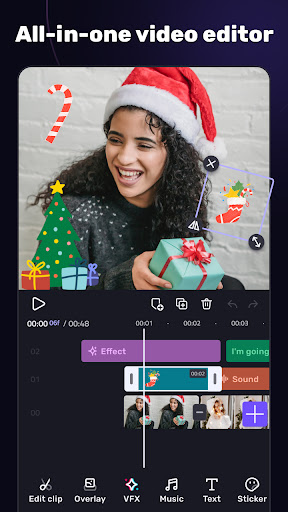
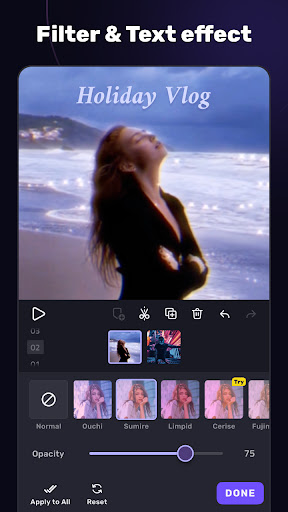
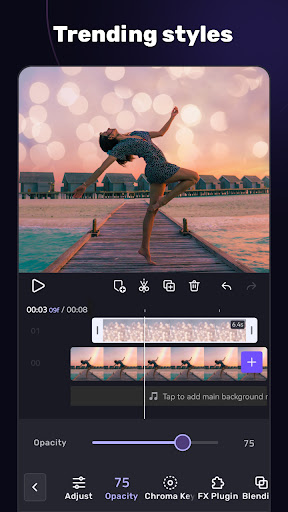
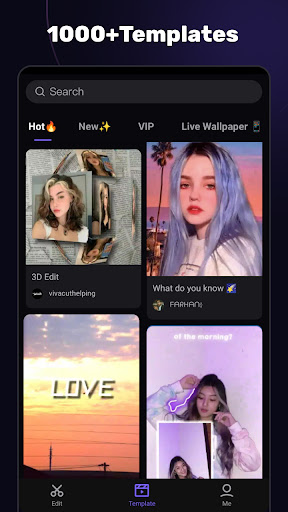
VivaCut is an amazing video editor & video maker. Whether you want to make a great movie or just want to share memories and fun moments with your friends, VivaCut is a perfect choice for you.
Create short videos with one click using cool effect and transition templates! VivaCut is also a professional video editing app with all the editing features. Multi-layer timeline, chroma key and green screen features help you create cinematic videos with music for YouTube, Instagram and TikTok. Want to get more likes on your social media? Download this video editor & video maker now!
Basic Video Editing
[Multi-layer timeline] An intuitive and sleek editing interface with zoom for frame-by-frame precision with overlay video editor app.
[Text] Edit, duplicate, and modify styles (variety of fonts & emoji, color, opacity, shadow, stroke).
[Trim videos] Professional tools developed for precise Video Editing App.
[Split videos] Split videos and optimize them for sharing.
[Combine video clips] Merge clips into a stunning video with transitions effects; combine video clips into one video.
[Speed Control] Fast & slow motion video like a pro, only with VivaCut Video - Pro Video Editing App!
Advanced Video Editing
[Green Screen/Chroma key] Combine/mix videos like a Hollywood-level movie. Best chroma key video editor app & video background changer editor.
[Keyframe Animation] Apply to Mask, Video Collage, Text, Stickers, Emoji, etc. Pro aesthetic video editor app.
[Mask] Linear, mirror, radial, rectangle, and oval, all for the scene. Full-screen video editor for YouTube.
[Picture in Picture] Combine clips together to create double exposures and eye-catching YouTube videos with transitions for free.
[Collage] Add pictures to your clips and edit videos, then go viral with VivaCut!
[Overlay options] Customize layers with tools such as opacity and blending.
[Blend videos] Mix videos using powerful blending modes such as Color Burn, Multiply, Screen, Soft Light, Hard Light, etc. VivaCut - best video background changer editor.
Effect & Filter & Transition
[Video Transition] Create amazing effects with cinematic overlay video editor with transition effects in VivaCut, a movie-level video background changer editor.
[Filters] Edit videos/combine video clips with adjustable filters and effects.
[Glitch Effects] Coolest video editing app with glitch effects and transitions!
Trendy Music
[Music Marker] Mark the track and add effects according to the music rhythm. Pro video editor app with music and effects.
[Audio Extraction] Aesthetic video editor with transition effects: extract music/audio from any video. Pro video editing app with sound effects.
[Templates] Create your own music videos by automatically adding unique filters and cool effects to video templates.
Save & Share
[Custom video resolution] Export videos in 720p, 1080p, and 4k.
[Rename] Rename video and mark memory with PRO aesthetic video editor.
Save videos directly with transition effects to your device's gallery, non-destructive video maker. One-click sharing to YouTube, Instagram, TikTok, Snapchat, etc.
VivaCut is a pro video editor and video editing app with all features you need! It's a video maker with music for cutting and splitting videos. Take a leap for your video and experience the next PRO video editor generation
Subscription
- Your subscription automatically renews unless auto-renew is turned off at least 24-hours before the end of the current period
- Your account will be charged for renewal within 24-hours prior to the end of the current period
Acknowledgements:
Music by audionautix.com and https://icons8.com/music/
Pokaż więcej

1. Pobierz instalator MEmu i zakończ instalację

2. Uruchom MEmu, a następnie otwórz Google Play na pulpicie

3. Wyszukaj Video Editor APP - VivaCut w Google Play
Install
4. Pobierz i zainstaluj Video Editor APP - VivaCut
5. Po zakończeniu instalacji kliknij ikonę, aby rozpocząć

6. Użyj MEmu, aby doświadczyć Video Editor APP - VivaCut na swoim komputerze
MEmu Play to najlepszy emulator Androida, z którego korzysta ponad 100 milionów użytkowników, ciesząc się wyjątkowym doświadczeniem aplikacji na Androida. Technologia wirtualizacji MEmu pozwala na płynne uruchamianie tysięcy aplikacji Androida na komputerze, nawet tych najbardziej wymagających.
Większy ekran z lepszą grafiką; Długi czas, bez ograniczeń baterii lub danych mobilnych.
Pełna obsługa mapowania klawiszy dla precyzyjnego sterowania klawiaturą i myszą lub gamepadem.
Wiele kont gier lub zadań na jednym komputerze jednocześnie z menedżerem wielu instancji.
Use Video Editor APP - VivaCut on PC by following steps: