Video Editor APP - VivaCut
Đã cập nhật
Phiên bản hiện tại
1
Cung cấp bởi

Bạn không cần phải lo lắng về việc sạc quá mức khi sử dụng Video Editor APP - VivaCut trên điện thoại của bạn, không phải sử dụng trên màn hình nhỏ bé và tận hưởng ứng dụng trên màn hình lớn hơn rất nhiều. Từ bây giờ, bạn hãy trải nghiệm ứng dụng của bạn toàn màn hình bằng bàn phím và chuột. MEmu cung cấp cho bạn tất cả các tính năng đáng ngạc nhiên mà bạn mong đợi: cài đặt nhanh, cài đặt dễ dàng, điều khiển trực quan, không còn giới hạn về pin, dữ liệu di động và các cuộc gọi làm phiền. MEmu 9 hoàn toàn mới là sự lựa chọn tốt nhất để sử dụng Video Editor APP - VivaCut trên máy tính của bạn. Được mã hóa với sự hợp nhất của chúng tôi, trình quản lý multi-instance giúp mở 2 tài khoản trở lên cùng một lúc. Và điều quan trọng nhất là, công cụ mô phỏng độc quyền của chúng tôi có thể tận dụng hết toàn bộ tiềm năng trên PC của bạn, giúp mọi thứ vận hành trơn tru và thú vị.
Nhiều hơn
Tải Video Editor APP - VivaCut trên PC với Trình giả lập Android MEmu. Tận hưởng trải nghiệm chơi game trên màn hình lớn VivaCut is an amazing video editor & video maker.
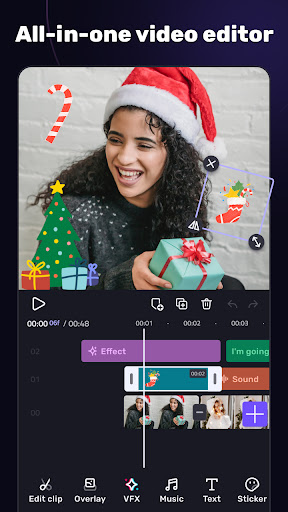
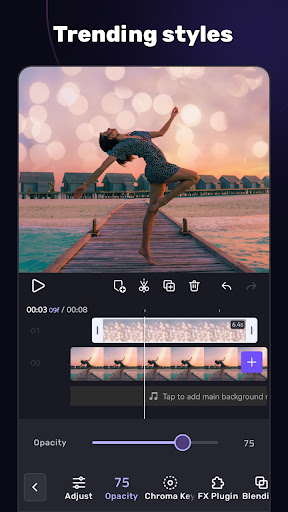
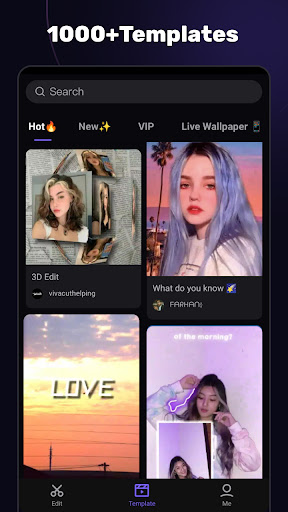
VivaCut is an amazing video editor & video maker. Whether you want to make a great movie or just want to share memories and fun moments with your friends, VivaCut is a perfect choice for you.
Create short videos with one click using cool effect and transition templates! VivaCut is also a professional video editing app with all the editing features. Multi-layer timeline, chroma key and green screen features help you create cinematic videos with music for YouTube, Instagram and TikTok. Want to get more likes on your social media? Download this video editor & video maker now!
Basic Video Editing
[Multi-layer timeline] An intuitive and sleek editing interface with zoom for frame-by-frame precision with overlay video editor app.
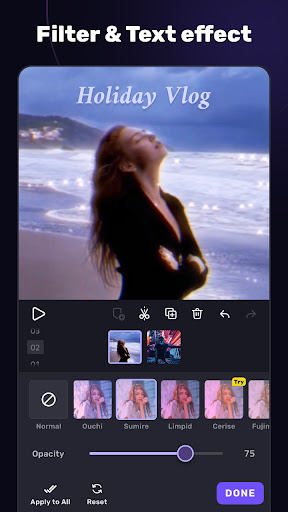
[Text] Edit, duplicate, and modify styles (variety of fonts & emoji, color, opacity, shadow, stroke).
[Trim videos] Professional tools developed for precise Video Editing App.
[Split videos] Split videos and optimize them for sharing.
[Combine video clips] Merge clips into a stunning video with transitions effects; combine video clips into one video.
[Speed Control] Fast & slow motion video like a pro, only with VivaCut Video - Pro Video Editing App!
Advanced Video Editing
[Green Screen/Chroma key] Combine/mix videos like a Hollywood-level movie. Best chroma key video editor app & video background changer editor.
[Keyframe Animation] Apply to Mask, Video Collage, Text, Stickers, Emoji, etc. Pro aesthetic video editor app.
[Mask] Linear, mirror, radial, rectangle, and oval, all for the scene. Full-screen video editor for YouTube.
[Picture in Picture] Combine clips together to create double exposures and eye-catching YouTube videos with transitions for free.
[Collage] Add pictures to your clips and edit videos, then go viral with VivaCut!
[Overlay options] Customize layers with tools such as opacity and blending.
[Blend videos] Mix videos using powerful blending modes such as Color Burn, Multiply, Screen, Soft Light, Hard Light, etc. VivaCut - best video background changer editor.
Effect & Filter & Transition
[Video Transition] Create amazing effects with cinematic overlay video editor with transition effects in VivaCut, a movie-level video background changer editor.
[Filters] Edit videos/combine video clips with adjustable filters and effects.
[Glitch Effects] Coolest video editing app with glitch effects and transitions!
Trendy Music
[Music Marker] Mark the track and add effects according to the music rhythm. Pro video editor app with music and effects.
[Audio Extraction] Aesthetic video editor with transition effects: extract music/audio from any video. Pro video editing app with sound effects.
[Templates] Create your own music videos by automatically adding unique filters and cool effects to video templates.
Save & Share
[Custom video resolution] Export videos in 720p, 1080p, and 4k.
[Rename] Rename video and mark memory with PRO aesthetic video editor.
Save videos directly with transition effects to your device's gallery, non-destructive video maker. One-click sharing to YouTube, Instagram, TikTok, Snapchat, etc.
VivaCut is a pro video editor and video editing app with all features you need! It's a video maker with music for cutting and splitting videos. Take a leap for your video and experience the next PRO video editor generation
Subscription
- Your subscription automatically renews unless auto-renew is turned off at least 24-hours before the end of the current period
- Your account will be charged for renewal within 24-hours prior to the end of the current period
Acknowledgements:
Music by audionautix.com and https://icons8.com/music/
Nhiều hơn

1. Tải trình cài đặt MEmu và hoàn tất cài đặt

2. Khởi động MEmu, sau đó mở Google Play trên trang chủ

3. Tìm kiếm Video Editor APP - VivaCut trong Google Play
Install
4. Tải và Cài Đặt Video Editor APP - VivaCut
5. Khi cài đặt hoàn tất, nhấp vào biểu tượng để bắt đầu

6. Trải nghiệm Video Editor APP - VivaCut trên PC của bạn bằng MEmu
MEmu Play là trình giả lập Android miễn phí tốt nhất, với 50 triệu người dùng trải nghiệm ứng dụng Android tuyệt vời. Công nghệ ảo hóa của MEmu cho phép bạn chạy mượt mà hàng ngàn ứng dụng Android trên máy tính, ngay cả những ứng dụng đòi hỏi cấu hình cao nhất.
Màn hình lớn hơn cùng với đồ hoạ tốt hơn; thời lượng dài, không giới hạn về pin hoặc dữ liệu di động
Hỗ trợ đầy đủ Keymapping cho việc kiểm soát chính xác bàn phím và chuột hoặc gamepad
Nhiều tài khoản trò chơi hoặc tác vụ cùng lúc trên một PC với Quản lý Đa năng
Use Video Editor APP - VivaCut on PC by following steps: