SkyView® Lite
Atualizada
Versão atual
3.8.6
Oferecido por

Pare de se preocupar com sobrecargas ao usar SkyView® Lite no seu celular, liberte-se da pequena tela e aproveite o uso do aplicativo numa tela muito maior. A partir de agora, obtenha uma experiência em tela cheia do seu aplicativo com teclado e mouse. O MEmu oferece-lhe todos os recursos surpreendentes que você esperava: instalação rápida e configuração fácil, controles intuitivos, sem mais limitações de bateria, dados móveis e chamadas perturbadoras. O novíssimo MEmu 9 é a melhor opção para usar SkyView® Lite no seu computador. Codificado com a nossa absorção, o gerenciador de multi-instâncias possibilita a abertura de 2 ou mais contas ao mesmo tempo. E o mais importante, nosso mecanismo de emulação exclusivo pode liberar todo o potencial do seu PC, tornando tudo suave e agradável.
Mostre mais
Download do SkyView® Lite no PC com MEmu Android Emulador: Divirta-se jogando na tela grande. You don't need to be an astronomer to find stars or constellations in the sky, just open SkyView® Free and let it guide you to their location and identify them.
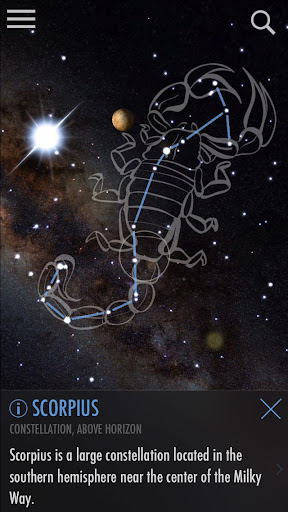
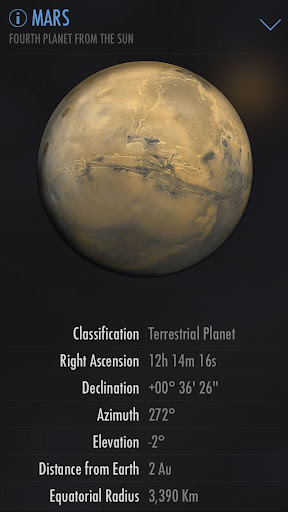
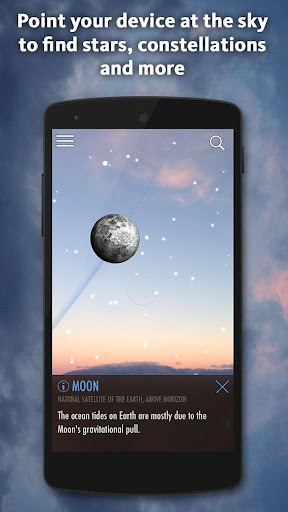
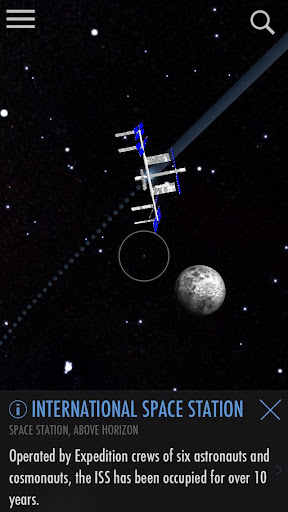
You don't need to be an astronomer to find stars or constellations in the sky, just open SkyView® Free and let it guide you to their location and identify them. SkyView Free is a beautiful and intuitive stargazing app that uses your camera to precisely spot and identify celestial objects in sky, day or night. Find popular constellations as they fade in and out while you scan across the sky, locate planets in our solar system, discover distant galaxies, and witness satellite fly-bys.
***Google Editor's Choice 2017***
Features:
• Simple: Point your device at the sky to identify galaxies, stars, constellations, planets, and satellites (including the ISS and Hubble) passing overhead at your location.
• Night Mode: Preserve your night vision with red or green night mode filters.
• Augmented Reality (AR): Use your camera to spot objects in the sky, day or night.
• Sky Paths: Follow the sky track for any object to see it’s exact location in the sky on any date and time.
• Time Travel: Jump to the future or the past and see the sky on different dates and times.
• Social: Capture and share beautiful images with friends and family on social networks.
• Mobile: WiFi is NOT required (does not require a data signal or GPS to function). Take it camping, boating, or even flying!
• Supports Space Navigator™ binoculars, spotting scope, and telescopes.
What a fun way to teach yourself, your children, your students, or your friends about our wonderful universe!
Mostre mais

1. Faça o download do instalador do MEmu e conclua a instalação

2. Inicie o MEmu e depois abra o Google Play na página inicial

3. Pesquise SkyView® Lite no Google Play
Install
4. Baixe e Instale SkyView® Lite
5. Na conclusão da instalação, clique no ícone para iniciar

6. º Experimente o SkyView® Lite no PC com o MEmu.
O MEmu Play é o melhor emulador Android gratuito, com 50 milhões de utilizadores a desfrutar da sua experiência superior com aplicações Android. A tecnologia de virtualização do MEmu permite-lhe executar milhares de aplicações Android sem problemas no seu computador, mesmo as mais exigentes.
Tela maior com gráficos melhores; Longa duração e sem limitação de bateria ou dados móveis.
Suporte completo ao Mapaeamento de Teclas para controle preciso do teclado e mouse ou gamepad.
Várias contas de jogos ou tarefas em um único PC de uma só vez com o Gerenciador de várias instâncias.
Use SkyView® Lite on PC by following steps: