Map Marker
Atualizada
Versão atual
3.9.0-723
Oferecido por

Pare de se preocupar com sobrecargas ao usar Map Marker no seu celular, liberte-se da pequena tela e aproveite o uso do aplicativo numa tela muito maior. A partir de agora, obtenha uma experiência em tela cheia do seu aplicativo com teclado e mouse. O MEmu oferece-lhe todos os recursos surpreendentes que você esperava: instalação rápida e configuração fácil, controles intuitivos, sem mais limitações de bateria, dados móveis e chamadas perturbadoras. O novíssimo MEmu 9 é a melhor opção para usar Map Marker no seu computador. Codificado com a nossa absorção, o gerenciador de multi-instâncias possibilita a abertura de 2 ou mais contas ao mesmo tempo. E o mais importante, nosso mecanismo de emulação exclusivo pode liberar todo o potencial do seu PC, tornando tudo suave e agradável.
Mostre mais
Enjoy superb experience of using Map Marker on PC with MEMU App Player. It's a powerful free Android emulator which provides you with thousands of android apps for their desktop version. Enjoy connecting with friends and polishing your work with higher efficiency! This app uses Google Maps and other sources in order to allow you to place markers even without internet connection.
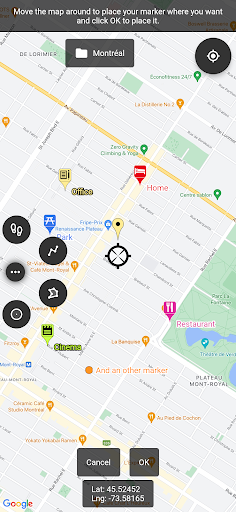
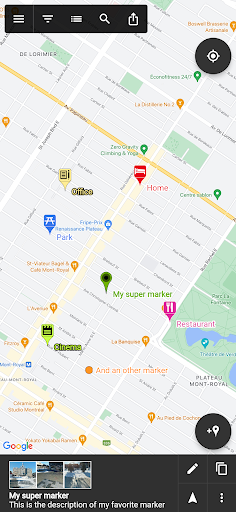
This app uses Google Maps and other sources in order to allow you to place markers even without internet connection.
If you have any issues with the app, please contact me by email, I will most likely be able to help.
Features:
• Offline maps: acquire offline map files elsewhere and use them to see the map even when offline!
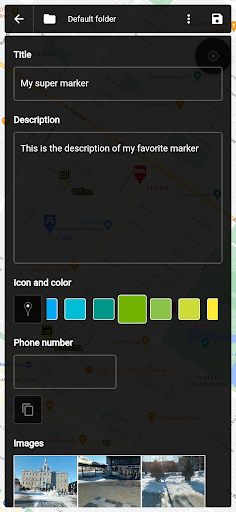
• Set a title, a description, a date, a color, an icon and pictures for each marker, and move them freely on the map
• Organise your markers into different folders
• Browse and organize your markers easily from the text-searchable markers list
• Search places from various sources and create a new marker from the result
• Open a marker's location in any other map application already installed
• Navigate to a marker's location with the integrated compass
• Display and copy marker GPS coordinates to clipboard with one click
• Display a marker's address if available
• Create path-markers and measure their distance easily
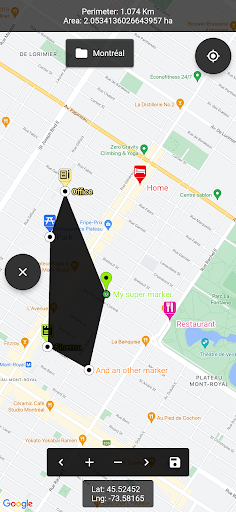
• Create polygon-surface-markers and measure their perimeter and area easily
• Create circle-surface-markers and measure perimeter and area easily
• Create GPS tracks recorded from your device location
• Share a captured image of the current map
• Share markers as KML files
• Import markers from a QR code
• Import/export markers from/to KML or KMZ files
• Import your Google Maps favorite locations (those marked with a star)
• Exported KML files are compatible with most other map softwares such as Google Earth
• Custom fields for markers: Checkbox, Date, Email, Text, Multi-choice, Phone, Web link
• Create templates for custom fields per folder: the child markers will inherit their parent folder's custom fields
Premium features:
• Save your markers on the cloud with Google Drive or Dropbox
• Collaborate with your friends by sharing your map cloud folder with them: anyone with access to the map folder can modify it and changes will be synced to everyone using the folder
• Restore previous versions of your cloud map folder
• One time purchase for a lifetime upgrade on your Google account with an unlimited number of Android devices
• No ads
Used permissions:
• Get your location ⇒ to locate you on the map
• Access to external storage ⇒ to export, save and import to/from files
• Read Google services configuration ⇒ to use Google Maps
• Call phone ⇒ for being able to one-click-call a phone number entered in a marker details
• Internet access ⇒ for Google Maps to display the map
• In-app purchase ⇒ for being able to purchase the premium upgrade
Mostre mais

1. Faça o download do instalador do MEmu e conclua a instalação

2. Inicie o MEmu e depois abra o Google Play na página inicial

3. Pesquise Map Marker no Google Play
Install
4. Baixe e Instale Map Marker
5. Na conclusão da instalação, clique no ícone para iniciar

6. º Experimente o Map Marker no PC com o MEmu.
O MEmu Play é o melhor emulador Android gratuito, com 50 milhões de utilizadores a desfrutar da sua experiência superior com aplicações Android. A tecnologia de virtualização do MEmu permite-lhe executar milhares de aplicações Android sem problemas no seu computador, mesmo as mais exigentes.
Tela maior com gráficos melhores; Longa duração e sem limitação de bateria ou dados móveis.
Suporte completo ao Mapaeamento de Teclas para controle preciso do teclado e mouse ou gamepad.
Várias contas de jogos ou tarefas em um único PC de uma só vez com o Gerenciador de várias instâncias.
Use Map Marker on PC by following steps: