Petal Maps – GPS & Navigation
Atualizada
Versão atual
3.7.0.302(002)
Oferecido por

Pare de se preocupar com sobrecargas ao usar Petal Maps – GPS & Navigation no seu celular, liberte-se da pequena tela e aproveite o uso do aplicativo numa tela muito maior. A partir de agora, obtenha uma experiência em tela cheia do seu aplicativo com teclado e mouse. O MEmu oferece-lhe todos os recursos surpreendentes que você esperava: instalação rápida e configuração fácil, controles intuitivos, sem mais limitações de bateria, dados móveis e chamadas perturbadoras. O novíssimo MEmu 9 é a melhor opção para usar Petal Maps – GPS & Navigation no seu computador. Codificado com a nossa absorção, o gerenciador de multi-instâncias possibilita a abertura de 2 ou mais contas ao mesmo tempo. E o mais importante, nosso mecanismo de emulação exclusivo pode liberar todo o potencial do seu PC, tornando tudo suave e agradável.
Mostre mais
Download do Petal Maps – GPS & Navigation no PC com MEmu Android Emulador: Divirta-se jogando na tela grande. Petal Maps is a unique map that lets you explore the world around you in new ways.
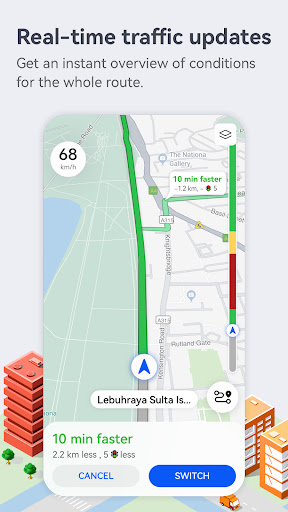
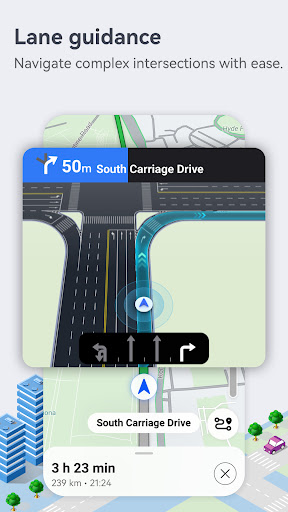
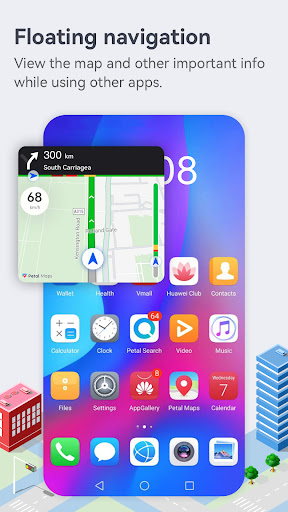
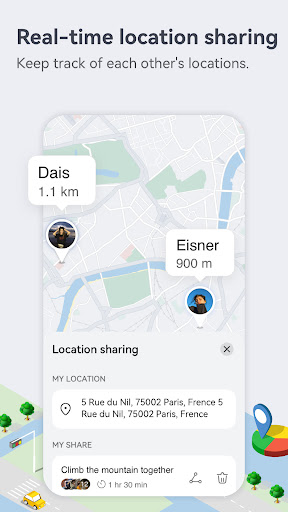
Petal Maps is a unique map that lets you explore the world around you in new ways. Available in over 160 countries and regions, it provides real-time traffic conditions, lane-level guidance, nearby services, various map layers, traffic events, place favorites, and loads more.
Real-time traffic data for faster and safer travel
· Recommends the quickest, shortest, and least congested route based on a combination of real-time traffic conditions and your personal preferences. You can even add multiple stops to your routes.
· Explore your route options and familiarize yourself with the way in advance.
· Provides accurate lane-level guidance for more precise navigation, helping you find your way through a wide variety of complex scenarios with ease.
· Allows you to report police locations, road closures, accidents, and more. You'll be able to see things reported by other users too.
· Supports navigating via HUAWEI WATCH 3, GT2, and GT3 series watches, with multiple modes of travel available – including walking, cycling, and public transportation.
· Lets you download offline maps so you can keep navigating even without an Internet connection.
Information for tons of local businesses
· Discover great local businesses through recommendations. You can even use voice search to find places to eat, drink, and hang out.
· Conveniently search for gas stations, parking lots, and loads more – allowing you to travel worry-free.
· Organize your favorite places by dividing them into separate lists with their own icons.
· Keep your devices in sync with each other by syncing your data to the cloud with HUAWEI Mobile Cloud or Dropbox.
Maintain the map together
· Help others decide where to go by rating and reviewing places on the map.
· Add new places and report or edit incorrect information.
You can send us questions and suggestions in the following ways. Your feedback will be dealt with as soon as possible.
Provide feedback in the app via Me > Help > Feedback.
Other channels:
Facebook-https://www.facebook.com/petalmapsglobal
Twitter-https://twitter.com/petalmaps
Instagram-https://www.instagram.com/petalmaps/
*Some features are only available in certain countries/regions
Mostre mais

1. Faça o download do instalador do MEmu e conclua a instalação

2. Inicie o MEmu e depois abra o Google Play na página inicial

3. Pesquise Petal Maps – GPS & Navigation no Google Play
Install
4. Baixe e Instale Petal Maps – GPS & Navigation
5. Na conclusão da instalação, clique no ícone para iniciar

6. º Experimente o Petal Maps – GPS & Navigation no PC com o MEmu.
O MEmu Play é o melhor emulador Android gratuito, com 50 milhões de utilizadores a desfrutar da sua experiência superior com aplicações Android. A tecnologia de virtualização do MEmu permite-lhe executar milhares de aplicações Android sem problemas no seu computador, mesmo as mais exigentes.
Tela maior com gráficos melhores; Longa duração e sem limitação de bateria ou dados móveis.
Suporte completo ao Mapaeamento de Teclas para controle preciso do teclado e mouse ou gamepad.
Várias contas de jogos ou tarefas em um único PC de uma só vez com o Gerenciador de várias instâncias.
Use Petal Maps – GPS & Navigation on PC by following steps: