Termius - SSH and SFTP client
Atualizada
Versão atual
6.3.17
Oferecido por

Pare de se preocupar com sobrecargas ao usar Termius - SSH and SFTP client no seu celular, liberte-se da pequena tela e aproveite o uso do aplicativo numa tela muito maior. A partir de agora, obtenha uma experiência em tela cheia do seu aplicativo com teclado e mouse. O MEmu oferece-lhe todos os recursos surpreendentes que você esperava: instalação rápida e configuração fácil, controles intuitivos, sem mais limitações de bateria, dados móveis e chamadas perturbadoras. O novíssimo MEmu 9 é a melhor opção para usar Termius - SSH and SFTP client no seu computador. Codificado com a nossa absorção, o gerenciador de multi-instâncias possibilita a abertura de 2 ou mais contas ao mesmo tempo. E o mais importante, nosso mecanismo de emulação exclusivo pode liberar todo o potencial do seu PC, tornando tudo suave e agradável.
Mostre mais
Download do Termius - SSH and SFTP client no PC com MEmu Android Emulador: Divirta-se jogando na tela grande. Termius is an SSH client and terminal how it should be.
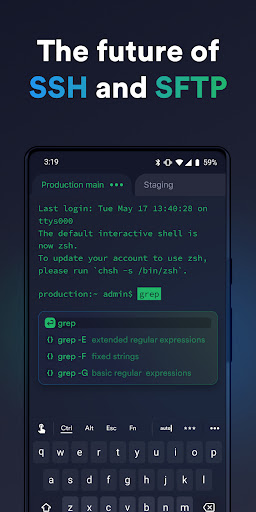
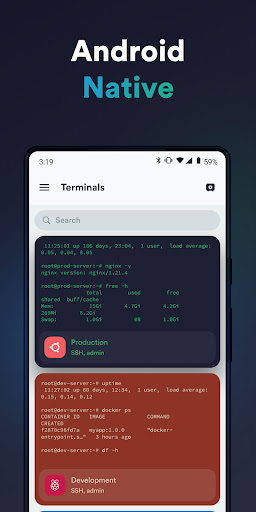
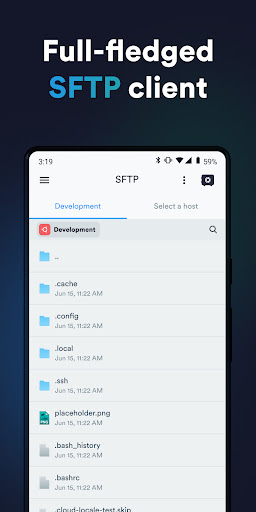
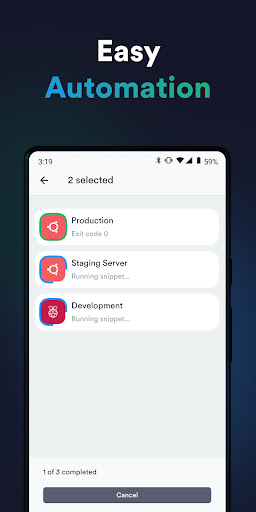
Termius is an SSH client and terminal how it should be. Connect with one tap from any mobile and desktop device—no re-entering IP addresses, ports, and passwords.
With a free Termius Starter plan, you can:
· Connect from your mobile and desktop device with SSH, Mosh, Telnet, Port Forwarding, and SFTP.
· Get a desktop-grade terminal experience with a virtual keyboard covering all the special keys required, or connect your Bluetooth keyboard.
Use gestures or shake the device while in the terminal to emulate stroking of Tab, arrows, PgUp/Down, Home, and End, etc.
· Work in several sessions simultaneously with a multi-tab interface and split-view support.
· Customize your terminal themes and fonts for each connection.
· Save your favorite and frequently used commands and shell scripts to execute them with a tap instead of typing.
· Quickly access the unified history of your terminal commands.
· Get the support of ECDSA and ed25519 keys as well as a chacha20-poly1305 cipher.
Ad-free.
With the Termius Pro plan, you can also:
· Access your connection settings and credentials from all your devices anytime with an encrypted cloud vault.
· No limitations on the number of devices to sync.
· Run your saved commands on multiple sessions or servers or instantly get them autocompleted in the terminal.
· Connect to your hardware via Serial Cable.
· Authenticate using hardware FIDO2 keys.
· Connect through Proxy and jump servers.
· Set custom environment variables.
Integrate with AWS and DigitalOcean.
· Protect your credentials with Touch ID or Face ID and your account with two-factor authentication.
· Keep your keys on your machine with SSH agent forwarding.
Termius reinvents the command line experience. We strive to make remote access for admins and engineers a more productive and enjoyable experience.
Mostre mais

1. Faça o download do instalador do MEmu e conclua a instalação

2. Inicie o MEmu e depois abra o Google Play na página inicial

3. Pesquise Termius - SSH and SFTP client no Google Play
Install
4. Baixe e Instale Termius - SSH and SFTP client
5. Na conclusão da instalação, clique no ícone para iniciar

6. º Experimente o Termius - SSH and SFTP client no PC com o MEmu.
O MEmu Play é o melhor emulador Android gratuito, com 50 milhões de utilizadores a desfrutar da sua experiência superior com aplicações Android. A tecnologia de virtualização do MEmu permite-lhe executar milhares de aplicações Android sem problemas no seu computador, mesmo as mais exigentes.
Tela maior com gráficos melhores; Longa duração e sem limitação de bateria ou dados móveis.
Suporte completo ao Mapaeamento de Teclas para controle preciso do teclado e mouse ou gamepad.
Várias contas de jogos ou tarefas em um único PC de uma só vez com o Gerenciador de várias instâncias.
Use Termius - SSH and SFTP client on PC by following steps: