Garmin Pilot
Обновлено
Текущая версия
24.12.2
Продавец

Перестаньте беспокоиться о быстром разряде батареи при использовании Garmin Pilot на вашем телефоне. Освободитесь от крошечного экрана и наслаждайтесь приложением на гораздо большем экране. Теперь вы можете работать с приложением в полноэкранном режиме с удобством клавиатуры и мыши. MEmu предлагает вам все ожидаемые удивительные функции: быструю установку и простую настройку, интуитивно понятное управление и больше никаких забот о времени автономной работы, мобильном трафике или неожиданных звонках. Совершенно новый MEmu 9 — идеальный выбор для использования Garmin Pilot на вашем компьютере. С помощью менеджера нескольких экземпляров MEmu вы можете одновременно использовать два или более аккаунтов. И самое главное, наш эксклюзивный движок эмуляции раскрывает весь потенциал вашего ПК, обеспечивая плавную и приятную работу.
Показать больше
Скачайте Garmin Pilot на ПК с помощью Андроид эмулятора MEmu. Наслаждайтесь на большом экране. ** 30 Day Free Trial!
** 30 Day Free Trial! **
Garmin Pilot is a comprehensive aviation application that allows pilots to plan, file, fly and log with ease.
Garmin Pilot is the most comprehensive suite of tools for Android designed specifically for general aviation and corporate pilots. Flight planning, filing, charts, interactive maps, weather briefing resources and navigation capabilities; it’s all included. The app’s intuitive interface mirrors those on the newest Garmin touchscreen avionics so you can go seamlessly from preflight to inflight. Plan, file, fly with Garmin Pilot.
Plan
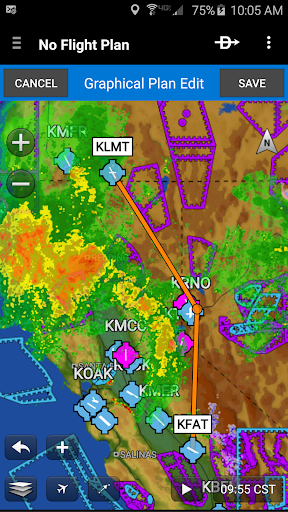
Garmin Pilot’s powerful capabilities start with pre-flight planning, providing pilots with the most comprehensive aviation weather information to make better-informed flight decisions. Pilots can check NEXRAD radar, visible and infrared cloud imagery, METARs, TAFs, AIRMETs, SIGMETs, PIREPs, NOTAMs, winds and temperature aloft, PIREPs, TFRs and lightning data. With Garmin Pilot, data can be displayed over a VFR sectional or an IFR low or high en-route chart to visualize the weather for your route. Add text-based weather widgets and use the exclusive NavTrack feature to view weather along the planned route.
File
With Garmin Pilot, users can easily enter a flight plan. Pre-loaded forms make it quick to save and reuse data for frequently flown routes. And when the flight plan is ready, Garmin Pilot makes it simple to file, cancel or close the flight plan.
Fly
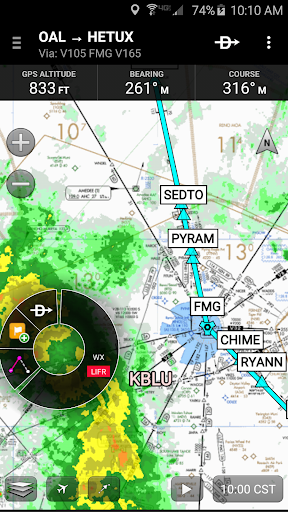
Garmin Pilot provides full en-route navigation capability on its moving map, while showing ETE, ETA, cross track error, distance to waypoint and current position.
Log
Garmin Pilot includes a comprehensive electronic logbook that syncs with flyGarmin. The logbook automatically generates entries based upon GPS data collected during the flight, tracks currency, supports manual entries, endorsements and creates reports.
Garmin Pilot. It’s the app aviators have been waiting for.
Features include:
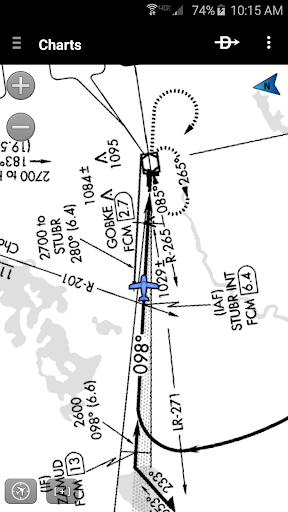
- Charts: VFR Sectionals, low and high IFR en-route, airport diagrams and approach procedures
- Optional geo-reference Garmin FliteCharts® and Garmin SafeTaxi® show aircraft position on approach charts and taxiways
- Weather Maps: Animated radar, AIRMETs/SIGMETs, Lightning, PIREPs, METARs/TAFs, Winds Aloft, TFRs, Infrared and Visible Satellite
- Extensive text products: METARs, TAFs, Winds Aloft, PIREPs, AIRMETs, SIGMETs, Area Forecasts and NOTAMs
- Dynamic weather overlays with your route displayed on map
- AOPA Airport Directory
- Flight plan filing via Lockheed Martin and DUATS
- Comprehensive weather data direct from the National Weather Service and Environment Canada
Показать больше

1. Скачать инсталлятор MEmu и завершайте установку

2. Запускайте MEmu, затем откройте Google Play на главной странице

3. Ищите Garmin Pilot в Google Play
Install
4. Скачайте и установите Garmin Pilot
5. При завершении установки, нажмите на значок для старта

6. Наслаждайтесь Garmin Pilot на своем компьютере с помощью MEmu.
MEmu Play — лучший бесплатный эмулятор Android, превосходный опыт работы с которым оценили 50 миллионов пользователей. Технология виртуализации MEmu позволяет без проблем запускать тысячи Android-приложений на вашем компьютере, даже самые требовательные.
Большой экран с лучшей графикой; Большая продолжительность, без ограничения батареи или мобильных данных.
Полная поддержка установки клавиш для точного управления клавиатурой и мышью или геймпадом.
Несколько игровых учетных записей или задач на одном компьютере одновременно с менеджером нескольких экземпляров.
Use Garmin Pilot on PC by following steps: