Garmin Pilot
更新日期
目前版本
24.12.2
提供者

想體驗Garmin Pilot,可是手機熒幕太小,一載軟體就變燙,怎麼辦?透過逍遙模擬器,在電腦的大熒幕上暢快體驗!用鍵鼠操作更精準流暢,逍遙模擬器滿足您的所有期待。在電腦上下載安裝Garmin Pilot,不用擔心電池當掉,想體驗多久就多久,順暢跑一天~全新的逍遙模擬器9,絕對是您體驗Garmin Pilot電腦版的最佳選擇。完美的按鍵映射系統讓Garmin Pilot如PC軟體般順手;強大的多開功能可同時執行多個任務;獨家虛擬化技術更能徹底釋放電腦效能,保障長時間穩定運作。我們致力於不讓設備限制您的體驗,助您輕鬆高效,暢快無比!
更多
透過逍遙模擬器,在電腦上下載Garmin Pilot,享受大熒幕的暢快體驗。 ** 30 Day Free Trial!
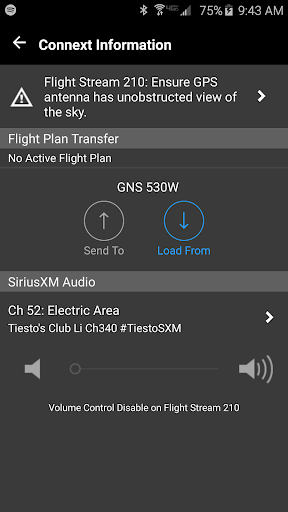
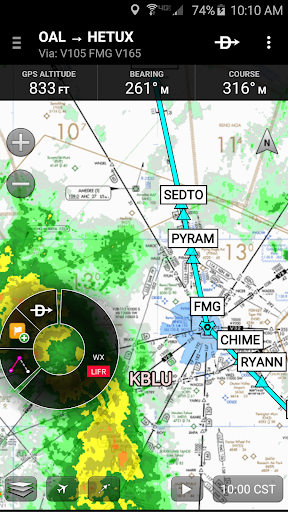
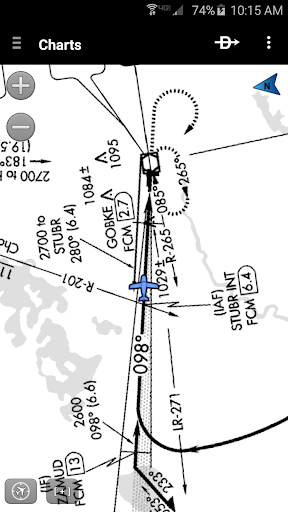
** 30 Day Free Trial! **
Garmin Pilot is a comprehensive aviation application that allows pilots to plan, file, fly and log with ease.
Garmin Pilot is the most comprehensive suite of tools for Android designed specifically for general aviation and corporate pilots. Flight planning, filing, charts, interactive maps, weather briefing resources and navigation capabilities; it’s all included. The app’s intuitive interface mirrors those on the newest Garmin touchscreen avionics so you can go seamlessly from preflight to inflight. Plan, file, fly with Garmin Pilot.
Plan
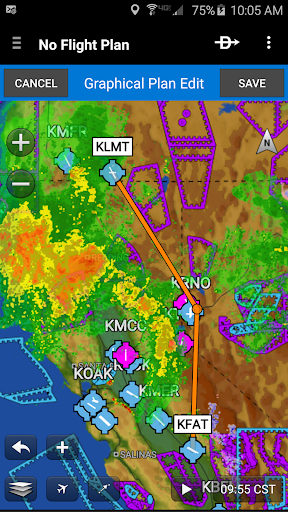
Garmin Pilot’s powerful capabilities start with pre-flight planning, providing pilots with the most comprehensive aviation weather information to make better-informed flight decisions. Pilots can check NEXRAD radar, visible and infrared cloud imagery, METARs, TAFs, AIRMETs, SIGMETs, PIREPs, NOTAMs, winds and temperature aloft, PIREPs, TFRs and lightning data. With Garmin Pilot, data can be displayed over a VFR sectional or an IFR low or high en-route chart to visualize the weather for your route. Add text-based weather widgets and use the exclusive NavTrack feature to view weather along the planned route.
File
With Garmin Pilot, users can easily enter a flight plan. Pre-loaded forms make it quick to save and reuse data for frequently flown routes. And when the flight plan is ready, Garmin Pilot makes it simple to file, cancel or close the flight plan.
Fly
Garmin Pilot provides full en-route navigation capability on its moving map, while showing ETE, ETA, cross track error, distance to waypoint and current position.
Log
Garmin Pilot includes a comprehensive electronic logbook that syncs with flyGarmin. The logbook automatically generates entries based upon GPS data collected during the flight, tracks currency, supports manual entries, endorsements and creates reports.
Garmin Pilot. It’s the app aviators have been waiting for.
Features include:
- Charts: VFR Sectionals, low and high IFR en-route, airport diagrams and approach procedures
- Optional geo-reference Garmin FliteCharts® and Garmin SafeTaxi® show aircraft position on approach charts and taxiways
- Weather Maps: Animated radar, AIRMETs/SIGMETs, Lightning, PIREPs, METARs/TAFs, Winds Aloft, TFRs, Infrared and Visible Satellite
- Extensive text products: METARs, TAFs, Winds Aloft, PIREPs, AIRMETs, SIGMETs, Area Forecasts and NOTAMs
- Dynamic weather overlays with your route displayed on map
- AOPA Airport Directory
- Flight plan filing via Lockheed Martin and DUATS
- Comprehensive weather data direct from the National Weather Service and Environment Canada
更多

1. 下載逍遙安裝器並完成設置

2. 啟動逍遙後打開位於桌面上的谷歌商店

3. 在谷歌商店中搜尋Garmin Pilot
Install
4. 下載並安裝Garmin Pilot
5. 下載完成後點擊圖標來啟動

6. 透過逍遙享受在電腦上體驗Garmin Pilot
逍遙安卓是優秀的安卓模擬器,全球超過5000萬用戶的優先選擇。逍遙安卓以虛擬化技術為核心,為用户打造突破手機配備局限的應用平台!
大屏精細展示;無限待機,超越電池和流量限制
鍵鼠,手把操作全面支持,操作更精準
用逍遙多開同時運行多個遊戲、應用。
Use Garmin Pilot on PC by following steps: