Garmin Pilot
Updated
Current Version
24.12.2
Offered By

Stop worrying about high battery drain when using Garmin Pilot on your phone. Free yourself from the tiny screen and enjoy the app on a much larger display. From now on, get a full-screen experience of your app with the convenience of a keyboard and mouse. MEmu offers you all the surprising features you’d expect: quick installation and easy setup, intuitive controls, and no more worries about battery life, mobile data, or unexpected calls. The all-new MEmu 9 is the choice for using Garmin Pilot on your computer. With the MEmu multi-instance manager, you can run two or more accounts at the same time. Most importantly, our exclusive emulation engine unlocks your PC’s full potential, delivering smooth and enjoyable performance.
Show more
Enjoy superb experience of using Garmin Pilot on PC with MEMU App Player. It's a powerful free Android emulator which provides you with thousands of android apps for their desktop version. Enjoy connecting with friends and polishing your work with higher efficiency! ** 30 Day Free Trial!
** 30 Day Free Trial! **
Garmin Pilot is a comprehensive aviation application that allows pilots to plan, file, fly and log with ease.
Garmin Pilot is the most comprehensive suite of tools for Android designed specifically for general aviation and corporate pilots. Flight planning, filing, charts, interactive maps, weather briefing resources and navigation capabilities; it’s all included. The app’s intuitive interface mirrors those on the newest Garmin touchscreen avionics so you can go seamlessly from preflight to inflight. Plan, file, fly with Garmin Pilot.
Plan
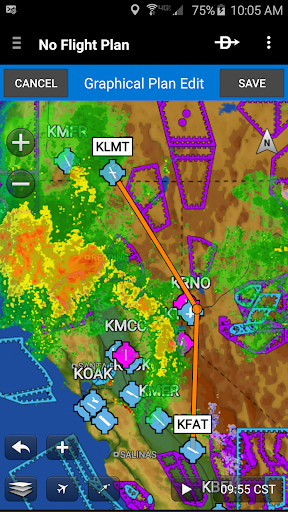
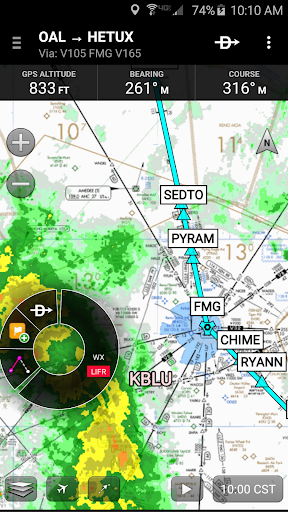
Garmin Pilot’s powerful capabilities start with pre-flight planning, providing pilots with the most comprehensive aviation weather information to make better-informed flight decisions. Pilots can check NEXRAD radar, visible and infrared cloud imagery, METARs, TAFs, AIRMETs, SIGMETs, PIREPs, NOTAMs, winds and temperature aloft, PIREPs, TFRs and lightning data. With Garmin Pilot, data can be displayed over a VFR sectional or an IFR low or high en-route chart to visualize the weather for your route. Add text-based weather widgets and use the exclusive NavTrack feature to view weather along the planned route.
File
With Garmin Pilot, users can easily enter a flight plan. Pre-loaded forms make it quick to save and reuse data for frequently flown routes. And when the flight plan is ready, Garmin Pilot makes it simple to file, cancel or close the flight plan.
Fly
Garmin Pilot provides full en-route navigation capability on its moving map, while showing ETE, ETA, cross track error, distance to waypoint and current position.
Log
Garmin Pilot includes a comprehensive electronic logbook that syncs with flyGarmin. The logbook automatically generates entries based upon GPS data collected during the flight, tracks currency, supports manual entries, endorsements and creates reports.
Garmin Pilot. It’s the app aviators have been waiting for.
Features include:
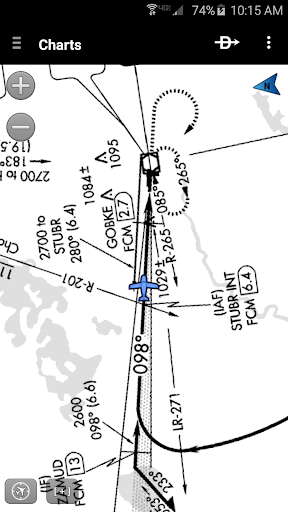
- Charts: VFR Sectionals, low and high IFR en-route, airport diagrams and approach procedures
- Optional geo-reference Garmin FliteCharts® and Garmin SafeTaxi® show aircraft position on approach charts and taxiways
- Weather Maps: Animated radar, AIRMETs/SIGMETs, Lightning, PIREPs, METARs/TAFs, Winds Aloft, TFRs, Infrared and Visible Satellite
- Extensive text products: METARs, TAFs, Winds Aloft, PIREPs, AIRMETs, SIGMETs, Area Forecasts and NOTAMs
- Dynamic weather overlays with your route displayed on map
- AOPA Airport Directory
- Flight plan filing via Lockheed Martin and DUATS
- Comprehensive weather data direct from the National Weather Service and Environment Canada
Show more

1. Download MEmu installer and finish the setup

2. Start MEmu then open Google Play on the desktop

3. Search Garmin Pilot in Google Play
Install
4. Download and Install Garmin Pilot
5. On install completion click the icon to start

6. Enjoy using Garmin Pilot on PC with MEmu
MEmu Play is the best Android emulator, and 100 million users already enjoy its superb Android app experience. Powered by advanced virtualization technology, it lets you enjoy thousands of Android apps smoothly on your PC—including the most graphics-intensive ones.
Bigger screen with better graphics; Long duration, without limitation of battery or mobile data.
Full Keymapping support for precise control of keyboard and mouse or gamepad.
Multiple game accounts or tasks on single PC at one time with Multi-Instance manager.
Use Garmin Pilot on PC by following steps: