DeeMoney—Global Money Transfer
อัปเดตเมื่อ
เวอร์ชันปัจจุบัน
2.13.3
ให้บริการโดย

เมื่อใช้ DeeMoney—Global Money Transfer บนโทรศัพท์ของคุณไม่ต้องกังวลกับการชาร์จไฟมากเกินไปปลดปล่อยตัวคุณเองจากหน้าจอขนาดเล็กและสนุกกับการใช้แอพนี้บนหน้าจอขนาดใหญ่ จากนี้ไปรับประสบการณ์เต็มหน้าจอของแอปพลิเคชันของคุณด้วยคีย์บอร์ดและเมาส์ MEmu มีคุณสมบัติที่น่าแปลกใจที่คุณคาดหวัง: การติดตั้งที่รวดเร็วและการตั้งค่าที่ง่ายควบคุมได้ง่ายไม่ จำกัด แบตเตอรี่ข้อมูลมือถือและการโทรที่รบกวน MEmu 9 ใหม่ล่าสุดเป็นตัวเลือกที่ดีที่สุดสำหรับการใช้ Meitu – โปรแกรมแก้ไขภาพแนวธรรมชาติ บนคอมพิวเตอร์ของคุณ ด้วยรหัสการดูดซึมของเราผู้จัดการหลายอินสแตนซ์ทำให้สามารถเปิดบัญชี 2 บัญชีขึ้นไปในเวลาเดียวกันได้ และที่สำคัญที่สุดเอ็นจิ้นจำลองพิเศษของเราสามารถปลดปล่อยศักยภาพของPCของคุณและทำให้ทุกอย่างราบรื่นและสนุกสนาน
แสดงเพิ่มเติม
ดาวน์โหลด DeeMoney—Global Money Transfer บน PC ด้วย MEmu Android Emulator สนุกกับการเล่นบนหน้าจอขนาดใหญ่ DeeMoney provides BETTER RATES than the banks.
DeeMoney provides BETTER RATES than the banks
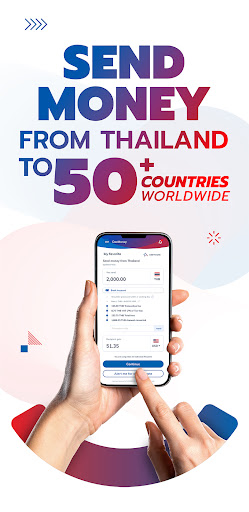
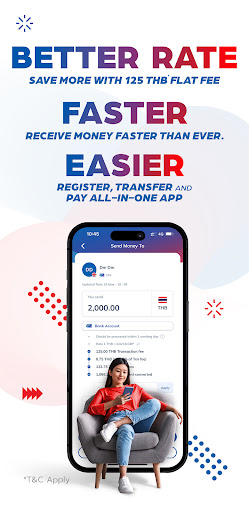
Tired of high fees? Send money from Thailand for 125 Thai Baht*. Reach 56 countries easily and transact in 26 currencies, including the US Dollar.
Our online money transfer service gives you great exchange rates and low fees when you need to send money back home. And with the DeeMoney app, you can easily check rates on your money transfers.
The minimum transfer per transaction is 1,000 THB and the maximum transfer per transaction is 500,000 THB.
*The actual fee is based on the receiving country, currency, and payout method. It may be higher, or even lower, than 125 Thai Baht.
DeeMoney provides SECURE TRANSACTIONS
We know that making international money transfers can feel a bit daunting. But with DeeMoney, your money will get to where it needs to go, quickly and reliably.
Whether you work in Thailand and need to send money to your family, or you are a tourist who needs to transfer funds back home, you can always count on DeeMoney to have your back.
DeeMoney provides EASY REGISTRATION
Send money right away from Thailand with our registration process.
Unlike Thai banks, Deemoney does not require you to have a specific visa status in Thailand. You can use DeeMoney whether you are in Thailand for ten days or ten years! Simply provide a few documents.
For Thai Nationals:
• Thai ID Card (front & back)
• Name change certificate (if any)
For Non-Thai Nationals with e-Passport (NFC embedded*):
• Original passport
For Non-Thai Nationals without an e-Passport (no NFC embedded):
• Original passport
And one of the following documents:
• Work permit (front & back)
• Valid visa
• A government-issued ID from your home country (front & back)
• A Thai government-issued valid ID (e.g. Thai driving licence, Pink Card; front & back)
*An NFC is a chip present in most passports or other identity documents. You can find the NFC chip on the bottom of your passport cover.
Once everything has been checked (which can take 1-3 business days), you can send money from Thailand right away.
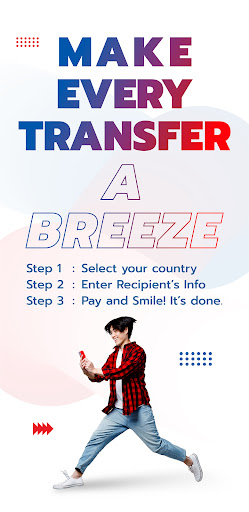
How to Transfer Money on the DeeMoney App?
• Step 1: Select the country of your recipient
• Step 2: Enter the amount you want to send
• Step 3: Enter your recipient’s information
• Step 4: Select your payment option
• Step 5: Check all your details before hitting send
Have Questions? Get in Touch with DeeMoney
• Call our customer support: +66 2 821 5555
• Talk to us on Facebook: deemoneyth
• Reach us on LinkedIn: deemoneycom
• Add us on LINE: @DeeMoney
• Email us: support@dee.money
Download the DeeMoney app today and send money from Thailand to the world.
แสดงเพิ่มเติม

1. ดาวน์โหลดตัวติดตั้ง MEmu และสิ้นสุดการติดตั้ง

2. เริ่ม MEmu จากนั้นเปิด Google Play บนหน้าแรก

3. ค้นหา DeeMoney—Global Money Transfer ใน Google Play
Install
4. ดาวน์โหลดและติดตั้ง DeeMoney—Global Money Transfer
5. เมื่อติดตั้งเสร็จให้คลิกที่ไอคอนเพื่อเริ่มใช้งาน

6. ใช้ MEmu เพื่อสัมผัสประสบการณ์ DeeMoney—Global Money Transfer บนคอมพิวเตอร์ของคุณ
MEmu Play คือโปรแกรมจำลอง Android ที่ดีที่สุด มีผู้ใช้มากกว่า 50 ล้านคน มอบประสบการณ์การใช้งานแอป Android ขั้นสุดยอดให้กับคุณ เทคโนโลยีจำลองเสมือนของ MEmu ช่วยให้คุณรันแอป Android หลายพันแอปบนคอมพิวเตอร์ได้อย่างราบรื่น แม้แอปที่กินทรัพยากรเครื่องสูงที่สุด
จอใหญ่และกราฟฟิกสวยกว่า; เล่นได้นาน, ไม่ต้องใช้แบตเตอรี่โทรศัพท์หรือเน็ตโทรศัพท์.
ระบบปรับแต่งปุ่มคีย์บอร์ดและเม้าส์ตามที่คุณเลือก
เล่นมากกว่าหนึ่งเกมบน PC ในเวลาเดียวกันด้วยระบบหลายจอหรือ Multi-Instance manager.
Use DeeMoney—Global Money Transfer on PC by following steps: