Harmony DSP
อัปเดตเมื่อ
เวอร์ชันปัจจุบัน
1.0.2
ให้บริการโดย

เมื่อใช้ Harmony DSP บนโทรศัพท์ของคุณไม่ต้องกังวลกับการชาร์จไฟมากเกินไปปลดปล่อยตัวคุณเองจากหน้าจอขนาดเล็กและสนุกกับการใช้แอพนี้บนหน้าจอขนาดใหญ่ จากนี้ไปรับประสบการณ์เต็มหน้าจอของแอปพลิเคชันของคุณด้วยคีย์บอร์ดและเมาส์ MEmu มีคุณสมบัติที่น่าแปลกใจที่คุณคาดหวัง: การติดตั้งที่รวดเร็วและการตั้งค่าที่ง่ายควบคุมได้ง่ายไม่ จำกัด แบตเตอรี่ข้อมูลมือถือและการโทรที่รบกวน MEmu 9 ใหม่ล่าสุดเป็นตัวเลือกที่ดีที่สุดสำหรับการใช้ Meitu – โปรแกรมแก้ไขภาพแนวธรรมชาติ บนคอมพิวเตอร์ของคุณ ด้วยรหัสการดูดซึมของเราผู้จัดการหลายอินสแตนซ์ทำให้สามารถเปิดบัญชี 2 บัญชีขึ้นไปในเวลาเดียวกันได้ และที่สำคัญที่สุดเอ็นจิ้นจำลองพิเศษของเราสามารถปลดปล่อยศักยภาพของPCของคุณและทำให้ทุกอย่างราบรื่นและสนุกสนาน
แสดงเพิ่มเติม
ดาวน์โหลด Harmony DSP บน PC ด้วย MEmu Android Emulator สนุกกับการเล่นบนหน้าจอขนาดใหญ่ The Harmony DSP App allows you to setup and tune your system with your smart phone or tablet.
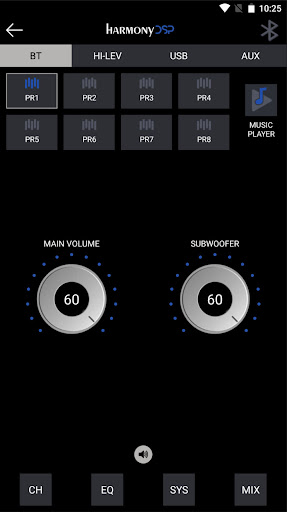
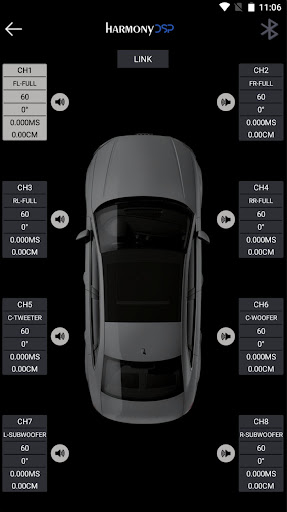
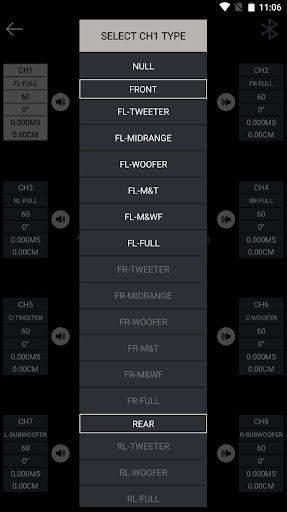
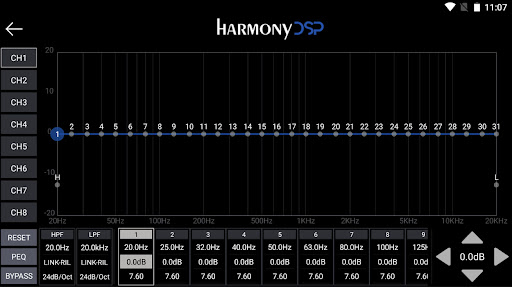
The Harmony DSP App allows you to setup and tune your system with your smart phone or tablet.
In the main screen you will find the Input Source menu where you can choose BT, HI-LEV, USB and AUX. Here you also find 8 Presets (saved into your device) to choose from, you access the Music Player, you have the Main and Subwoofer Volume, and the Advanced menu with Channels, EQ, System and Mixing.
From the Channel Page, you can assign the function of each speaker, check the Phase for polarity, adjust the individual Channel Gains and set Delay in milliseconds or centimeters, for a rock solid and accurate front stage.
The EQ page holds the heart and the brains of the App. You can use either the Graphic or the Paragraphic EQ’s. You can customize the crossovers to fit the needs of your individual system. You have adjustments for Gain, frequency, and Q factor. You can work on channels individually or you can link them.
With the MIX function you can manually determine which inputs (USB-L/R, Digital-L/R, BT-L/R) will be used for each output (processing channel) and how much of each input the output will receive.
The new Music Player function lets you have full control of all your favorite songs, inside the App. Be sure to connect a proper USB device containing audio files in the supported format (MP2/4, WMA, APE, FLAC, AAC, M4A,WAV, AIF, AIFC). From the App it is possible to access the folders and the contained audio files.
แสดงเพิ่มเติม

1. ดาวน์โหลดตัวติดตั้ง MEmu และสิ้นสุดการติดตั้ง

2. เริ่ม MEmu จากนั้นเปิด Google Play บนหน้าแรก

3. ค้นหา Harmony DSP ใน Google Play
Install
4. ดาวน์โหลดและติดตั้ง Harmony DSP
5. เมื่อติดตั้งเสร็จให้คลิกที่ไอคอนเพื่อเริ่มใช้งาน

6. ใช้ MEmu เพื่อสัมผัสประสบการณ์ Harmony DSP บนคอมพิวเตอร์ของคุณ
MEmu Play คือโปรแกรมจำลอง Android ที่ดีที่สุด มีผู้ใช้มากกว่า 50 ล้านคน มอบประสบการณ์การใช้งานแอป Android ขั้นสุดยอดให้กับคุณ เทคโนโลยีจำลองเสมือนของ MEmu ช่วยให้คุณรันแอป Android หลายพันแอปบนคอมพิวเตอร์ได้อย่างราบรื่น แม้แอปที่กินทรัพยากรเครื่องสูงที่สุด
จอใหญ่และกราฟฟิกสวยกว่า; เล่นได้นาน, ไม่ต้องใช้แบตเตอรี่โทรศัพท์หรือเน็ตโทรศัพท์.
ระบบปรับแต่งปุ่มคีย์บอร์ดและเม้าส์ตามที่คุณเลือก
เล่นมากกว่าหนึ่งเกมบน PC ในเวลาเดียวกันด้วยระบบหลายจอหรือ Multi-Instance manager.
Use Harmony DSP on PC by following steps: