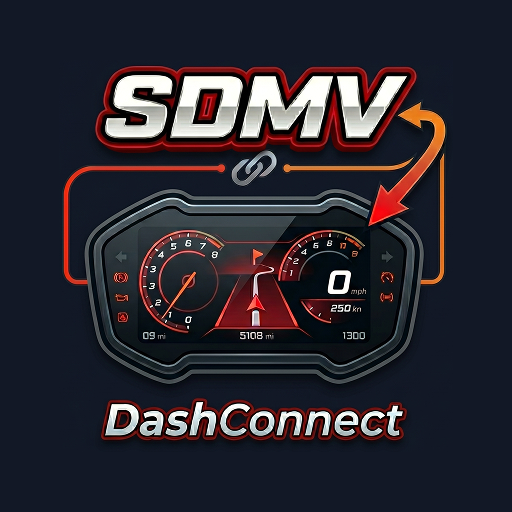
SDMV DashConnect
อัปเดตเมื่อ
เวอร์ชันปัจจุบัน
1.1
ให้บริการโดย

เมื่อใช้ SDMV DashConnect บนโทรศัพท์ของคุณไม่ต้องกังวลกับการชาร์จไฟมากเกินไปปลดปล่อยตัวคุณเองจากหน้าจอขนาดเล็กและสนุกกับการใช้แอพนี้บนหน้าจอขนาดใหญ่ จากนี้ไปรับประสบการณ์เต็มหน้าจอของแอปพลิเคชันของคุณด้วยคีย์บอร์ดและเมาส์ MEmu มีคุณสมบัติที่น่าแปลกใจที่คุณคาดหวัง: การติดตั้งที่รวดเร็วและการตั้งค่าที่ง่ายควบคุมได้ง่ายไม่ จำกัด แบตเตอรี่ข้อมูลมือถือและการโทรที่รบกวน MEmu 9 ใหม่ล่าสุดเป็นตัวเลือกที่ดีที่สุดสำหรับการใช้ Meitu – โปรแกรมแก้ไขภาพแนวธรรมชาติ บนคอมพิวเตอร์ของคุณ ด้วยรหัสการดูดซึมของเราผู้จัดการหลายอินสแตนซ์ทำให้สามารถเปิดบัญชี 2 บัญชีขึ้นไปในเวลาเดียวกันได้ และที่สำคัญที่สุดเอ็นจิ้นจำลองพิเศษของเราสามารถปลดปล่อยศักยภาพของPCของคุณและทำให้ทุกอย่างราบรื่นและสนุกสนาน
แสดงเพิ่มเติม
สัมผัสประสบการณ์สุดยอดการใช้งาน SDMV DashConnect บนพีซีด้วย MEmu Play นี่คือโปรแกรมจำลอง Android ฟรีที่ทรงพลัง ให้คุณใช้งานแอป Android นับพันบนเดสก์ท็อป สนุกกับการเชื่อมต่อกับเพื่อนๆ และขัดเกลาผลงานของคุณอย่างมีประสิทธิภาพยิ่งขึ้น! Ride smarter with the ultimate motorcycle navigation companion.
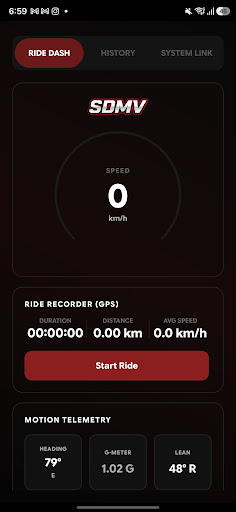
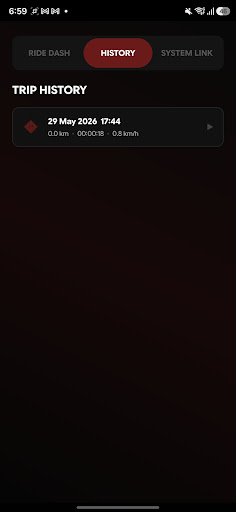
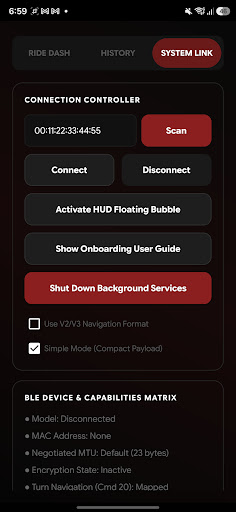
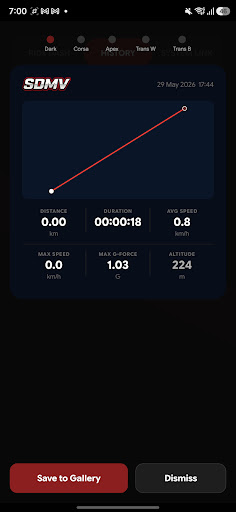
Ride smarter with the ultimate motorcycle navigation companion.
SDMV QJ Navigation seamlessly bridges Google Maps turn-by-turn navigation directly from your phone onto your motorcycle’s physical speedometer cluster, alongside an elegant floating HUD overlay and a professional-grade telemetry ride recorder.
Designed for riders who demand premium performance, safety, and a state-of-the-art interface.
DYNAMIC SPEEDOMETER STEP NAVIGATION
Never look down at your map again. The App captures active Google Maps directions in real time and transmits high-fidelity navigation icons directly onto your motorcycle's physical instrument cluster.
• Supports all standard turns, slight/sharp curves, and highway exits.
• Complete Lane Guidance: Premium Keep Left and Keep Right diagonal fissions.
• Roundabout Precision: Displays entry warnings and the exact exit number (e.g., "Exit 3") in both English and Indonesian formats.
• Symmetrical U-Turn Loops: Left and right U-turns are classified with absolute quadrant precision.
SPORTY ALWAYS-ON-TOP HUD WIDGET
Enjoy an elegant floating HUD overlay card that displays on top of Google Maps (or any other active app).
• Immersive, transparent dark glass design matching your premium instrumentation.
• Highly readable, sporty typography displaying distance, target road name, and colored instructions.
• Unique double-diagonal lane indicators ("⇖" / "⇗") and looping U-turn curves.
ADVANCED RIDE RECORDER
Record your rides with professional, high-fidelity GPS telemetry.
• Full Ride Tracking: Tracks your trip duration, GPS speed, distance, average speed, maximum speed, and altitude.
• Peak G-Force Sensor: Utilizes your phone’s accelerometer and magnetometer to track and lock your maximum G-forces during lean angles and acceleration.
• Local Route Maps: Generates interactive offline route maps from your GPS path coordinates.
• Locally Saved History: Browse your complete logs under a gorgeous, organized History tab with bulk-selection and single-tap delete options.
STUNNING DESIGNER SUMMARY CARDS
Share your rides with style! Once you finish a ride, the App compiles your stats into beautiful, highly shareable ride summary cards in 5 distinct sporty visual templates:
• Dark Sport: Bold, neon-inspired theme for high-contrast presentation.
• Corsa: Clean, race-track minimalist style.
• Apex: Classic high-fidelity dial aesthetics.
• Transparent Light / Dark: Modern layouts designed for clean transparent image exports directly to your gallery.
100% PRIVATE & CRASH-RESISTANT
• All data remains strictly local: Your coordinates, route maps, and telemetry history are saved entirely in your device's secure internal database. Nothing is sent to external servers.
• Optimized Performance: The dynamic bitmap classifier operates in under 0.2ms with zero background memory leaks.
• Bulletproof Background Service: Designed with crash-resistant reflection boundaries, preventing interruptions on modern Android API levels.
• Android 14+ Package Safety: Integrated visibility queries ensure vector resources load instantly without security delays.
Turn your phone into a professional motorcycle cockpit. Download SDMV QJ Navigation today!
แสดงเพิ่มเติม

1. ดาวน์โหลดตัวติดตั้ง MEmu และสิ้นสุดการติดตั้ง

2. เริ่ม MEmu จากนั้นเปิด Google Play บนหน้าแรก

3. ค้นหา SDMV DashConnect ใน Google Play
Install
4. ดาวน์โหลดและติดตั้ง SDMV DashConnect
5. เมื่อติดตั้งเสร็จให้คลิกที่ไอคอนเพื่อเริ่มใช้งาน

6. ใช้ MEmu เพื่อสัมผัสประสบการณ์ SDMV DashConnect บนคอมพิวเตอร์ของคุณ
MEmu Play คือโปรแกรมจำลอง Android ที่ดีที่สุด มีผู้ใช้มากกว่า 50 ล้านคน มอบประสบการณ์การใช้งานแอป Android ขั้นสุดยอดให้กับคุณ เทคโนโลยีจำลองเสมือนของ MEmu ช่วยให้คุณรันแอป Android หลายพันแอปบนคอมพิวเตอร์ได้อย่างราบรื่น แม้แอปที่กินทรัพยากรเครื่องสูงที่สุด
จอใหญ่และกราฟฟิกสวยกว่า; เล่นได้นาน, ไม่ต้องใช้แบตเตอรี่โทรศัพท์หรือเน็ตโทรศัพท์.
ระบบปรับแต่งปุ่มคีย์บอร์ดและเม้าส์ตามที่คุณเลือก
เล่นมากกว่าหนึ่งเกมบน PC ในเวลาเดียวกันด้วยระบบหลายจอหรือ Multi-Instance manager.
Use SDMV DashConnect on PC by following steps: