Clover Tales: Idle Adventure
Güncellendi
Mevcut Sürüm
Sunan

Clover Tales: Idle Adventure oynamak için bu kadar tutkuluyken, ellerin telefonunun küçük ekranıyla sınırlı kalmamalı.Bir profesyonel gibi oyna ve klavye ve fare ile oyununun tüm kontrolü sende olsun.MEmu sana beklediğin her şeyi sunuyor.PC'de Clover Tales: Idle Adventure indir ve oyna. İstediğin kadar oyna, artık pil sınırlamaları, mobil veri ve rahatsız edici çağrılar yok.Yepyeni MEmu 9, PC'de Clover Tales: Idle Adventure oynamak için en iyi seçim. Uzmanlığımızla hazırlanan zarif ön ayar tuş eşleme sistemi Clover Tales: Idle Adventure oyununu gerçek bir PC oyununa dönüştürüyor.MEmu çoklu örnek yöneticisi, aynı cihazda 2 veya daha fazla hesap oynamayı mümkün kılıyor.Ve en önemlisi, özel emülasyon motorumuz PC'nizin tüm potansiyelini ortaya çıkarıyor, her şeyi sorunsuz hale getiriyor.
Daha fazla göster
Clover Tales: Idle Adventure’i MEmu Android Emülatör ile PC’ye indirin. Büyük ekranda oynamanın keyfini çıkarın. Legend says that in the continent of Clovia, four-leaf clovers drift in the wind, guiding the way to a fantastical world.


Legend says that in the continent of Clovia, four-leaf clovers drift in the wind, guiding the way to a fantastical world.
There, vast forests, open grasslands, and ancient ruins come together, filled with the unknown and countless surprises, as well as many untold stories waiting to be discovered.
Everyone who steps into this world will begin their own unique adventure.
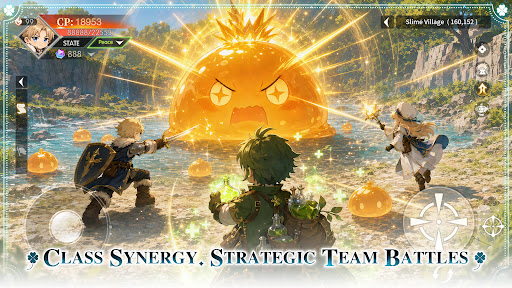
Class Synergy, Strategic Team Battles
Combine a variety of classes to create the perfect team composition. Leverage each role’s unique strengths and adapt to ever-changing battles to overcome every challenge ahead.
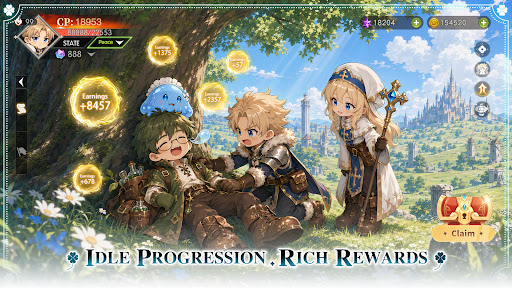
Idle Progression, Rich Rewards
Keep growing even while offline. Earn valuable resources and equipment automatically, allowing you to advance your adventure with ease and enjoy steady progression at your own pace.
Unlock New Classes, Grow Stronger
As your journey unfolds, new classes become available, bringing fresh skills and combat styles. Continue to strengthen your character and discover new ways to conquer the challenges ahead.
Explore the World, Discover Hidden Wonders
Travel across vast grasslands, dense forests, and ancient ruins. Venture into unexplored regions, uncover hidden secrets, and experience the unique stories each land has to offer.
Gather Allies, Adventure Together
Join forces with like-minded companions and take on challenges as a team. Grow stronger through every battle and expedition while creating unforgettable memories along the way.
Daha fazla göster

1. MEmu yükleyicisini indirin ve kurulumu tamamlayın

2. MEmu'yu başlatın ve ana sayfada Google Play'i açın

3. Google Play'de Clover Tales: Idle Adventure arayın
Install
4. Clover Tales: Idle Adventure indirin ve yükleyin
5. Kurulum tamamlandığında başlamak için simgeye tıklayın

6. PC’de MEmu ile Clover Tales: Idle Adventure oyunun keyfini çıkarın
MEmu App Player, en iyi ücretsiz Android emülatörüdür ve 50 milyon insan zaten mükemmel Android oyun deneyimini yaşamaktadır. MEmu sanallaştırma teknolojisi, binlerce grafik oyunu hatta grafikte en yoğun olanları bile sorunsuz bir şekilde bilgisayarınızda oynamanızı sağlar.
Daha büyük ekranla daha iyi grafiklere sahip; Pil veya mobil veri sınırlaması olmaksızın uzun süre.
Keymapping klavye ve fare veya gamepad'in hassas kontrolü için destek verir.
Multi-Instance yöneticisi ile tek bir bilgisayarda aynı anda birden fazla oyun hesabı veya görev gerçekleşilebilir.
Play Clover Tales: Idle Adventure on PC by following steps: