
Clover Tales: Idle Adventure
อัปเดตเมื่อ
เวอร์ชันปัจจุบัน
ให้บริการโดย

เวลาคุณเล่น Clover Tales: Idle Adventure, คุณอาจรู้สึกว่ามือคุณอาจบังจอแล้วทำให้ไม่ได้เล่นแบบเต็มที่. เล่นแบบไร้ขีดจำกัดด้วยเม้าส์และคีย์บอร์ด. MEmu มีตัวเลือกหลายอย่างให้คุณใช้งานเกมที่คุณเล่นแบบที่คุณต้องการ. ดาวน์โหลดและเล่น Clover Tales: Idle Adventure บน PC. เล่นนานแค่ไหนก็ได้, ไม่ต้องชาร์จแบตเตอรี่, หรือเจอคนโทรเข้ามาระหว่างเล่น. MEmu 9 เป็นตัวเลือกสำหรับการเล่น Clover Tales: Idle Adventure บน PC. ทางทีมงานเราได้ปรับแต่งเกม, ปรับให้เล่นเกมบางเกมได้เหมือนเล่น Clover Tales: Idle Adventure เป็นเกม PC เช่นเล็งด้วยเม้าส์หรือใช้คีย์บอร์ด. ระบบของเรายังทำให้คุณสามารถเปิดเล่นได้มากกว่า 2 เกมพร้อมๆกันในคอมของคุณ. และที่สำคัญที่สุด, ระบบโปรแกรมของเราสามารถทำให้คุณใช้ระบบของ PC ทำให้เกมลื่นเหมือนกับใช้โทรศัพท์รุ่นล่าสุด. เราไม่ได้ดูแลเรื่องการเล่นเกม, แต่เราดูแลถึงความสนุกสนานที่คุณได้จากการเล่นด้วย.
แสดงเพิ่มเติม
ดาวน์โหลด Clover Tales: Idle Adventure บน PC ด้วย MEmu Android Emulator สนุกกับการเล่นบนหน้าจอขนาดใหญ่ Legend says that in the continent of Clovia, four-leaf clovers drift in the wind, guiding the way to a fantastical world.


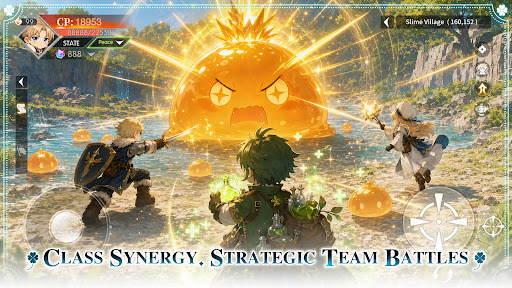

Legend says that in the continent of Clovia, four-leaf clovers drift in the wind, guiding the way to a fantastical world.
There, vast forests, open grasslands, and ancient ruins come together, filled with the unknown and countless surprises, as well as many untold stories waiting to be discovered.
Everyone who steps into this world will begin their own unique adventure.
Class Synergy, Strategic Team Battles
Combine a variety of classes to create the perfect team composition. Leverage each role’s unique strengths and adapt to ever-changing battles to overcome every challenge ahead.
Idle Progression, Rich Rewards
Keep growing even while offline. Earn valuable resources and equipment automatically, allowing you to advance your adventure with ease and enjoy steady progression at your own pace.
Unlock New Classes, Grow Stronger
As your journey unfolds, new classes become available, bringing fresh skills and combat styles. Continue to strengthen your character and discover new ways to conquer the challenges ahead.
Explore the World, Discover Hidden Wonders
Travel across vast grasslands, dense forests, and ancient ruins. Venture into unexplored regions, uncover hidden secrets, and experience the unique stories each land has to offer.
Gather Allies, Adventure Together
Join forces with like-minded companions and take on challenges as a team. Grow stronger through every battle and expedition while creating unforgettable memories along the way.
แสดงเพิ่มเติม

1. ดาวน์โหลดตัวติดตั้ง MEmu และสิ้นสุดการติดตั้ง

2. เริ่ม MEmu จากนั้นเปิด Google Play บนหน้าแรก

3. ค้นหา Clover Tales: Idle Adventure ใน Google Play
Install
4. ดาวน์โหลดและติดตั้ง Clover Tales: Idle Adventure
5. เมื่อติดตั้งเสร็จให้คลิกที่ไอคอนเพื่อเริ่มใช้งาน

6. สนุกกับการเล่น Clover Tales: Idle Adventure บนพีซีด้วย MEmu
MEmu App Player เป็นอีมูเลเตอร์ Android ที่ดีที่สุดและผู้คนกว่า 50 ล้านคนเพลิดเพลินไปกับประสบการณ์การเล่นเกม Android ที่ยอดเยี่ยม เทคโนโลยีการจำลองเสมือนของ MEmu ช่วยให้คุณเล่นเกม Android หลายพันเกมได้อย่างราบรื่นบนพีซีของคุณแม้แต่เกมที่ต้องใช้กราฟิกมากที่สุด
จอใหญ่และกราฟฟิกสวยกว่า; เล่นได้นาน, ไม่ต้องใช้แบตเตอรี่โทรศัพท์หรือเน็ตโทรศัพท์.
ระบบปรับแต่งปุ่มคีย์บอร์ดและเม้าส์ตามที่คุณเลือก
เล่นมากกว่าหนึ่งเกมบน PC ในเวลาเดียวกันด้วยระบบหลายจอหรือ Multi-Instance manager.
Play Clover Tales: Idle Adventure on PC by following steps:

























![[ไกด์เกม] CookieRun Classic แนะนำ 5 คุกกี้น่าปั้น น่าลงทุน ที่มือใหม่ห้ามพลาด! (เล่นบน PC ผ่าน MEmu ให้ลื่นสุด ๆ) PC](https://www.memuplay.com/blog/wp-content/uploads/2026/08/579c01ab-a953-45b3-8115-9b6279b7d6f9.png)


















