
Goodnight
Güncellendi
Mevcut Sürüm
1.134.0
Sunan

Cep telefonunda Goodnight kullanırken fazla şarjlardan endişelenme, kendini küçük ekrandan kurtar ve uygulamayı çok daha büyük bir ekranda kullanmanın tadını çıkar. Şu andan itibaren, klavye ve fare ile uygulamayı tam ekran da kullanmayı dene. MEmu, beklediğin tüm şaşırtıcı özellikleri sunar: hızlı ve kolay kurulum, sezgisel kontroller, bunun dışında pil sınırı, mobil veri ve rahatsız edici aramalar artık yok. Yepyeni MEmu 9, bilgisayarında Goodnight kullanmanın en iyi seçimidir. Emilimimizle kodlanan çok örnekli yönetici, aynı anda 2 veya daha fazla hesap açmayı mümkün kılar. Ve en önemlisi, özel emülasyon motorumuz PC'nin tüm potansiyelini serbest bırakabilir, her şeyi pürüzsüz ve eğlenceli hale getirebilir.
Daha fazla göster
Goodnight’i MEmu Android Emülatör ile PC’ye indirin. Büyük ekranda oynamanın keyfini çıkarın. Find someone special to say Goodnight !



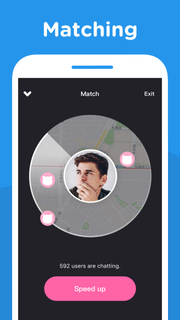
Find someone special to say Goodnight !Goodnight app is an incredibly simple, fun and exciting voice-chatting app that you can call and chat with someone close to you for free. Whether you want to meet new people close by, make new friends, learn and practice new languages (like Spanish or English) or find your romance, Goodnight is the app you need on your phone.Every day every night, 24 hours for free. Once you connect with someone, you can talk up to 7 minutes.If you enjoy your match, become friends and send messages again another time.---------------------------------------------------------All packages are auto-renewable subscriptions which mean the subscription will be automatically renewed when it runs out unless you cancel it at least 24 hours before the end of the current subscription period.Subscription payment will be charged to the Google Play account at confirmation of purchase.An account will be charged for renewal within 24-hours prior to the end of the current period, and identify the cost of the renewal.Subscriptions may be managed by the user and auto-renewal may be turned off by going to the user's Account Settings after purchase.No cancellation of the current subscription is allowed during active subscription period.---------------------------------------------------------Permission detail for Goodnight:* STORAGE / CAMERA :Using for taking photo or selecting photo from device album.* MICROPHONE :Using for voice call, sending voice message and voice intro recording.* PHONE :Using for getting phone call status.* LOCATION :Using for accessing user's location while matching.
Daha fazla göster

1. MEmu yükleyicisini indirin ve kurulumu tamamlayın

2. MEmu'yu başlatın ve ana sayfada Google Play'i açın

3. Google Play'de Goodnight arayın
Install
4. Goodnight indirin ve yükleyin
5. Kurulum tamamlandığında başlamak için simgeye tıklayın

6. Goodnight'i PC'de için MEmu'yu kullanın
MEmu Play, 50 milyon kullanıcısıyla en iyi ücretsiz Android emülatörüdür ve en üst düzey Android uygulama deneyiminin keyfini çıkarır. MEmu'nun sanallaştırma teknolojisi, en zorlu uygulamalar da dahil olmak üzere binlerce uygulamayı bilgisayarınızda sorunsuz bir şekilde çalıştırmanızı sağlar.
Daha büyük ekranla daha iyi grafiklere sahip; Pil veya mobil veri sınırlaması olmaksızın uzun süre.
Keymapping klavye ve fare veya gamepad'in hassas kontrolü için destek verir.
Multi-Instance yöneticisi ile tek bir bilgisayarda aynı anda birden fazla oyun hesabı veya görev gerçekleşilebilir.
Use Goodnight on PC by following steps: