Noteshelf 3: Digital Notes
Güncellendi
Mevcut Sürüm
1.2.1
Sunan

Cep telefonunda Noteshelf 3: Digital Notes kullanırken fazla şarjlardan endişelenme, kendini küçük ekrandan kurtar ve uygulamayı çok daha büyük bir ekranda kullanmanın tadını çıkar. Şu andan itibaren, klavye ve fare ile uygulamayı tam ekran da kullanmayı dene. MEmu, beklediğin tüm şaşırtıcı özellikleri sunar: hızlı ve kolay kurulum, sezgisel kontroller, bunun dışında pil sınırı, mobil veri ve rahatsız edici aramalar artık yok. Yepyeni MEmu 9, bilgisayarında Noteshelf 3: Digital Notes kullanmanın en iyi seçimidir. Emilimimizle kodlanan çok örnekli yönetici, aynı anda 2 veya daha fazla hesap açmayı mümkün kılar. Ve en önemlisi, özel emülasyon motorumuz PC'nin tüm potansiyelini serbest bırakabilir, her şeyi pürüzsüz ve eğlenceli hale getirebilir.
Daha fazla göster
Noteshelf 3: Digital Notes’i MEmu Android Emülatör ile PC’ye indirin. Büyük ekranda oynamanın keyfini çıkarın. "Introducing the all new Noteshelf 3 - the perfect note-taking app for students, teachers, professionals, artists and bullet journal enthusiasts to create & organize digital notes.
"Introducing the all new Noteshelf 3 - the perfect note-taking app for students, teachers, professionals, artists and bullet journal enthusiasts to create & organize digital notes. Download for free and embark on a journey of seamless organization, productivity and creativity.
PERSONALIZE YOUR NOTE-TAKING EXPERIENCE
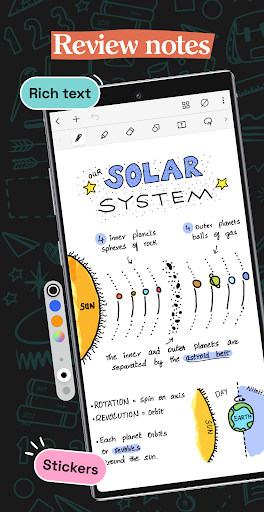
- Craft beautiful handwritten notes with a range of lifelike pens and highlighters. Try our fountain pen for an aesthetic touch to your handwriting.
- Take notes on lined, dotted, or grid papers in any color or line spacing.
- Personalize your digital notebooks with multiple cover options - from classic designs to custom ones of your own images or artwork.
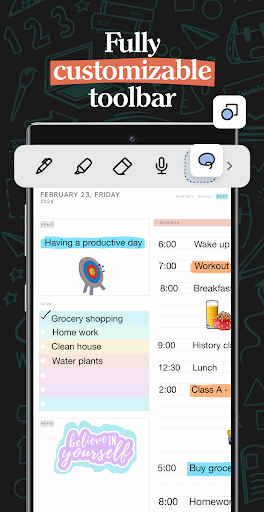
- Enjoy a fully customizable toolbar! Add, remove, or re-arrange tools according to your unique workflow.
- Choose from a vast library of 200+ exclusive templates for study planners, class notes, wellness trackers, bullet journals, etc., created by the Noteshelf team.
- Plan and organize your daily tasks with configurable digital diaries & journals.
WRITE, TYPE, DRAW, OR RECORD - YOUR CHOICE!
- Transform your strokes into flawless shapes or choose geometric shapes to create flowcharts and diagrams.
- Type your notes in various styles and formatting options.
- Record audio as you take notes and never miss anything important - great for lectures & meetings!
- Convert handwriting into text and search handwritten notes with handwriting recognition in 65 supported languages!
- Make every page uniquely yours with fun stickers.
- Find the perfect visuals to complement your notes from the UNSPLASH and PIXABAY libraries.
- Use advanced image editing features like background removal and freeform cropping.
DISCOVER THE BLISS OF PAPERLESS ORGANIZATION
- Organize your notebooks into categories, groups, subgroups, and sort them in your preferred order.
- Bookmark important pages, name them, and add colors to create your personalized table of contents.
- Multi-task and work on two notebooks simultaneously with multiple windows support.
ANNOTATE LIKE A PRO
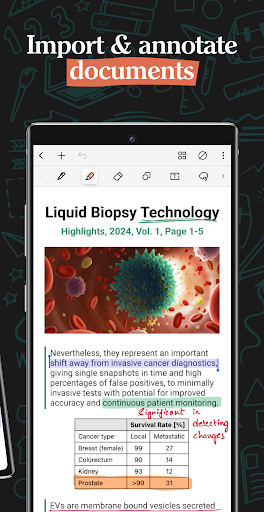
- Import and highlight, underline or annotate PDFs & images with precision.
- Use the built-in document scanner to quickly digitize physical documents.
- Export and share your notes as images & PDFs.
LET NOTESHELF AI DO THE HEAVY LIFTING
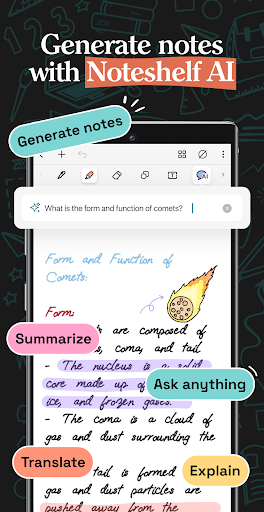
- Generate handwritten notes effortlessly on any topic with Noteshelf AI.
- Use Noteshelf AI to summarize whole pages, translate text into different languages, explain complex terms, and more.
KEEP YOUR NOTES SAFE & ACCESSIBLE
- Secure your notes with passwords, Face ID or Touch ID.
- Access your notes across your Android devices with Google Drive sync.
- Auto-backup your valuable notes to popular cloud storage devices like Google Drive, OneDrive, Dropbox and WebDAV.
- Auto-publish notes to Evernote and access them from anywhere.
STAY TUNED FOR EXCITING UPDATES
We’re constantly working on new features to enhance your note-taking experience.
---
Noteshelf 3 is free to use with some limits. Go Premium and unlock the full experience with a small one-time fee:
- Unlimited Notebooks
- Handwriting recognition and search
- Digital Diaries
Have a suggestion? Reach out to us at noteshelf[at]fluidtouch.biz. We’d love to hear from you!
Happy note-taking!
Daha fazla göster

1. MEmu yükleyicisini indirin ve kurulumu tamamlayın

2. MEmu'yu başlatın ve ana sayfada Google Play'i açın

3. Google Play'de Noteshelf 3: Digital Notes arayın
Install
4. Noteshelf 3: Digital Notes indirin ve yükleyin
5. Kurulum tamamlandığında başlamak için simgeye tıklayın

6. Noteshelf 3: Digital Notes'i PC'de için MEmu'yu kullanın
MEmu Play, 50 milyon kullanıcısıyla en iyi ücretsiz Android emülatörüdür ve en üst düzey Android uygulama deneyiminin keyfini çıkarır. MEmu'nun sanallaştırma teknolojisi, en zorlu uygulamalar da dahil olmak üzere binlerce uygulamayı bilgisayarınızda sorunsuz bir şekilde çalıştırmanızı sağlar.
Daha büyük ekranla daha iyi grafiklere sahip; Pil veya mobil veri sınırlaması olmaksızın uzun süre.
Keymapping klavye ve fare veya gamepad'in hassas kontrolü için destek verir.
Multi-Instance yöneticisi ile tek bir bilgisayarda aynı anda birden fazla oyun hesabı veya görev gerçekleşilebilir.
Use Noteshelf 3: Digital Notes on PC by following steps: