Noteshelf 3: Digital Notes
Zaktualizowano
Aktualna wersja
1.2.1
Sprzedawca

Przestań martwić się nadmiernymi opłatami podczas korzystania z Noteshelf 3: Digital Notes na telefonie komórkowym, uwolnij się od małego ekranu i ciesz się korzystaniem z aplikacji na znacznie większym wyświetlaczu. Od teraz korzystaj z aplikacji na pełnym ekranie za pomocą klawiatury i myszy. MEmu oferuje wszystkie zaskakujące funkcje, których się spodziewałeś: szybką instalację i łatwą konfigurację, intuicyjne sterowanie, koniec z ograniczeniami baterii, danych mobilnych i niepokojących połączeń. Zupełnie nowy MEmu 9 to najlepszy wybór do używania Noteshelf 3: Digital Notes na twoim komputerze. Zakodowany przez naszą absorpcję, menedżer wielu instancji umożliwia otwarcie 2 lub więcej kont w tym samym czasie. A co najważniejsze, nasz ekskluzywny emulator może uwolnić pełny potencjał twojego komputera, sprawić, że wszystko będzie płynne i przyjemne.
Pokaż więcej
Ciesz się wspaniałym doświadczeniem podczas grania w Noteshelf 3: Digital Notes na komputerze z aplikacją MEMU App Player. Jest to potężny darmowy emulator Androida pozwalający grać w tysiące gier na Androida. "Introducing the all new Noteshelf 3 - the perfect note-taking app for students, teachers, professionals, artists and bullet journal enthusiasts to create & organize digital notes.
"Introducing the all new Noteshelf 3 - the perfect note-taking app for students, teachers, professionals, artists and bullet journal enthusiasts to create & organize digital notes. Download for free and embark on a journey of seamless organization, productivity and creativity.
PERSONALIZE YOUR NOTE-TAKING EXPERIENCE
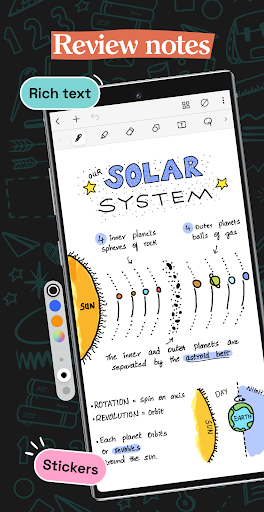
- Craft beautiful handwritten notes with a range of lifelike pens and highlighters. Try our fountain pen for an aesthetic touch to your handwriting.
- Take notes on lined, dotted, or grid papers in any color or line spacing.
- Personalize your digital notebooks with multiple cover options - from classic designs to custom ones of your own images or artwork.
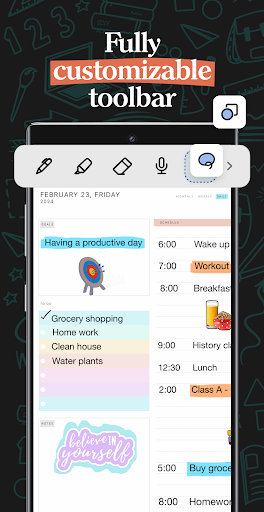
- Enjoy a fully customizable toolbar! Add, remove, or re-arrange tools according to your unique workflow.
- Choose from a vast library of 200+ exclusive templates for study planners, class notes, wellness trackers, bullet journals, etc., created by the Noteshelf team.
- Plan and organize your daily tasks with configurable digital diaries & journals.
WRITE, TYPE, DRAW, OR RECORD - YOUR CHOICE!
- Transform your strokes into flawless shapes or choose geometric shapes to create flowcharts and diagrams.
- Type your notes in various styles and formatting options.
- Record audio as you take notes and never miss anything important - great for lectures & meetings!
- Convert handwriting into text and search handwritten notes with handwriting recognition in 65 supported languages!
- Make every page uniquely yours with fun stickers.
- Find the perfect visuals to complement your notes from the UNSPLASH and PIXABAY libraries.
- Use advanced image editing features like background removal and freeform cropping.
DISCOVER THE BLISS OF PAPERLESS ORGANIZATION
- Organize your notebooks into categories, groups, subgroups, and sort them in your preferred order.
- Bookmark important pages, name them, and add colors to create your personalized table of contents.
- Multi-task and work on two notebooks simultaneously with multiple windows support.
ANNOTATE LIKE A PRO
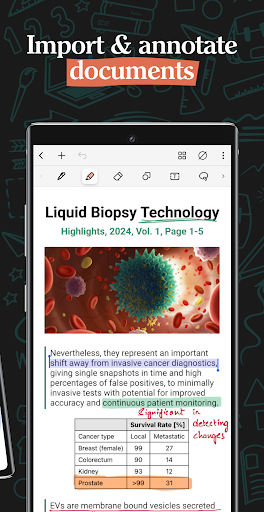
- Import and highlight, underline or annotate PDFs & images with precision.
- Use the built-in document scanner to quickly digitize physical documents.
- Export and share your notes as images & PDFs.
LET NOTESHELF AI DO THE HEAVY LIFTING
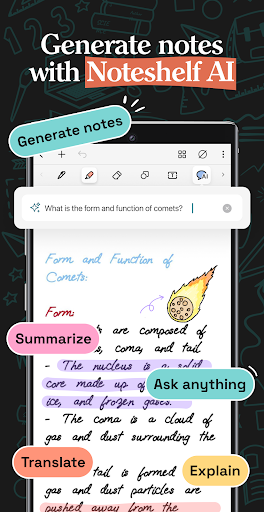
- Generate handwritten notes effortlessly on any topic with Noteshelf AI.
- Use Noteshelf AI to summarize whole pages, translate text into different languages, explain complex terms, and more.
KEEP YOUR NOTES SAFE & ACCESSIBLE
- Secure your notes with passwords, Face ID or Touch ID.
- Access your notes across your Android devices with Google Drive sync.
- Auto-backup your valuable notes to popular cloud storage devices like Google Drive, OneDrive, Dropbox and WebDAV.
- Auto-publish notes to Evernote and access them from anywhere.
STAY TUNED FOR EXCITING UPDATES
We’re constantly working on new features to enhance your note-taking experience.
---
Noteshelf 3 is free to use with some limits. Go Premium and unlock the full experience with a small one-time fee:
- Unlimited Notebooks
- Handwriting recognition and search
- Digital Diaries
Have a suggestion? Reach out to us at noteshelf[at]fluidtouch.biz. We’d love to hear from you!
Happy note-taking!
Pokaż więcej

1. Pobierz instalator MEmu i zakończ instalację

2. Uruchom MEmu, a następnie otwórz Google Play na pulpicie

3. Wyszukaj Noteshelf 3: Digital Notes w Google Play
Install
4. Pobierz i zainstaluj Noteshelf 3: Digital Notes
5. Po zakończeniu instalacji kliknij ikonę, aby rozpocząć

6. Użyj MEmu, aby doświadczyć Noteshelf 3: Digital Notes na swoim komputerze
MEmu Play to najlepszy emulator Androida, z którego korzysta ponad 100 milionów użytkowników, ciesząc się wyjątkowym doświadczeniem aplikacji na Androida. Technologia wirtualizacji MEmu pozwala na płynne uruchamianie tysięcy aplikacji Androida na komputerze, nawet tych najbardziej wymagających.
Większy ekran z lepszą grafiką; Długi czas, bez ograniczeń baterii lub danych mobilnych.
Pełna obsługa mapowania klawiszy dla precyzyjnego sterowania klawiaturą i myszą lub gamepadem.
Wiele kont gier lub zadań na jednym komputerze jednocześnie z menedżerem wielu instancji.
Use Noteshelf 3: Digital Notes on PC by following steps: