Noteshelf 3: Digital Notes
อัปเดตเมื่อ
เวอร์ชันปัจจุบัน
1.2.1
ให้บริการโดย

เมื่อใช้ Noteshelf 3: Digital Notes บนโทรศัพท์ของคุณไม่ต้องกังวลกับการชาร์จไฟมากเกินไปปลดปล่อยตัวคุณเองจากหน้าจอขนาดเล็กและสนุกกับการใช้แอพนี้บนหน้าจอขนาดใหญ่ จากนี้ไปรับประสบการณ์เต็มหน้าจอของแอปพลิเคชันของคุณด้วยคีย์บอร์ดและเมาส์ MEmu มีคุณสมบัติที่น่าแปลกใจที่คุณคาดหวัง: การติดตั้งที่รวดเร็วและการตั้งค่าที่ง่ายควบคุมได้ง่ายไม่ จำกัด แบตเตอรี่ข้อมูลมือถือและการโทรที่รบกวน MEmu 9 ใหม่ล่าสุดเป็นตัวเลือกที่ดีที่สุดสำหรับการใช้ Meitu – โปรแกรมแก้ไขภาพแนวธรรมชาติ บนคอมพิวเตอร์ของคุณ ด้วยรหัสการดูดซึมของเราผู้จัดการหลายอินสแตนซ์ทำให้สามารถเปิดบัญชี 2 บัญชีขึ้นไปในเวลาเดียวกันได้ และที่สำคัญที่สุดเอ็นจิ้นจำลองพิเศษของเราสามารถปลดปล่อยศักยภาพของPCของคุณและทำให้ทุกอย่างราบรื่นและสนุกสนาน
แสดงเพิ่มเติม
ดาวน์โหลด Noteshelf 3: Digital Notes บน PC ด้วย MEmu Android Emulator สนุกกับการเล่นบนหน้าจอขนาดใหญ่ "Introducing the all new Noteshelf 3 - the perfect note-taking app for students, teachers, professionals, artists and bullet journal enthusiasts to create & organize digital notes.
"Introducing the all new Noteshelf 3 - the perfect note-taking app for students, teachers, professionals, artists and bullet journal enthusiasts to create & organize digital notes. Download for free and embark on a journey of seamless organization, productivity and creativity.
PERSONALIZE YOUR NOTE-TAKING EXPERIENCE
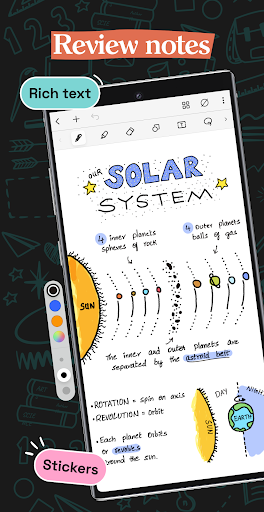
- Craft beautiful handwritten notes with a range of lifelike pens and highlighters. Try our fountain pen for an aesthetic touch to your handwriting.
- Take notes on lined, dotted, or grid papers in any color or line spacing.
- Personalize your digital notebooks with multiple cover options - from classic designs to custom ones of your own images or artwork.
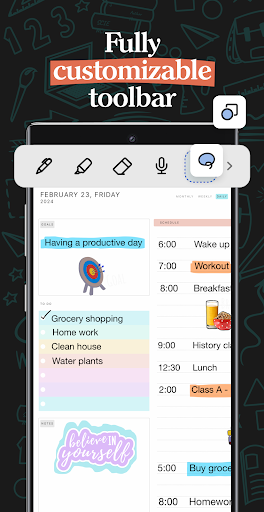
- Enjoy a fully customizable toolbar! Add, remove, or re-arrange tools according to your unique workflow.
- Choose from a vast library of 200+ exclusive templates for study planners, class notes, wellness trackers, bullet journals, etc., created by the Noteshelf team.
- Plan and organize your daily tasks with configurable digital diaries & journals.
WRITE, TYPE, DRAW, OR RECORD - YOUR CHOICE!
- Transform your strokes into flawless shapes or choose geometric shapes to create flowcharts and diagrams.
- Type your notes in various styles and formatting options.
- Record audio as you take notes and never miss anything important - great for lectures & meetings!
- Convert handwriting into text and search handwritten notes with handwriting recognition in 65 supported languages!
- Make every page uniquely yours with fun stickers.
- Find the perfect visuals to complement your notes from the UNSPLASH and PIXABAY libraries.
- Use advanced image editing features like background removal and freeform cropping.
DISCOVER THE BLISS OF PAPERLESS ORGANIZATION
- Organize your notebooks into categories, groups, subgroups, and sort them in your preferred order.
- Bookmark important pages, name them, and add colors to create your personalized table of contents.
- Multi-task and work on two notebooks simultaneously with multiple windows support.
ANNOTATE LIKE A PRO
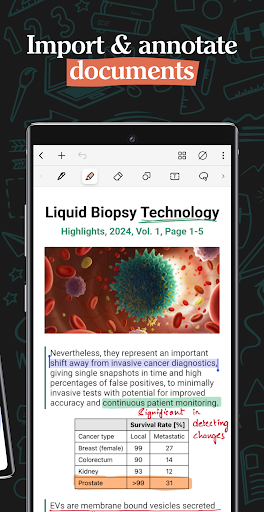
- Import and highlight, underline or annotate PDFs & images with precision.
- Use the built-in document scanner to quickly digitize physical documents.
- Export and share your notes as images & PDFs.
LET NOTESHELF AI DO THE HEAVY LIFTING
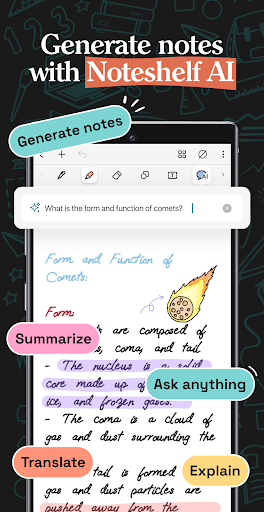
- Generate handwritten notes effortlessly on any topic with Noteshelf AI.
- Use Noteshelf AI to summarize whole pages, translate text into different languages, explain complex terms, and more.
KEEP YOUR NOTES SAFE & ACCESSIBLE
- Secure your notes with passwords, Face ID or Touch ID.
- Access your notes across your Android devices with Google Drive sync.
- Auto-backup your valuable notes to popular cloud storage devices like Google Drive, OneDrive, Dropbox and WebDAV.
- Auto-publish notes to Evernote and access them from anywhere.
STAY TUNED FOR EXCITING UPDATES
We’re constantly working on new features to enhance your note-taking experience.
---
Noteshelf 3 is free to use with some limits. Go Premium and unlock the full experience with a small one-time fee:
- Unlimited Notebooks
- Handwriting recognition and search
- Digital Diaries
Have a suggestion? Reach out to us at noteshelf[at]fluidtouch.biz. We’d love to hear from you!
Happy note-taking!
แสดงเพิ่มเติม

1. ดาวน์โหลดตัวติดตั้ง MEmu และสิ้นสุดการติดตั้ง

2. เริ่ม MEmu จากนั้นเปิด Google Play บนหน้าแรก

3. ค้นหา Noteshelf 3: Digital Notes ใน Google Play
Install
4. ดาวน์โหลดและติดตั้ง Noteshelf 3: Digital Notes
5. เมื่อติดตั้งเสร็จให้คลิกที่ไอคอนเพื่อเริ่มใช้งาน

6. ใช้ MEmu เพื่อสัมผัสประสบการณ์ Noteshelf 3: Digital Notes บนคอมพิวเตอร์ของคุณ
MEmu Play คือโปรแกรมจำลอง Android ที่ดีที่สุด มีผู้ใช้มากกว่า 50 ล้านคน มอบประสบการณ์การใช้งานแอป Android ขั้นสุดยอดให้กับคุณ เทคโนโลยีจำลองเสมือนของ MEmu ช่วยให้คุณรันแอป Android หลายพันแอปบนคอมพิวเตอร์ได้อย่างราบรื่น แม้แอปที่กินทรัพยากรเครื่องสูงที่สุด
จอใหญ่และกราฟฟิกสวยกว่า; เล่นได้นาน, ไม่ต้องใช้แบตเตอรี่โทรศัพท์หรือเน็ตโทรศัพท์.
ระบบปรับแต่งปุ่มคีย์บอร์ดและเม้าส์ตามที่คุณเลือก
เล่นมากกว่าหนึ่งเกมบน PC ในเวลาเดียวกันด้วยระบบหลายจอหรือ Multi-Instance manager.
Use Noteshelf 3: Digital Notes on PC by following steps: