PrinterShare Mobile Print
Güncellendi
Mevcut Sürüm
12.15.01
Sunan

Cep telefonunda PrinterShare Mobile Print kullanırken fazla şarjlardan endişelenme, kendini küçük ekrandan kurtar ve uygulamayı çok daha büyük bir ekranda kullanmanın tadını çıkar. Şu andan itibaren, klavye ve fare ile uygulamayı tam ekran da kullanmayı dene. MEmu, beklediğin tüm şaşırtıcı özellikleri sunar: hızlı ve kolay kurulum, sezgisel kontroller, bunun dışında pil sınırı, mobil veri ve rahatsız edici aramalar artık yok. Yepyeni MEmu 9, bilgisayarında PrinterShare Mobile Print kullanmanın en iyi seçimidir. Emilimimizle kodlanan çok örnekli yönetici, aynı anda 2 veya daha fazla hesap açmayı mümkün kılar. Ve en önemlisi, özel emülasyon motorumuz PC'nin tüm potansiyelini serbest bırakabilir, her şeyi pürüzsüz ve eğlenceli hale getirebilir.
Daha fazla göster
PrinterShare Mobile Print’i MEmu Android Emülatör ile PC’ye indirin. Büyük ekranda oynamanın keyfini çıkarın. Print directly from Android phone or tablet to almost any printer!
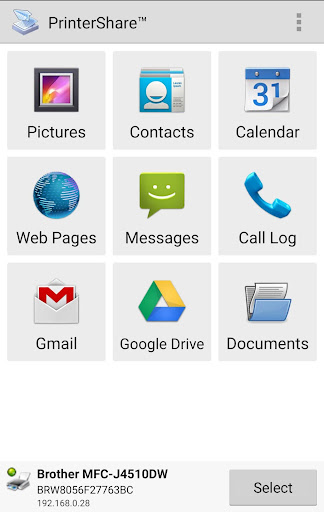
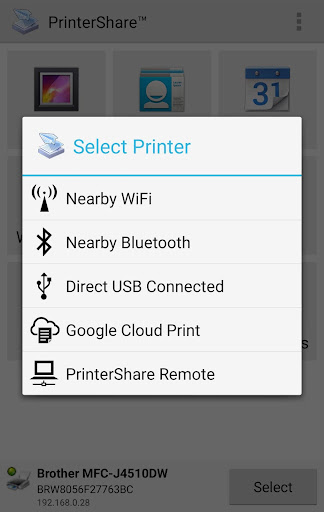
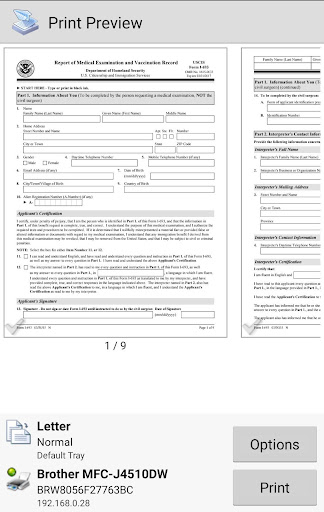
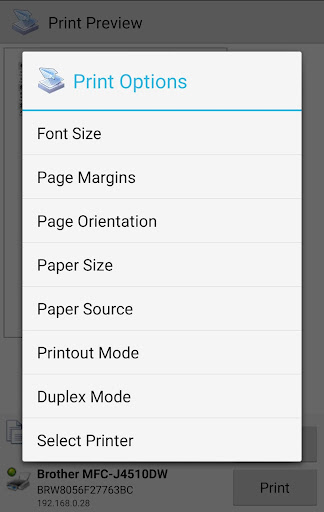
Print directly from Android phone or tablet to almost any printer! Print photos, emails, documents (including PDF, Microsoft® Word, Excel®, PowerPoint®, and other files), bills, invoices, messages, web pages, and more. PrinterShare makes printing easy and convenient whether your printer is right next to you or across the world!
IMPORTANT: Some of the features are NOT FREE! To unlock these features, you would need to make a purchase to unlock the Premium Features of the free app. We highly recommend printing the test page to ensure compatibility with your printer prior to making a purchase.
NOTE: Due to the update to the Permissions policy on Google Play, we had to remove the SMS and Call log printing features from our app.
With PrinterShare you can easily print images and photos (JPG, PNG, GIF), emails (from Gmail) and attachments (PDF, DOC, XLS, PPT, TXT), contacts, agenda, web pages (HTML), and other digital content from device memory, cloud storage providers such as Google Drive, One Drive, Box, Dropbox and other applications using Share action. You even can print text messages for trial or legal matters!
Print UPS shipping labels directly from a browser on your device to supported thermal printers by logging into the UPS website.
Also, you can configure many printing options such as paper size, page orientation, copies, page range, one- or two-sided printing (duplex mode), print quality (resolution), color or monochrome, media tray, and more.
With the free version of the app, you can:
* Print with certain restrictions on nearby wireless (WiFi, Bluetooth) and direct USB OTG connected printers;
* Print on Windows shared (SMB/CIFS) or Mac shared printers;
Premium Features include:
* Unlimited Nearby direct printing (PDFs, documents, photos, and more) via Wi-Fi or Bluetooth without a computer;
* Complimentary 100 pages for Remote Printing under the same account
PrinterShare supports a wide variety of HP, Canon, Brother, Kodak, Samsung, Dell, Ricoh, Lexmark, Kyocera, OKI, and other printers including legacy networkable. A full list of supported printers available at http://printershare.com/help-mobile-supported.sdf. You can also print to unsupported and legacy printers with our free computer software for Mac and Windows available at http://printershare.com.
Here is the list of printers supported by the PrinterShare app:
http://www.printershare.com/help-mobile-supported.sdf
Make sure that your printer is supported.
Please note:
1) Requested permissions are needed to print content and are not used to collect your personal data. For a more detailed explanation please see our FAQ at http://www.printershare.com/help-mobile-faq.sdf
2) If something isn't working as expected, please send us an email to support@printershare.com
Have a good print!
P.S. For direct nearby printing to selected printer models PrinterShare downloads and uses drivers provided by HPLIP (http://hplipopensource.com) and GutenPrint (http://gimp-print.sourceforge.net). These drivers are distributed under GNU General Public License, version 2.
Daha fazla göster

1. MEmu yükleyicisini indirin ve kurulumu tamamlayın

2. MEmu'yu başlatın ve ana sayfada Google Play'i açın

3. Google Play'de PrinterShare Mobile Print arayın
Install
4. PrinterShare Mobile Print indirin ve yükleyin
5. Kurulum tamamlandığında başlamak için simgeye tıklayın

6. PrinterShare Mobile Print'i PC'de için MEmu'yu kullanın
MEmu Play, 50 milyon kullanıcısıyla en iyi ücretsiz Android emülatörüdür ve en üst düzey Android uygulama deneyiminin keyfini çıkarır. MEmu'nun sanallaştırma teknolojisi, en zorlu uygulamalar da dahil olmak üzere binlerce uygulamayı bilgisayarınızda sorunsuz bir şekilde çalıştırmanızı sağlar.
Daha büyük ekranla daha iyi grafiklere sahip; Pil veya mobil veri sınırlaması olmaksızın uzun süre.
Keymapping klavye ve fare veya gamepad'in hassas kontrolü için destek verir.
Multi-Instance yöneticisi ile tek bir bilgisayarda aynı anda birden fazla oyun hesabı veya görev gerçekleşilebilir.
Use PrinterShare Mobile Print on PC by following steps: