PrinterShare Mobile Print
अपडेट किया गया
वर्तमान वर्शन
12.15.01
संसाधन

PrinterShare Mobile Print पर अपनी मोबाइल डेटा सीमा पार करने को अलविदा कहें और छोटी स्क्रीन की सीमाओं से मुक्त होकर बड़े डिस्प्ले के लाभों का अनुभव करें। अब, आप अपने कीबोर्ड और माउस का उपयोग करके फुल-स्क्रीन मोड में टॉपर्स क्लैन की शक्ति का अनुभव कर सकते हैं। MEmu Play में वे सभी बेहतरीन सुविधाएँ हैं जिनकी आप अपेक्षा करते हैं: त्वरित इंस्टॉलेशन और आसान सेटअप, सहज नियंत्रण, बैटरी की आवश्यकता नहीं, और कोई डेटा या कॉल समय सीमा नहीं। नया MEmu 9 आपके कंप्यूटर पर PrinterShare Mobile Print का उपयोग करने के लिए सबसे अच्छा विकल्प है। हमारा मालिकाना मल्टी-इंस्टेंस मैनेजर एक साथ दो या अधिक खातों को चलाने का समर्थन करता है। इससे भी महत्वपूर्ण बात यह है कि हमारा अनूठा इम्यूलेशन इंजन आपके कंप्यूटर के प्रदर्शन का पूरा उपयोग करता है, जिससे एक सहज और निर्बाध अनुभव मिलता है।
और दिखाएं
डाउनलोड करें PrinterShare Mobile Print पीसी पर MEmu एंड्रॉयड एमुलेटर के साथ बड़े पर्दे पर खेलने का आनंद लें। Print directly from Android phone or tablet to almost any printer!
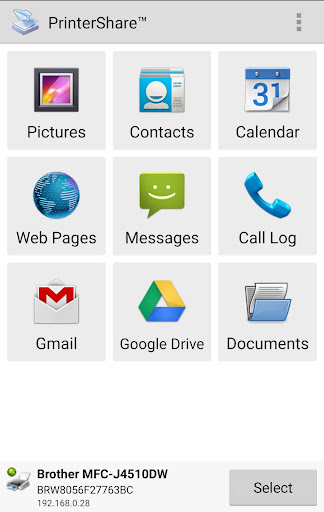
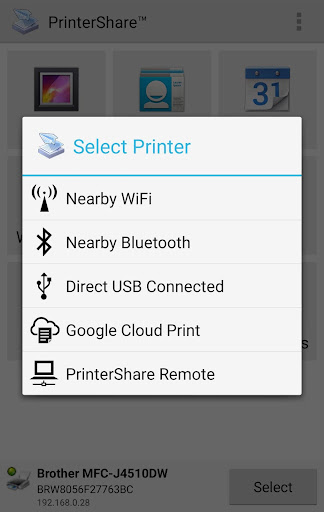
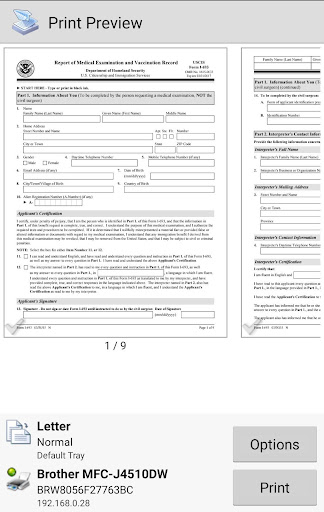
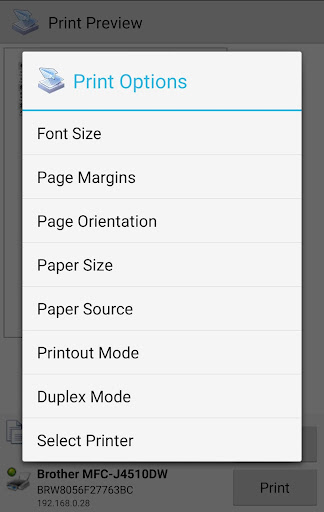
Print directly from Android phone or tablet to almost any printer! Print photos, emails, documents (including PDF, Microsoft® Word, Excel®, PowerPoint®, and other files), bills, invoices, messages, web pages, and more. PrinterShare makes printing easy and convenient whether your printer is right next to you or across the world!
IMPORTANT: Some of the features are NOT FREE! To unlock these features, you would need to make a purchase to unlock the Premium Features of the free app. We highly recommend printing the test page to ensure compatibility with your printer prior to making a purchase.
NOTE: Due to the update to the Permissions policy on Google Play, we had to remove the SMS and Call log printing features from our app.
With PrinterShare you can easily print images and photos (JPG, PNG, GIF), emails (from Gmail) and attachments (PDF, DOC, XLS, PPT, TXT), contacts, agenda, web pages (HTML), and other digital content from device memory, cloud storage providers such as Google Drive, One Drive, Box, Dropbox and other applications using Share action. You even can print text messages for trial or legal matters!
Print UPS shipping labels directly from a browser on your device to supported thermal printers by logging into the UPS website.
Also, you can configure many printing options such as paper size, page orientation, copies, page range, one- or two-sided printing (duplex mode), print quality (resolution), color or monochrome, media tray, and more.
With the free version of the app, you can:
* Print with certain restrictions on nearby wireless (WiFi, Bluetooth) and direct USB OTG connected printers;
* Print on Windows shared (SMB/CIFS) or Mac shared printers;
Premium Features include:
* Unlimited Nearby direct printing (PDFs, documents, photos, and more) via Wi-Fi or Bluetooth without a computer;
* Complimentary 100 pages for Remote Printing under the same account
PrinterShare supports a wide variety of HP, Canon, Brother, Kodak, Samsung, Dell, Ricoh, Lexmark, Kyocera, OKI, and other printers including legacy networkable. A full list of supported printers available at http://printershare.com/help-mobile-supported.sdf. You can also print to unsupported and legacy printers with our free computer software for Mac and Windows available at http://printershare.com.
Here is the list of printers supported by the PrinterShare app:
http://www.printershare.com/help-mobile-supported.sdf
Make sure that your printer is supported.
Please note:
1) Requested permissions are needed to print content and are not used to collect your personal data. For a more detailed explanation please see our FAQ at http://www.printershare.com/help-mobile-faq.sdf
2) If something isn't working as expected, please send us an email to support@printershare.com
Have a good print!
P.S. For direct nearby printing to selected printer models PrinterShare downloads and uses drivers provided by HPLIP (http://hplipopensource.com) and GutenPrint (http://gimp-print.sourceforge.net). These drivers are distributed under GNU General Public License, version 2.
और दिखाएं

1. MEmu इंस्टॉलर को डाउनलोड करें और इंस्टॉलेशन को पूरा करें

2. MEmu शुरू करें फिर होमपेज पर Google Play खोलें

3. Google Play में PrinterShare Mobile Print खोजें
Install
4. PrinterShare Mobile Print डाउनलोड कर इंस्टॉल करें
5. इंस्टॉल पूरा होने पर आइकन दबाएं

6. MEmu का उपयोग करके अपने कंप्यूटर पर PrinterShare Mobile Print का अनुभव करें
MEmu Play सबसे बेहतरीन मुफ़्त Android एमुलेटर है और 5 करोड़ लोग पहले ही इसके शानदार Android ऐप अनुभव का आनंद ले चुके हैं। MEmu 9 वर्चुअलाइज़ेशन तकनीक आपको अपने PC पर हज़ारों Android ऐप्स, यहाँ तक कि सबसे ज़्यादा ग्राफ़िक्स वाले ऐप्स भी, आसानी से चलाने की सुविधा देती है।
असीमित बैटरी या मोबाइल डेटा के साथ बेहतर ग्राफिक्स के साथ बड़ी स्क्रीन; लंबी अवधि।
कीबोर्ड और माउस या गेमपैड के उत्तम नियंत्रण के लिए संपूर्ण कीमैपिंग का समर्थन करता हैं।
एक ही पीसी पर मल्टी-इंस्टेंस मैनेजर के साथ एक समय में कई गेम खाते या कार्य कर सकते हैं।
Use PrinterShare Mobile Print on PC by following steps: