Sengoku Bushido
更新日期
目前版本
提供者

愛玩Sengoku Bushido的你,雙手不應該被束縛在智慧手機的小屏幕上。像職業選手一樣用鍵盤和滑鼠來全面控制你的遊戲吧。逍遙模擬器給你提供了你所有的期待。在電腦上下載、安裝Sengoku Bushido並盡情遊玩。再也不用擔心剩餘電量、流量消耗和煩人的來電。全新的逍遙模擬器9是你在電腦上遊玩Sengoku Bushido的最佳選擇!我们用心準備,完美的按鍵映射系統讓Sengoku Bushido宛如電腦遊戲;我們,用嫻熟的技術編程,逍遙多開器讓所有遊戲開好開滿;獨一無二的虛擬化引擎釋放你電腦的全部潛力,一切都入絲般順滑。我們不僅在意你怎樣遊玩,更在意如何讓你享受遊玩的樂趣!
更多
透過逍遙模擬器,在電腦上下載Sengoku Bushido,享受大熒幕的暢快體驗。 The Sengoku Era Rises Once More.
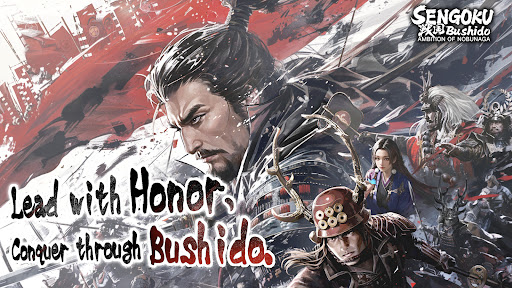
The Sengoku Era Rises Once More
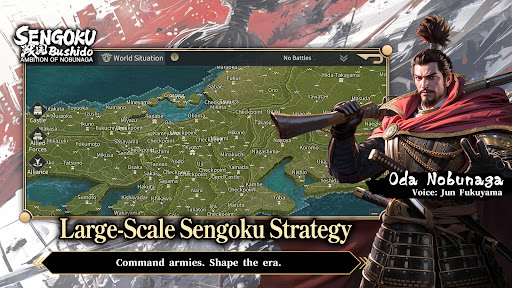
A Large-Scale Historical Strategy SLG
War returns to Japan in an age of ambition, alliances, and shifting frontlines.
Step into the Sengoku era, command powerful Generals, and shape the course of history through strategy rather than force alone.
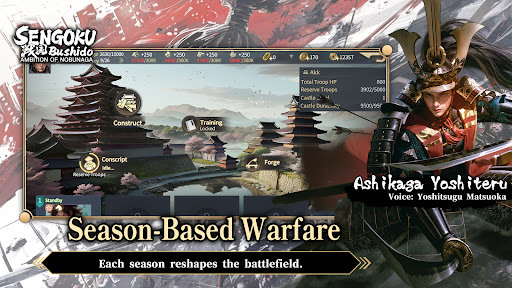
■ Season-Based Warfare
This title features a season-based strategy system, returning players to the Sengoku era with each new campaign.
Fight alongside alliance members to pursue shared seasonal objectives.
Rankings are determined by territory control and season goal progression.
At the start of every new season, territories are reset and new content is introduced.
Players may realign their chosen faction each season, while balance adjustments ensure that every campaign begins on an even battlefield—where planning, coordination, and timing matter more than legacy power.
■ Free March Across the Battlefield
March freely across the map of Japan using a real-time free march system, enabling rapid tactical responses and dynamic engagements.
Siege battles demand constant awareness of enemy alliance counterattacks.
Multiple march routes prevent concentrated pressure from high-strength forces.
Victory depends on coordination, role distribution, and alliance-level strategy.
The battlefield is never static—frontlines shift as decisions unfold in real time.
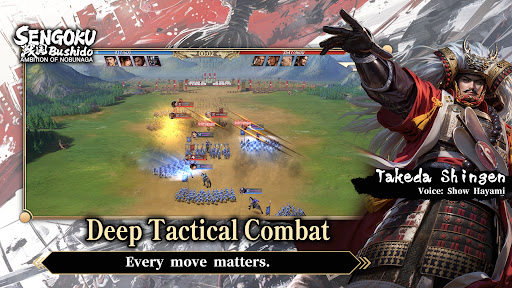
■ Deep Tactical Combat
Victory is decided before the battle begins.
Combine Generals, troop types, siege weapons, and combat techniques to create your own tactical approach.
Battles take place on a 3×3 tactical grid, with up to four units deployable per engagement.
Pre-battle formations and unit composition have a decisive impact on outcomes.
Troop types counter one another, while synergy between Generals and their skills can turn the tide of battle.
Adapt your strategy to the objective at hand:
Catapults to break castle defenses
Ballistae to strike rear formations
War Drums to bolster allied forces
Shield Wagons to withstand cavalry charges
Every move matters.
■ Premium Visual Presentation
Experience the Sengoku era through a refined, grounded visual style.
Generals are rendered in high-detail character models, from armor and attire to weapon craftsmanship.
A weighty, realistic art direction brings the era to life, creating an immersive sense of scale and presence on the battlefield.
■ Generals Brought to Life by a Star-Studded Cast
Over 200 playable Generals appear throughout the game.
Each is fully portrayed through an all-star Japanese voice cast, delivering performances that capture the ambition, resolve, and humanity of the Sengoku era.
更多

1. 下載逍遙安裝器並完成設置

2. 啟動逍遙後打開位於桌面上的谷歌商店

3. 在谷歌商店中搜尋Sengoku Bushido
Install
4. 下載並安裝Sengoku Bushido
5. 下載完成後點擊圖標來啟動

6. 透過逍遙享受在電腦上玩Sengoku Bushido
逍遙安卓是優秀的安卓模擬器,全球超過5000萬用戶的優先選擇。逍遙安卓以虛擬化技術為核心,為用户打造突破手機配備局限的遊戲平台!
大屏精細展示;無限待機,超越電池和流量限制
鍵鼠,手把操作全面支持,操作更精準
用逍遙多開同時運行多個遊戲、應用。
Play Sengoku Bushido on PC by following steps: