
Kiss KH
Оновлено
Поточна версія
9.8
Постачальник

Перестаньте турбуватися про надмірні витрати, використовуючи ххх на своєму мобільному телефоні, звільніться від крихітного екрану і насолоджуйтеся використанням програми на набагато більшому дисплеї. Відтепер отримуйте повний екран свого додатка за допомогою клавіатури та миші. MEmu пропонує вам усі дивовижні функції, які ви очікували: швидка установка та просте налаштування, інтуїтивно зрозумілі елементи керування, більше обмежень від акумулятора, мобільних даних та тривожних дзвінків. Зовсім новий MEmu 9 – найкращий вибір для використання Єдина Школа на вашому комп’ютері. За допомогою нашого поглинання менеджер із кількома примірниками одночасно дозволяє відкрити 2 або більше рахунків. І найголовніше, наш ексклюзивний емуляційний двигун може вивільнити весь потенціал вашого ПК, зробити все гладким і приємним.
Show more
Насолоджуйтесь чудовим досвідом використання Kiss KH на ПК за допомогою MEmu Play. Це потужний безкоштовний емулятор Android, який пропонує тисячі програм Android для настільних комп'ютерів. Насолоджуйтесь спілкуванням з друзями та покращенням своєї роботи з більшою ефективністю! Kiss KH helps users who want an easy place to watch Asian dramas and movies without switching between different apps.
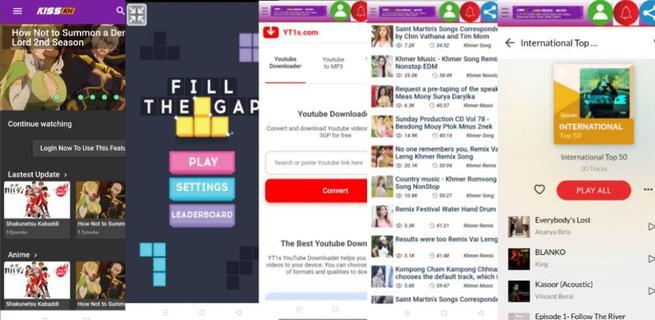
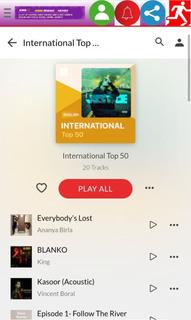
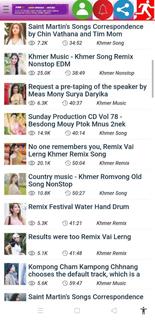
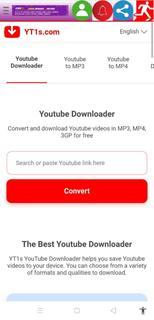
Kiss KH helps users who want an easy place to watch Asian dramas and movies without switching between different apps. It centralizes streaming and discovery in a clean layout, so you can find current hits and explore older titles with minimal effort. Because connection quality can vary, playback adapts to different situations, and navigation stays simple across sections. If you plan to download Kiss KH, the app presents entertainment content alongside handy tools, keeping everything accessible from one screen. Key features in Kiss KH Free streaming and downloads Kiss KH lets you watch dramas and movies online and save videos to your device at no cost. Playback focuses on high quality for a clear viewing experience. Downloads are helpful when you want to watch later without using mobile data. Flexible resolution control To match your connection and device, you can choose different resolutions while watching. Options range from 240p and 360p to 480p and 720p HD, and some titles may also offer 1080p. Switching resolution helps balance clarity and data usage as your network changes. Wide regional catalog Kiss KH includes a broad mix of content from multiple regions and genres. You can explore titles from South Korea, China, Japan, Thailand, Hong Kong, Hollywood, and the United States. This variety makes it easier to find the shows and films you prefer across different cultures and styles. Discovery categories Finding what to watch is straightforward with organized browsing. Kiss KH separates content by ongoing, completed, upcoming, and popularity categories. This structure helps you follow new releases, finish older series, and quickly identify what other viewers are watching right now. Navigation and quick reload A simple sidebar guides you to core sections and extras, including Movies, mini-games like Fill The Gap and Oil Hunt, social tools such as Search Tube, and music areas like Asia Music and Europe Music. If you ever face infinite loading, use the Reload option to refresh the screen and continue watching. Before downloading Kiss KH APK Many users first access Kiss KH through its website, and availability of the Android app can change over time. Version names may differ by release, so check the version details to understand what you are installing. Video quality choices affect data usage, with lower resolutions using less data and higher ones needing faster connections. Catalogs evolve as series move from ongoing to completed, and new titles arrive regularly, so expect periodic changes to what is available. How to use Kiss KH on Android Kiss KH opens to a simple home screen with clear sections for browsing and playback. After installing the Kiss KH latest version, you can start in the main Movies or Dramas area and move to other parts when needed. Launch Kiss KH and tap the sidebar to reveal all sections for browsing. Select a region or a discovery category such as ongoing, completed, upcoming, or popularity. Open a title, view the episode list, then start playback or choose Download to save the video. Tap the resolution control and switch between 240p, 360p, 480p, 720p, or 1080p when available. If the screen shows infinite loading, tap Reload to refresh and continue watching without leaving the page. Start watching with Kiss KH Kiss KH brings Asian dramas and movies together with flexible video settings and straightforward discovery. Users can stream or download, browse regional catalogs, and access extras like mini-games and music from the sidebar. To get started, install the Kiss KH APK and follow the simple steps above.
Show more

1. Download MEmu installer and finish the setup

2. Start MEmu then open Google Play on the desktop

3. Search Kiss KH in Google Play
Install
4. Download and Install Kiss KH
5. On install completion click the icon to start

6. Enjoy using Kiss KH on PC with MEmu
MEmu App Player є кращим безкоштовним емулятором Android, і 50 мільйонів людей вже користуються його чудовим ігровим досвідом Android. Технологія віртуалізації MEmu дає вам змогу відтворювати тисячі ігор Android на вашому комп'ютері, навіть найбільш насичених графікою.
Bigger screen with better graphics; Long duration, without limitation of battery or mobile data.
Full Keymapping support for precise control of keyboard and mouse or gamepad.
Multiple game accounts or tasks on single PC at one time with Multi-Instance manager.
Use Kiss KH on PC by following steps: