Anymoji - Emoji Face Recorder
تازہ کاری
موجودہ ورژن
1.2.1
پیشکش بذریعہ

اپنے موبائل فون پر Anymoji - Emoji Face Recorder کا استعمال کرتے وقت زیادہ چارج ہونے کی فکر نہ کریں، خود کو چھوٹی اسکرین سے آزاد کریں اور ایپ کو زیادہ بڑے ڈسپلے پر استعمال کرنے کا لطف اٹھائیں۔ اس کے بعد سے کی بورڈ اور ماؤس کے ساتھ اپنے ایپ کا فل اسکرین کا تجربہ حاصل کریں۔ MEmu آپ کو وہ تمام حیران کن خصوصیات پیش کرتا ہے جن کی آپ کو توقع کرتے ہیں: فوری انسٹال اور آسان سیٹ اپ، وجدانی کنٹرول، مزید بیٹری، موبائل ڈیٹا کی کوئی حد نہیں اور اب مزید پریشان کن کالز نہیں۔ نئے برانڈ کا MEmu 9 آپ کے کمپیوٹر پر Anymoji - Emoji Face Recorder استعمال کرنے کے لیے بہترین اختیار ہے۔ MEmu کثیر نظیری منیجر بیک وقت 2 یا اس سے زیادہ اکاؤنٹس کھولنا ممکن بناتا ہے۔ اور سب اہم بات، ہمارا خصوصی ایمولیشن انجن آپ کے پی سی کی پوری طاقت ریلیز کرتے ہوئے ہر چیز ہموار اور قابل تفریح بناتا ہے۔
مزید دکھائیں
Download Anymoji - Emoji Face Recorder on PC with MEmu Android Emulator. Enjoy playing on big screen. Anymoji is the animoji maker for Android.
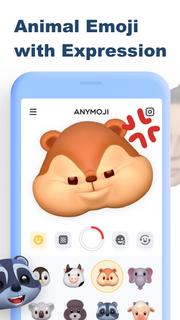
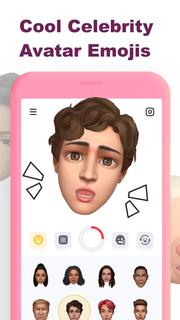
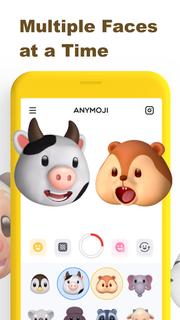
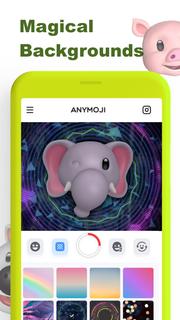
Anymoji is the animoji maker for Android. It has tons of 3D animal emoji and celebrity avatar emoji that can follow your facial expression. You can use Anymoji to create cool post or story for social media like TikTok, Instagram, Snapchat and YouTube. Let it get you more likes for your posts and stories, and get more fans & followers on Instagram, Tik Tok, Snapchat, YouTube, etc.Key Features:• Cute Animal Emoji (Animoji)• Celebrity Avatar Emojis• Multiple Faces at a Time• Magical Backgrounds* Animal Emoji (Animoji)Great variety of cute 3D animal emoji including monkey, pig, lion and so on. It rings emoji to life in a fun new way by combining your own expressions with your favorite emoji. It uses the TrueDepth camera to capture and analyze over 50 different facial muscle movements, including smiles, frowns, and more to make those animoji follow your expression.* Celebrity Avatar EmojiBesides animal emoji (animoji), Anymoji also got 3D avatar emoji of celebrities. You can use those celebrity emojis to do the lip sync of famous songs or famous scenes. That’ll be trending or viral on social media.* Multiple Faces at a TimeAnymoji can capture and analyze more than one face at a time. You can use it with your friends together to create wonderful videos. * Magical BackgroundsYou can choose to change the background when you record the video to match your style and preference or just add some edge to your video.———————————————————————————————————————Upgrade to Anymoji Premium for more awesome features:* Unlimited Cute Animal Emojis* Multiple Faces to Play Together* Huge Library of Magic Backgrounds* Remove Watermark Only For PremiumIf you want to cancel subscriptions, please go to Google Play Store and follow the related guidelines.More details can be found here:Privacy Policy: https://get.anymoji.app/support/privacy.htm Terms of Use: https://get.anymoji.app/support/terms.htmNote: If you have any questions, please feel free to contact us: Email: [email protected]
مزید دکھائیں

1. MEmu انسٹالر ڈاؤن لوڈ کریں اور سیٹ اپ مکمل کریں

2. MEmu شروع کریں اسکے بعد ڈیسکٹاپ پر Google Play کھولیں

3. Google Play میں Anymoji - Emoji Face Recorder تلاش کریں
Install
4. Anymoji - Emoji Face Recorder ڈاؤن لوڈ کریں اور انسٹال کریں
5. انسٹال مکمل ہونے کے بعد سٹارٹ کرنے کے لیے آئیکن پر کلک کریں

6. MEmu کے ساتھ پی سی پر Anymoji - Emoji Face Recorder کھیلنے کا لطف لیں
MEmu پلے بہترین اینڈرائڈ ایمولیٹر ہے اور 100 ملین لوگ اس کے زبردست اینڈرائڈ گیمنگ تجربہ سے لطف اندوز ہو رہے ہیں۔ MEmu کی ورچولائزیشن ٹیکنالوجی آپ کو اپنے PC پر ہزاروں اینڈرائڈ گیمز یہاں تک کہ انتہائی گرافک والے گیمز باسہولت کھیلنے کی طاقت دیتی ہے۔
بہتر گرافکس کے ساتھ بڑی اسکرین؛ طویل دورانیہ، بیٹری یا لامحدود موبائل ڈیٹا کے بغیر۔
کی بورڈ اور ماؤس یا گیم پیڈ کے عین مطابق کنٹرول کے لیے کی میپنگ کا پورا سپورٹ۔
کثیر مثالی منیجر کے ساتھ بیک وقت ایک پی سی پر متعدد گیم اکاؤنٹس یا ٹاسکس۔
پی سی پر درج ذیل مراحل پر عمل کرتے ہوئے پر Anymoji - Emoji Face Recorder استعمال کریں: u003c/p>